HiPer+ Configuration
HiPer+ Operator’s Manual
3-24
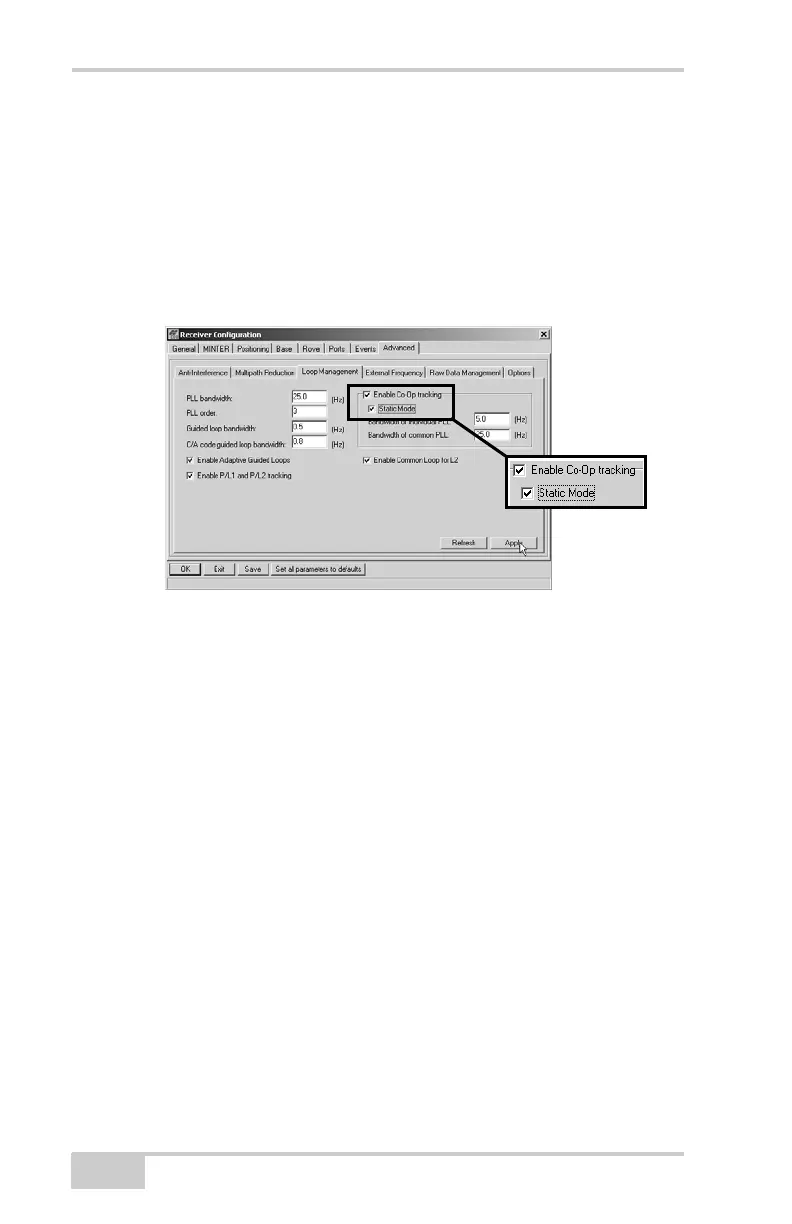
13. Click the Loop Management tab and set the following parameters,
then click Apply (Figure 3-24):
• Enable Co-Op tracking – enable
• Static mode – enable
Only enable Static mode if the receiver’s antenna remains
completely stationary throughout the survey. Any movement
may result in losing the satellite lock.
Figure 3-24. Configure Loop Management
14. Click OK to save the settings and close the dialog box.
Once the receiver is configured, the configuration will remain
until you change it using PC-CDU or clearing the NVRAM.
For more details on the settings available for configuring the Base
and Rover receivers, refer to the PC-CDU Reference Manual.
15. For RTK Rover receivers, check the LQ field on the main screen
(Figure 3-25 on page 3-25) to ensure the receiver obtains
differential corrections. Usually, the receiver will start to output
the coordinates of the antenna’s phase center along with the
solution type within 10–30 seconds. However, GSM phones may
take as long as 60 seconds to synchronize.
The geodetic coordinates displayed on the Geo tab are always
computed in WGS84 and have four solution types.
• Standalone – where the receiver computes 3D coordinates in
autonomous mode without using differential corrections.



 To Next Page