Receiver Setup and Survey
HiPer+ Operator’s Manual
4-2
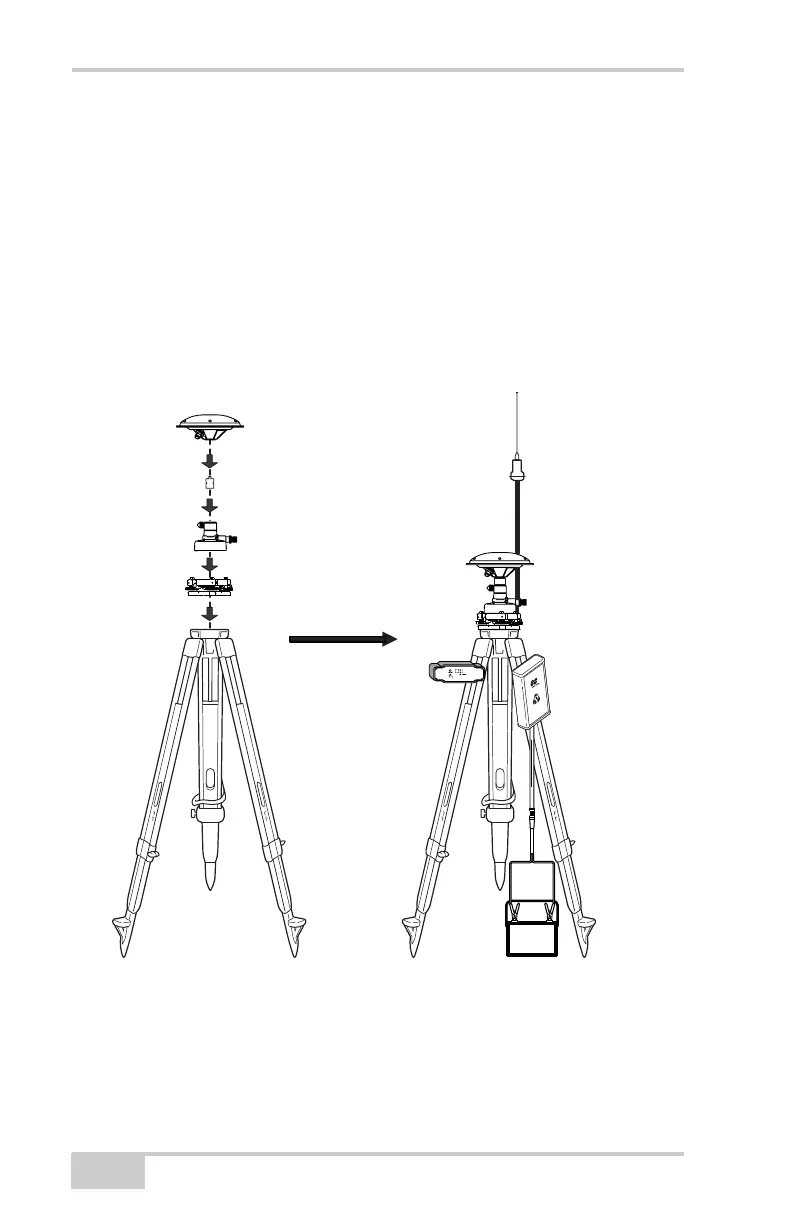
To set up the Base station (Figure 4-1):
1. Install a tripod over a known control point and secure the
universal tribrach to the tripod.
2. Place the tribrach adapter (either universal or precision) on the
tribrach and tighten the screws.
3. Insert the L-plug (horizontal spacer) into the tribrach adapter.
4. Attach the GPS antenna to the horizontal spacer.
5. Carefully level the tripod and tighten the screws.
6. Attach the radio modem, GPS receiver, and radio antenna.
Figure 4-1. Setup Base Station over Control Point – Example Using PG-A1 GPS
Antenna and Legacy-E+ GPS Receiver
7. Connect the GPS antenna and radio modem cables to the GPS
receiver (Figure 4-2 on page 4-3) and then to the corresponding
equipment.
Horizontal Spacer
Tribrach Adapter (Precision)
Universal Tribrach
PG-A1 antenna
Radio Modem
GPS Receiver
GPS Antenna
Radio Antenna



 To Next Page