Calibration
MachineCalibration
34
X‐63/X‐63i/X‐62/X‐33/X‐32InstallationandCalibrationManual P/N:7010‐0697
Bucket-Mounted Calibration
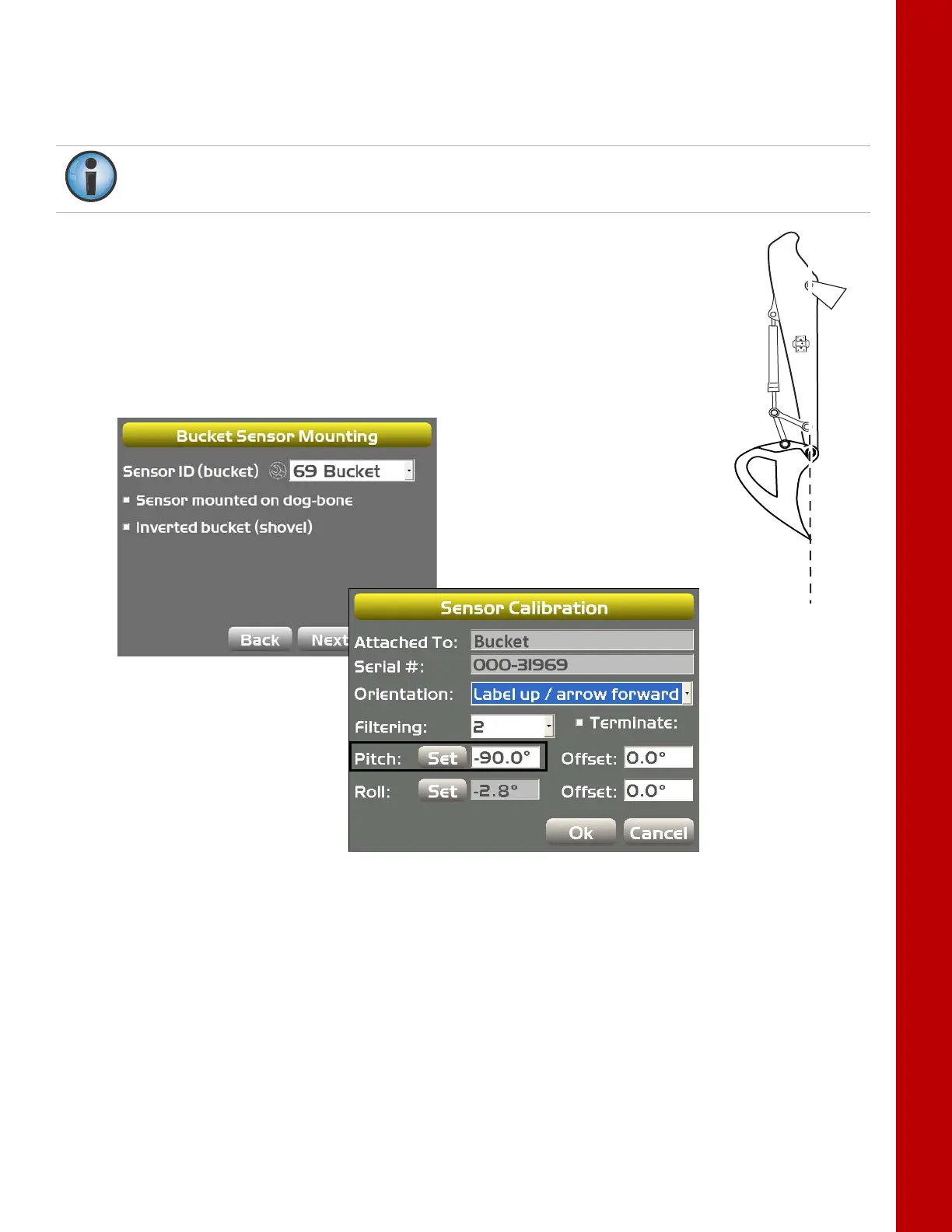
Thebucketsensorcalibrationrequiresboththepitchandtherollcalibration.Whenperformingthe
bucketsensorcalibration,positionthebucketat‐90°degrees.
1. Alignthebucketpivotandthebucketteeth.
2. In3D‐MC,tapTopconMenuButtonControlMachinesetup,selectthe
applicablemachinefileforthejob,andtapEdit.
3. TapNext tonavigatetotheBucketSensorMountingscreen.
4. TaptheWrench iconforthebucketsensor(Figure43).
5. TapSetnexttoPitch,enterthePitchvalueas‐90.0°,andtapSetagain
(Figure43).
Figure43:SetthePitchValueto‐90.0°
6. Similartothestickcalibration,oncethebucketPitchvalueissetto‐90.0°,movethebucketuntil
thepitchvaluereadszero(0.0°).
Ifusingatiltbucketsensor,skipto“TiltBucketCalibration”onpage37.



 To Next Page