LS-B10W Laser Receiver Setup
43
X‐63/X‐63i/X‐62/X‐33/X‐32InstallationandCalibrationManual P/N:7010‐0697
LS-B10W Calibration
Tocalibrat etheLS‐B10WLaserReceiver,determinethepositionofthereceiveronthestick.After
calibratingthesensor,3D‐MCwilldete rminetheangleoftheLS‐B10Wtothestickcenterline.
1. Positionthemachineonastablesurfacefreeofobstructions,androtatethebodyto0.0°roll.
2. OrientthesticksothattheLS‐B10Wispositionedvertically.
3. In3D‐MC,tapTopconMenuButtonControlMachinesetup.Selecttheapplicablemachine
fileforthejobandtapEdit.TapNexttonavigatetotheLaserReceiver(LSB10W)screen.
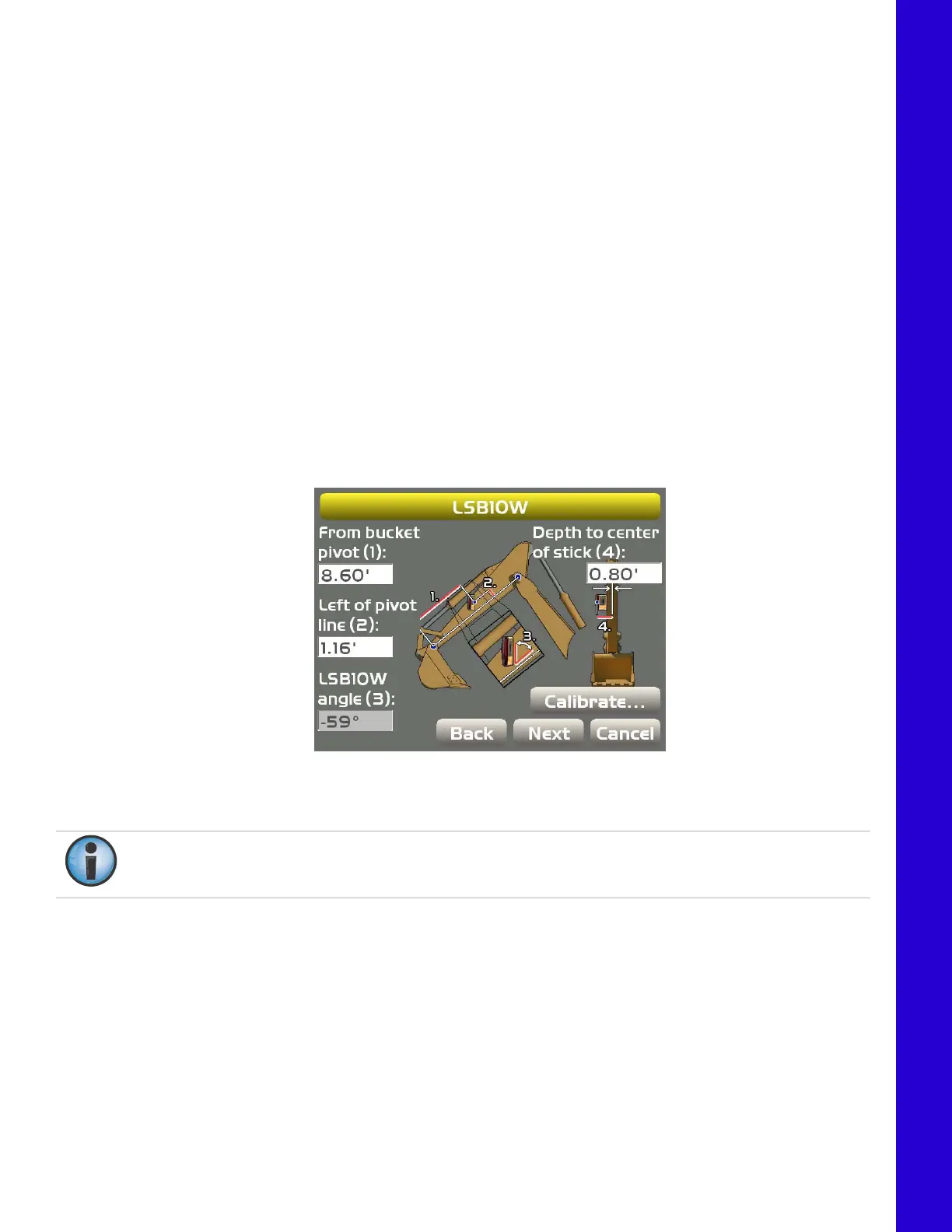
4. EnterthefollowingmeasurementsfortheLS‐B10W(Figure58).
•
Depthtocenterofstick
–enterthemeasurementforthedistancebetweenthemiddleofthe stick
tothelightcellsontheLS‐B10W.
•
Frombucketpivot
–enterthemeasurementforthedistancefromthealongtheprojectedline
betweenthebucketpivotandstickpivotatthepointwheretheLS‐B10Wisperpendiculartothe
projectedline(
Figure58).
•
Leftofpivotline
–enterthemeasurementforthedistancebetweenthemarkontheLS‐B10Wand
thepivotline.Ifrightofpivotline,useanegativevalue.
5. MakesuretheLS‐B10WLaser Receiverisvertical,andthentapCalibratetodeterminetheangle
betweenthestickandtheLS‐B10W(Figure58).
Figure58:LS‐B10WLaserReceiverMeasurements
Ifthesticksensorisreplacedwithanewtiltsensor,youmustrecalibratetheLS‐B10WLaserReceiver.
TotesttheLS‐B10Wcalibration,see“LS‐B10WTest ”onpage63.



 To Next Page