4: INSTALLATION
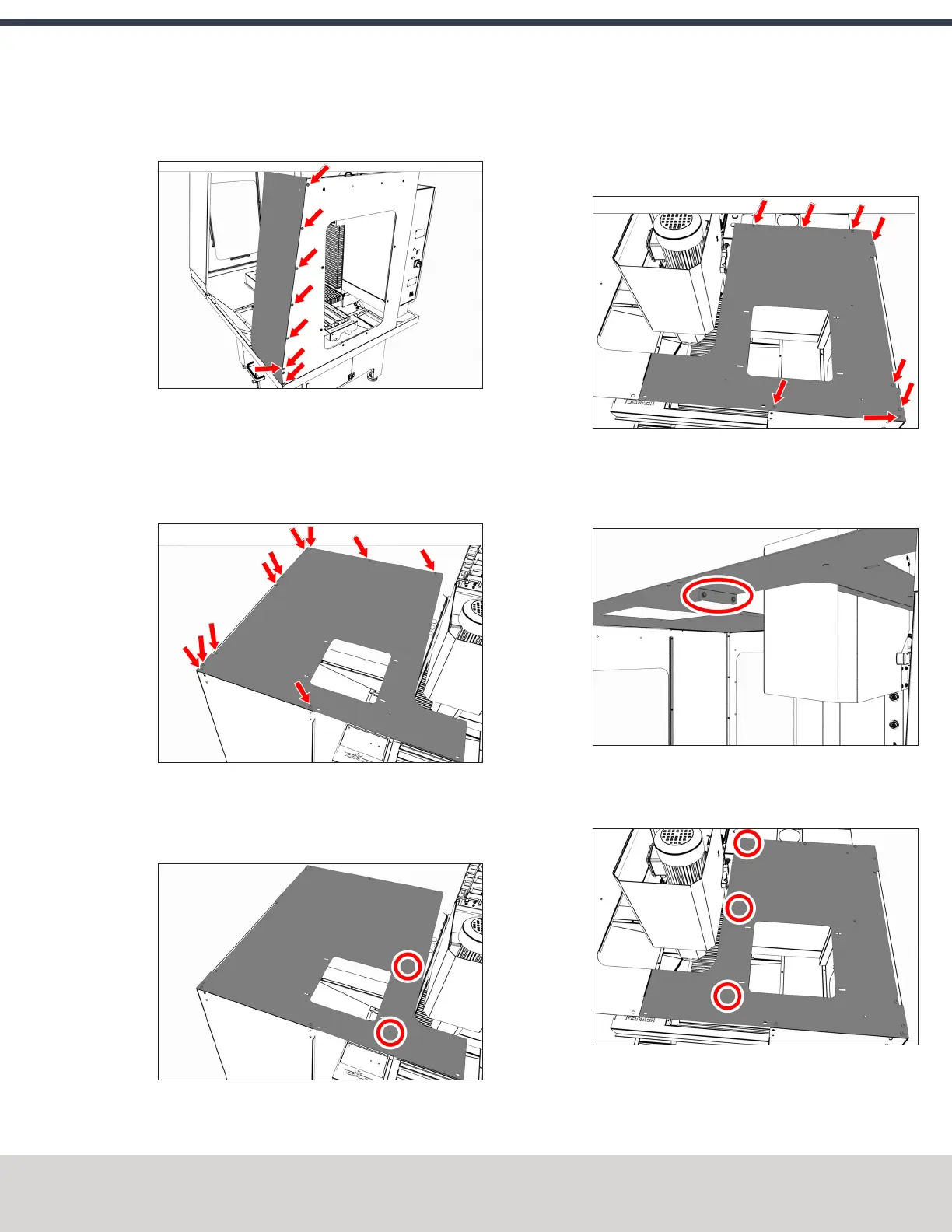
2. Attach the right front panel to the right side panel with
eight M5 × 0.8 - 10 screws.
Figure 4-92: Right front panel attached to the right
side panel.
Install the Left Top Panel
1. Attach the left top panel to the panels on the left side of
the enclosure with 12 M5 × 0.8 - 10 screws.
Figure 4-93: Left top panel attached to the left side of
the enclosure.
2. Attach two cable tie anchors to the left top panel with
two M5 × 0.8 - 10 screws.
Figure 4-94: Location to attach two cable tie anchors.
Install the Right Top Panel
1. Attach the right top panel to the panels on the right side
of the enclosure with 11 M5 × 0.8 - 10 screws.
Figure 4-95: Right top panel attached to the right side
of the enclosure.
2. Connect the left and right top panels with two M5 × 0.8 -
10 screws.
Figure 4-96: Left and right top panels connected.
3. Attach three cable tie anchors to the right top panel with
three M5 × 0.8 - 10 screws.
Figure 4-97: Location to attach three cable tie
anchors.
©Tormach® 2020
Specifications subject to change without notice.
Page 73 Tormach 1100MX Operator's Manual (Version 0720A)
For the most recent version, see tormach.com/support



 To Next Page