50
The S-4 Sculpting Sampler - Ofcial Manual
51
The S-4 Sculpting Sampler - Ofcial Manual
Audio Engine
3
Audio Engine
3
NOTES
NOTES
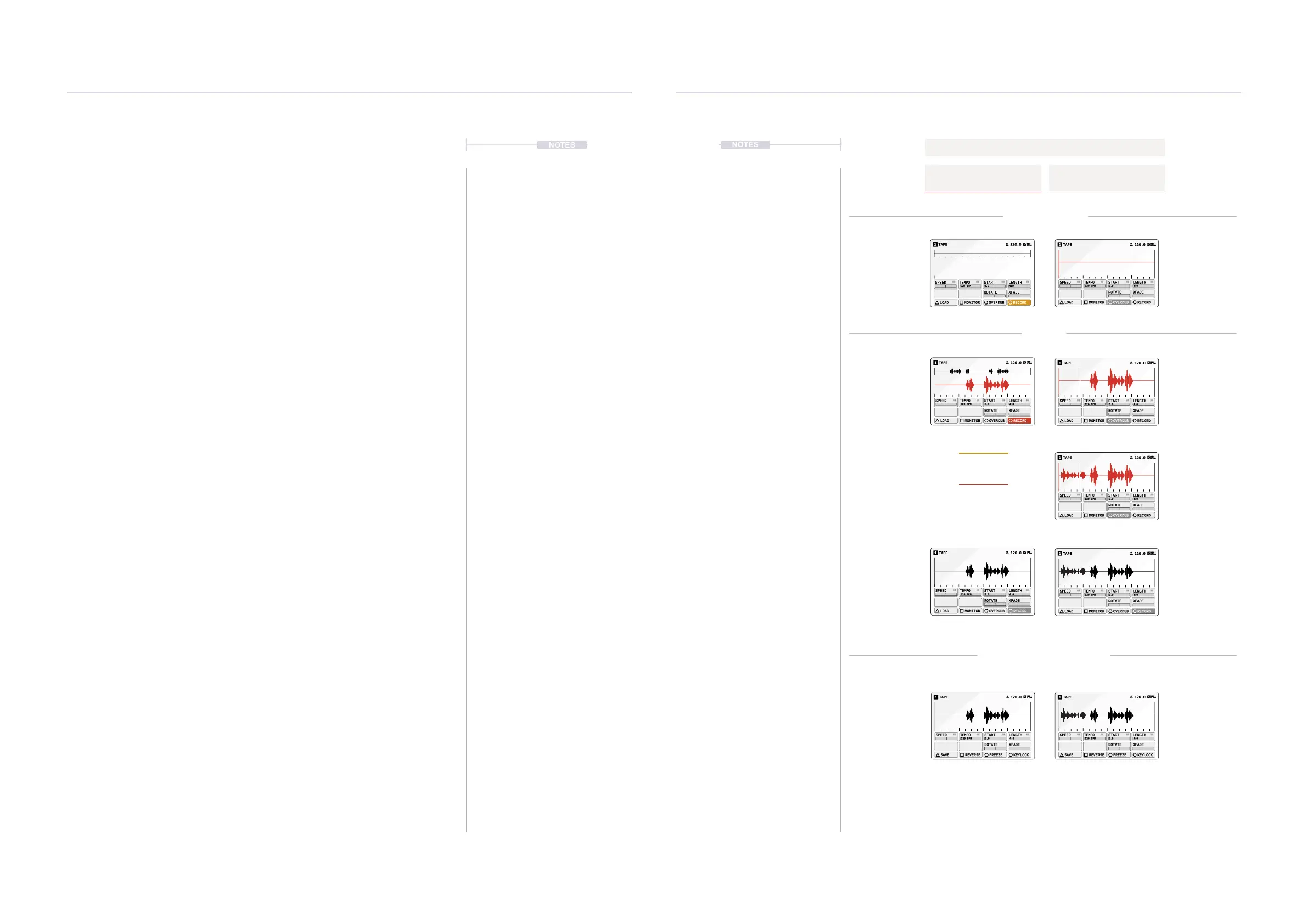
▌ RECORDING A SAMPLE TO THE TAPE DEVICE
1. Select the desired track 1-4 and ensure that a tape device is assigned
to the material slot. Also se any tempo and start / length positions.
2. On the Tape device, Arm to set the recording mode desired.
• Record. Press [RECORD], action button to select this mode.
Record will create a new blank tape and ready the recording.
Recording is currently armed indicated on the action button in
yellow when a recording is queued & red when the quantized start
position is triggered. Recording will start if already playing or when
Play/Stop is pressed.
• Overdub. Press [OVERDUB], action button to select this mode.
Overdub will ready the recording to add new audio to the existing
tape. Recording is currently armed, indicated by the button highlight.
Recording will start if already playing or when Play/Stop is pressed.
• SOS. Sound On Sound sets the amount of audio from the old,
original tape that will be re-recorded into the new overdub or to the
new tape recording. If this is set to ‘0 DB’ then only new audio
recordings are captured.
3. To start recording, Press [PLAY/STOP]. Recording will automatically
start if play is already in progress. Press [PLAY/STOP] at anytime to
stop the recording. Recording will operate in the mode selected above
and the button will ash.
4. Recording is captured into the Tape Device audio buffer which is not
saved into the sample library automatically. To save to the ‘BOUNCES’
folder in the sample library, Hold [CTRL] + Press [SAVE], action
button.
For the Page 2 Action button options - Hold [CTRL] to access.
Record
To a New Tape
Recording Process
Overdub
On the Same Tape
[RECORD] [OVERDUB]
[OVERDUB]
[PLAY/STOP] [PLAY/STOP]
[PLAY/STOP]
[PLAY/STOP]
[CLEAR] + [BUFFER] [CLEAR] + [BUFFER]
[PLAY/STOP]
[PLAY/STOP]
[CTRL] + [SAVE] [CTRL] + [SAVE]
Arm Recording Arm Recording
Unarm Recording
Start Recording
Record - Yellow
Queued recording mode.
Record - Red
Quantized start position triggered
Start Recording
Stop Recording
Stop Recording
Clear Recording Clear Recording
Play / Stop the Playback
Arm Recording
Record
Overdub Record
Save the Recording Save the Recording
[MONITOR] to
preview the audio
on or off.
[MONITOR] to
preview the audio
on or off.
TAPE1 120.0
120 BPM
SPEED
TEMPO
START LENGTH
ROTATE XFADE
LOAD MONITOR OVERDUB RECORD
0.0 4:0
TAPE1 120.0
120 BPM
SPEED
TEMPO
START LENGTH
ROTATE XFADE
LOAD MONITOR OVERDUB RECORD
0.0 4:0
TAPE1 120.0
120 BPM
SPEED
TEMPO
START LENGTH
ROTATE XFADE
LOAD MONITOR OVERDUB RECORD
0.0 4:0
120 BPM
SPEED
TEMPO
START LENGTH
ROTATE XFADE
LOAD MONITOR OVERDUB RECORD
0.0 4:0
TAPE1 120.0
120 BPM
SPEED
TEMPO
START LENGTH
ROTATE XFADE
LOAD MONITOR OVERDUB RECORD
0.0 4:0
TAPE1 120.0
TAPE1 120.0
120 BPM
SPEED
TEMPO
START LENGTH
ROTATE XFADE
LOAD MONITOR OVERDUB RECORD
0.0 4:0
TAPE1 120.0
120 BPM
SPEED
TEMPO
START LENGTH
ROTATE XFADE
SAVE REVERSE FREEZE KEYLOCK
0.0 4:0
TAPE1 120.0
120 BPM
SPEED
TEMPO
START LENGTH
ROTATE XFADE
SAVE REVERSE FREEZE KEYLOCK
0.0 4:0
120 BPM
SPEED
TEMPO
START LENGTH
ROTATE XFADE
LOAD MONITOR OVERDUB RECORD
0.0 4:0
TAPE1 120.0



 To Next Page