54
The S-4 Sculpting Sampler - Ofcial Manual
55
The S-4 Sculpting Sampler - Ofcial Manual
Audio Engine
3
Audio Engine
3
NOTES
NOTES
8. Press [MATERIAL] to cycle the pages and select Page 2.
9. Adjust the audio gain level if required, Turn (LEVEL). It is useful to
adjust this to the desired level by ear while playing back the sample.
10. Glide can be adjusted to smooth any changes that are applied through
speed adjustments. Turn (GLIDE).
11. Xfade introduces a crossfade at the loop and/start points. This will avoid
any audio transition artefacts and clicks at the loop point. Turn (XFADE)
to apply the crossfade.
12. To start playing with record and overdub deselected, Press [PLAY/
STOP]. Press [PLAY/STOP] at anytime to stop the playing.
13. Once completed the tape can be manually saved. To save the tape,
Hold [CTRL] + Press [SAVE], action button.
Note:
The [CTRL] Button can be held when adjusting some parameters to enable ner control of
the parameter values.
TAPE1 120.0
120 BPM
SPEED
TEMPO
START LENGTH
ROTATE XFADE
SAVE MONITOR OVERDUB RECORD
0.0 4:0
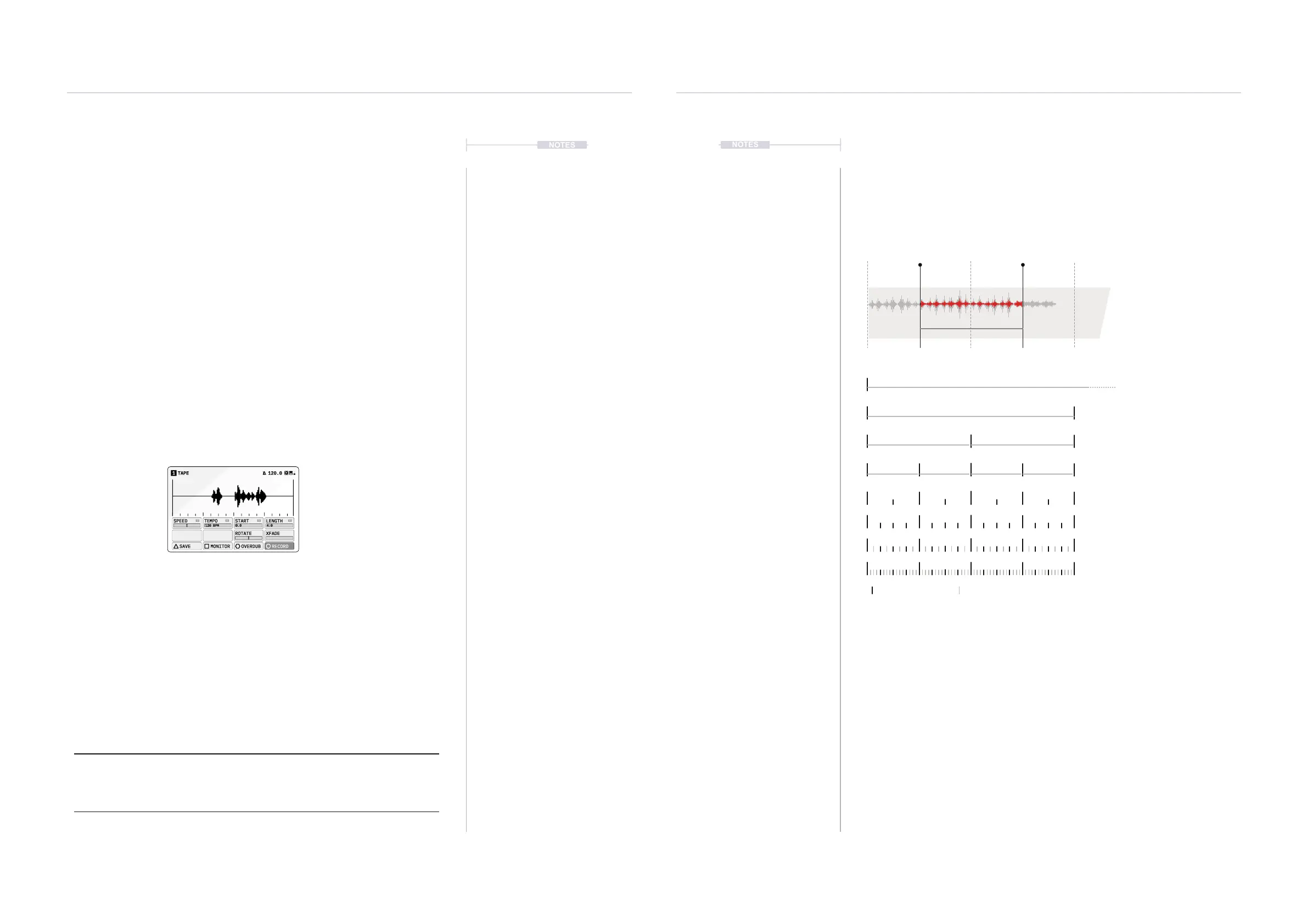
Tape Grid
A tape grid markers are presented in the tape device screen for timing
alignment especially when adjusting the start and length of the tape reel
with respect to the Tempo BPM.
▌ CONFIGURING TAPE QUANTIZATION
1. Select the desired track 1-4 and ensure that a tape device is assigned
to the material slot and a sample is present in the tape device.
2. The main start and length editing parameters are located on Page 1 of
the ‘Tape’ Device page. Press [MATERIAL] to cycle the pages and
select page 1.
3. Adjusting (START) and (LENGTH) will adjust the positions in quantized
intervals.
4. Press + Turn (START) or (LENGTH) to select a quantize resolution to
be applied when editing the start and length positions.
Start & Length
Quantize
Playback start and end position of
sample. Quantize to selected
resolution intervals.
Sets the resolution of the start and
length positions, Press + Turn
(START) or (LENGTH).
Start Length
Visual Tape Markers Actual Resolution
0:0
0:0
0:0
0:0
0:0
0:0
0:0
0:0
1/2
1/1
2/1
4/1
8/1
1/4
1/8
1/16
Quantize Options & Examples
A ‘Free’ option also is available
which allows adjustment with
no quantization.
1/2



 To Next Page