60 Playback Tutorial
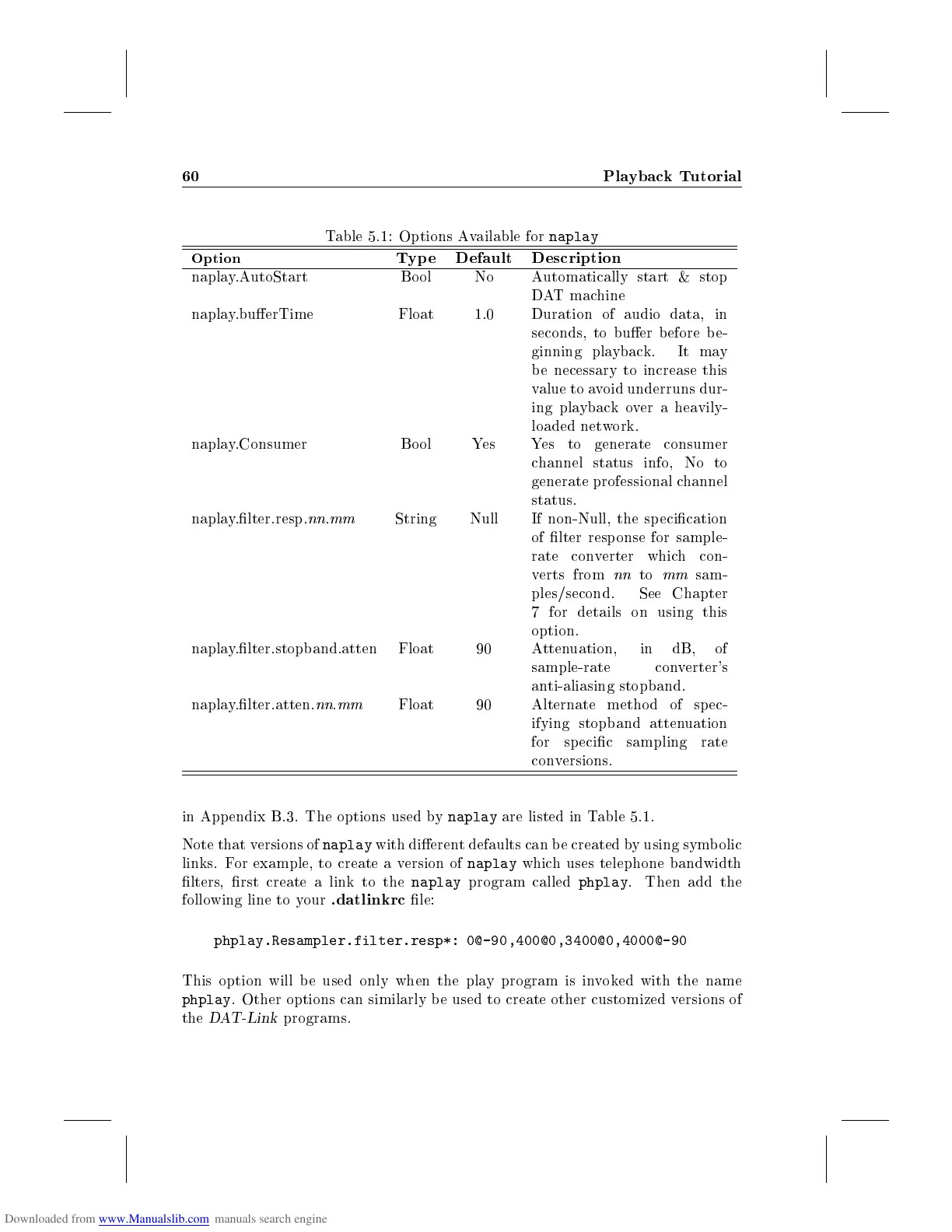
Table 5.1: Options Available for
naplay
Option
Typ e Default Description
naplay.AutoStart Bool No Automatically start & stop
DAT machine
naplay.buerTime Float 1.0 Duration of audio data, in
seconds, to buer b efore be-
ginning playback. It may
be necessary to increase this
value to avoid underruns dur-
ing playback over a heavily-
loaded network.
naplay.Consumer Bo ol Yes Yes to generate consumer
channel status info, No to
generate professional channel
status.
naplay.lter.resp.
nn
.
mm
String Null If non-Null, the specication
of lter response for sample-
rate converter which con-
verts from
nn
to
mm
sam-
ples/second. See Chapter
7 for details on using this
option.
naplay.lter.stopband.atten Float 90 Attenuation, in dB, of
sample-rate converter's
anti-aliasing stopband.
naplay.lter.atten.
nn
.
mm
Float 90 Alternate method of sp ec-
ifying stopband attenuation
for specic sampling rate
conversions.
in App endix B.3. The options used by
naplay
are listed in Table 5.1.
Note that versions of
naplay
with dierent defaults can be created by using symbolic
links. For example, to create a version of
naplay
which uses telephone bandwidth
lters, rst create a link to the
naplay
program called
phplay
. Then add the
following line to your
.datlinkrc
le:
phplay.Resampler.filter.resp*: 0@-90,400@0,3400@0,4000@-90
This option will be used only when the play program is invoked with the name
phplay
. Other options can similarly b e used to create other customized versions of
the
DAT-Link
programs.



 To Next Page