68 Recording Tutorial
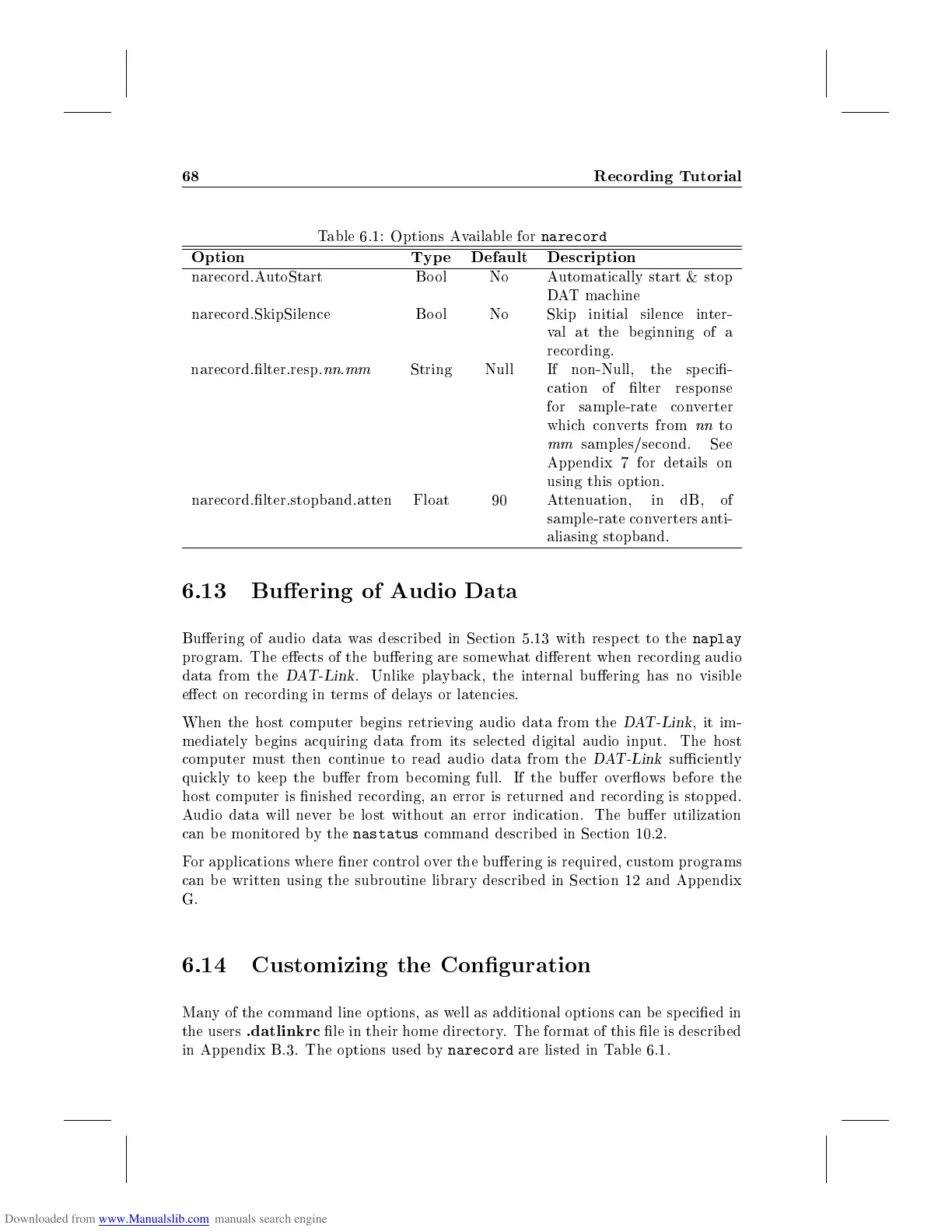
Table 6.1: Options Available for
narecord
Option Typ e Default Description
narecord.AutoStart Bool No Automatically start & stop
DAT machine
narecord.SkipSilence Bo ol No Skip initial silence inter-
val at the b eginning of a
recording.
narecord.lter.resp.
nn
.
mm
String Null If non-Null, the sp eci-
cation of lter resp onse
for sample-rate converter
which converts from
nn
to
mm
samples/second. See
Appendix 7 for details on
using this option.
narecord.lter.stopband.atten Float 90 Attenuation, in dB, of
sample-rate converters anti-
aliasing stopband.
6.13 Buering of Audio Data
Buering of audio data was describ ed in Section 5.13 with resp ect to the
naplay
program. The eects of the buering are somewhat dierent when recording audio
data from the
DAT-Link
. Unlike playback, the internal buering has no visible
eect on recording in terms of delays or latencies.
When the host computer begins retrieving audio data from the
DAT-Link
, it im-
mediately b egins acquiring data from its selected digital audio input. The host
computer must then continue to read audio data from the
DAT-Link
suciently
quickly to keep the buer from b ecoming full. If the buer overows b efore the
host computer is nished recording, an error is returned and recording is stopp ed.
Audio data will never be lost without an error indication. The buer utilization
can be monitored by the
nastatus
command described in Section 10.2.
For applications where ner control over the buering is required, custom programs
can b e written using the subroutine library described in Section 12 and Appendix
G.
6.14 Customizing the Conguration
Many of the command line options, as well as additional options can be specied in
the users
.datlinkrc
le in their home directory. The format of this le is describ ed
in App endix B.3. The options used by
narecord
are listed in Table 6.1.



 To Next Page