16 AU-OPR-AureFloFT-EN,
Rev H
V. User Interface Menus
NOTE: All Monitor functions can be accessed by pressing the
interactive touch screen with your nger or soft touch stylus.
A. System Settings Menu
Tapping [Systems Settings] on the upper left of FlowTrace
®
screen
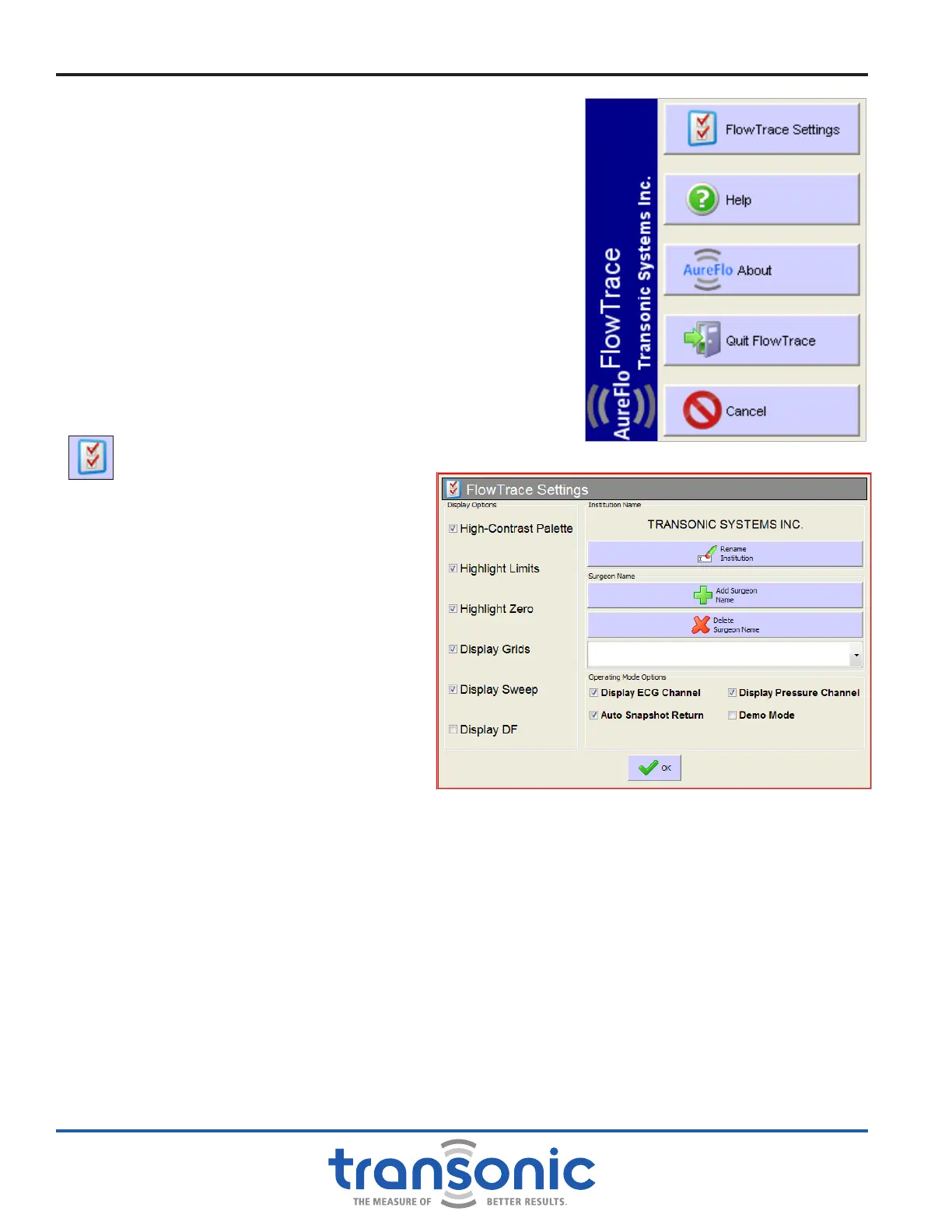
opens the System Settings Menu (Fig. 5.1). From this menu you:
● Use [FlowTrace
®
Setting] to change software settings
● Access a [Help] menu for icon descriptions
● Access Corporate Information including software version from
the [About] menu
● [Quit FlowTrace
®
] software to return to the Desktop.
● [Cancel] to return to the Realtime Mode of operation
1. FLOWTRACE
®
SETTINGS
Tap [FlowTrace
®
Settings] to change display options, add the
institution’s & surgeon's names and display ECG signal (Fig. 5.2):
a) DISPLAY OPTIONS:
i) High-Contrast Palette: designed to
make it easier to see the waveform
ii) Highlight Limits
iii) Highlight Zero
iv) Display Grid
v) Display Sweep
vi) Display DF (instead of D/S Flow
ratio). This box is selected by default
such that the DF % is displayed.
Deselecting the box will revert to
displaying the D/S Flow Ratio (no
DF).
b) INSTITUTION NAME: For entering
the institution’s name and to have it
displayed on printouts only. Tapping
[Rename Institution] will bring up the
virtual keyboard, on which to type in the
institution’s name.
c) SURGEON'S NAMES: Add Surgeon's names by pressing [Add Surgeon Name] and typing in the
name. Names will appear in a dropdown list in the FlowTrace Settings, Add Patient, Edit Patient
and Find Patient screens. New surgeons cannot be added from the patient settings. To remove a
Surgeon from the list, select the name in the dropdown list on the FlowTrace Settings page then
press [Delete Surgeon Name]. A warning will appear asking to conrm the deletion, select [Yes]
then press [OK] to delete the Surgeon's name.
d) OPERATING MODE OPTIONS:
i) Display ECG Channel: select to display an ECG signal. During surgery the ECG is used to identify
systolic and diastolic blood ow and color the waveforms. Display ECG is selected by default.
Unchecking [Display ECG Channel] will remove both ECG and Pressure channels from the
display.
ii) Display Pressure Channel: select to display a pressure signal.
Fig. 5.1: System Settings menu
Fig. 5.2: FlowTrace
®
Settings dialog box



 To Next Page