79
79
Brightness
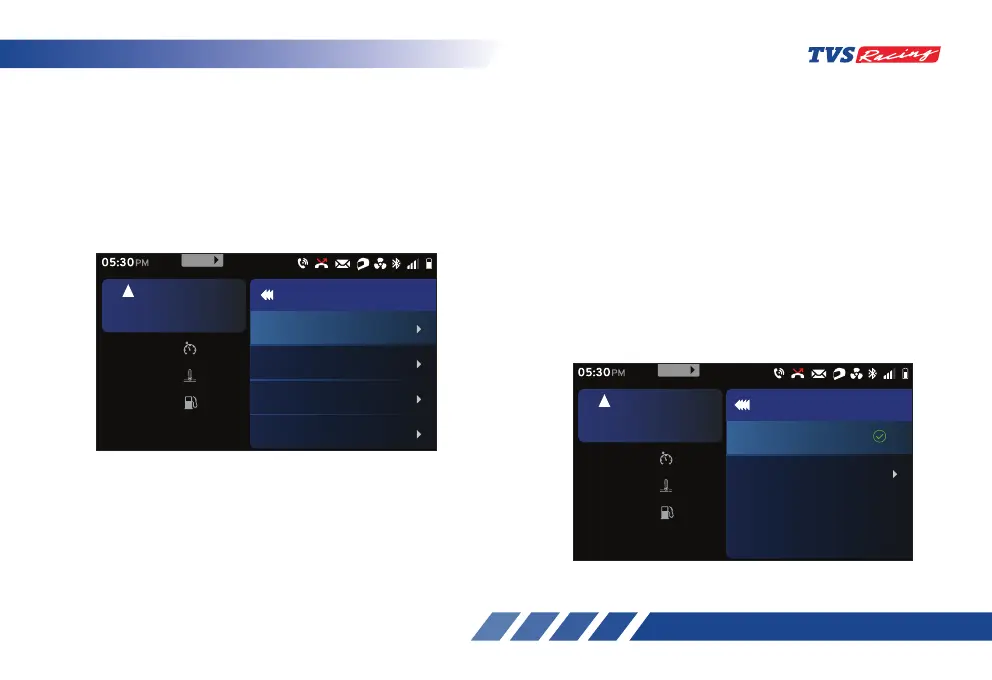
The ‘Brightness’ option allows you to adjust the
brightness of your connected instrument TFT cluster.
- After entering the ‘Preferences’ menu, select
the ‘Brightness’ option using ‘Up’ (D2) or
‘Down’ (D3) arrow (ref. Fig. 24).
- Once the ‘Brightness’ option is selected,
press the ‘ENT’ (D1) button.
• There are two more additional options available
under the ‘Brightness’ and they are:
Auto
Manual
D6. Display setup
Under the ‘Display setup’ option there are five more
additional options are available and they are:
Brightness
Clock
Date
Day & Night mode
• To enter the ‘Display setup’ option:
- After entering the ‘Preferences’ menu, select
the ‘Display setup’ option using ‘Up’ (D2) or
‘Down’ (D3) arrow (ref. Fig. 24).
- Once the ‘Display setup’ option is selected,
Press the ‘ENT’ (D1) button.
Set
km/h
60
oc
Coolant Temp
30
km
Range
30
rpm
6700
5
km/h
URBAN
05:30
PM
Display setup
Clock
Date
Day & Night mode
Brightness
999
MENU
Set
km/h
60
oc
Coolant Temp
30
km
Range
30
rpm
6700
5
km/h
URBAN
05:30
PM
Brightness
Manual
Auto
SET
999
MENU













 To Next Page