Videojet DataFlex 6530 Operator Manual - Rev AA 4-5
Startup
4.5 Understanding Printhead LEDs
Table 4-1 lists the printhead LEDs that indicate the status of the printer.
Note: The red LED also flashes when the printer is being powered on and the printhead is initializing.
4.6 Setting the Time and Date
To set the time and date in the CLARiTY Controller, proceed as follows:
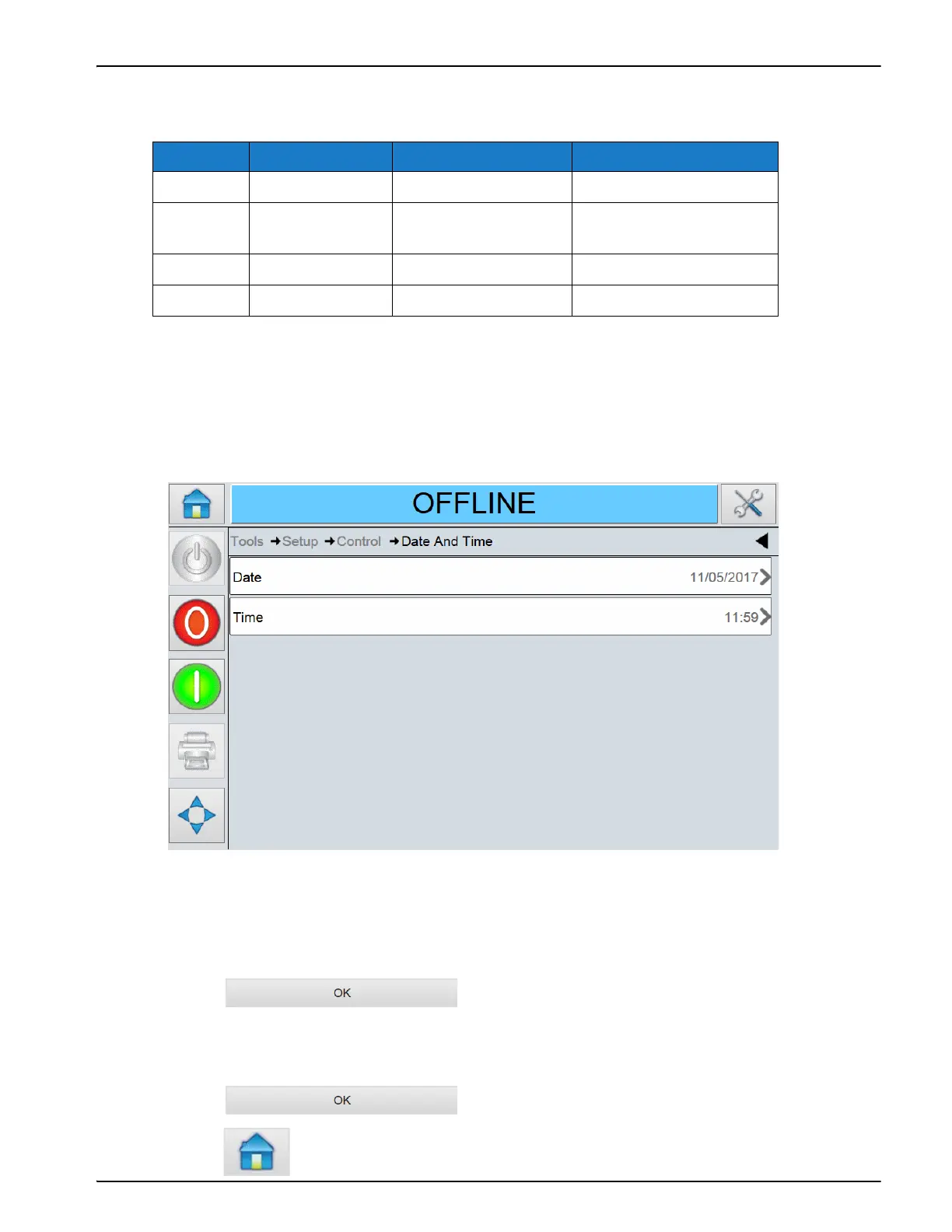
1. Navigate to Tools > Setup >Control > Date and Time (see Figure 4-6).
2. Touch Date to set the Date, and the calendar page will appear.
3. Select the current month and year using the + and – keys.
4. Touch today's date to select it.
5. Touch to save the settings.
6. Touch Time to set the time. The time setup screen is displayed.
7. Use the + and – keys to give a value for each of the settings [Hours, Minutes and (optionally)
Seconds].
8. Touch to save the settings.
9. Touch to return to the Home Screen.
Color On Flashing Off
Red Printer Offline Printer in fault —
Amber Warning Printer is printing
with warning
No warning or fault
Green Printer Online Printhead is printing —
Blue Power On — No power to printhead
Table 4-1: LED Indicators
Figure 4-6: CLARiTY Controller Date and Time



 To Next Page