6-10 Videojet DataFlex 6530 Operator Manual - Rev AA
Job Editor
3. The job opens, with the user editable fields highlighted.
Note: Only jobs that have user editable fields can be edited using Touch to Edit feature. These are set
up in CLARiSOFT during message creation.
4. To edit a user field, touch the user field.
5. The appropriate user field editor, based on the user field type, is displayed for the update.
Update the user field as required and touch .
6. If there are additional user fields, repeat step 4 and step 5 for each field.
7. Touch after editing all the required user fields. The job will
be updated in the printer and displayed in the current job details bar following the next print.
6.5 Changing the Position or Appearance of the Print
The following features can be changed and applied to modify the quality or position of the print
image:
•Print position
• Print orientation
• Darkness of the print image
• Print delay (intermittent mode applications only)
• Print speed (intermittent mode applications only)
• Printhead print position (continuous mode applications only)
• Interleaved printing
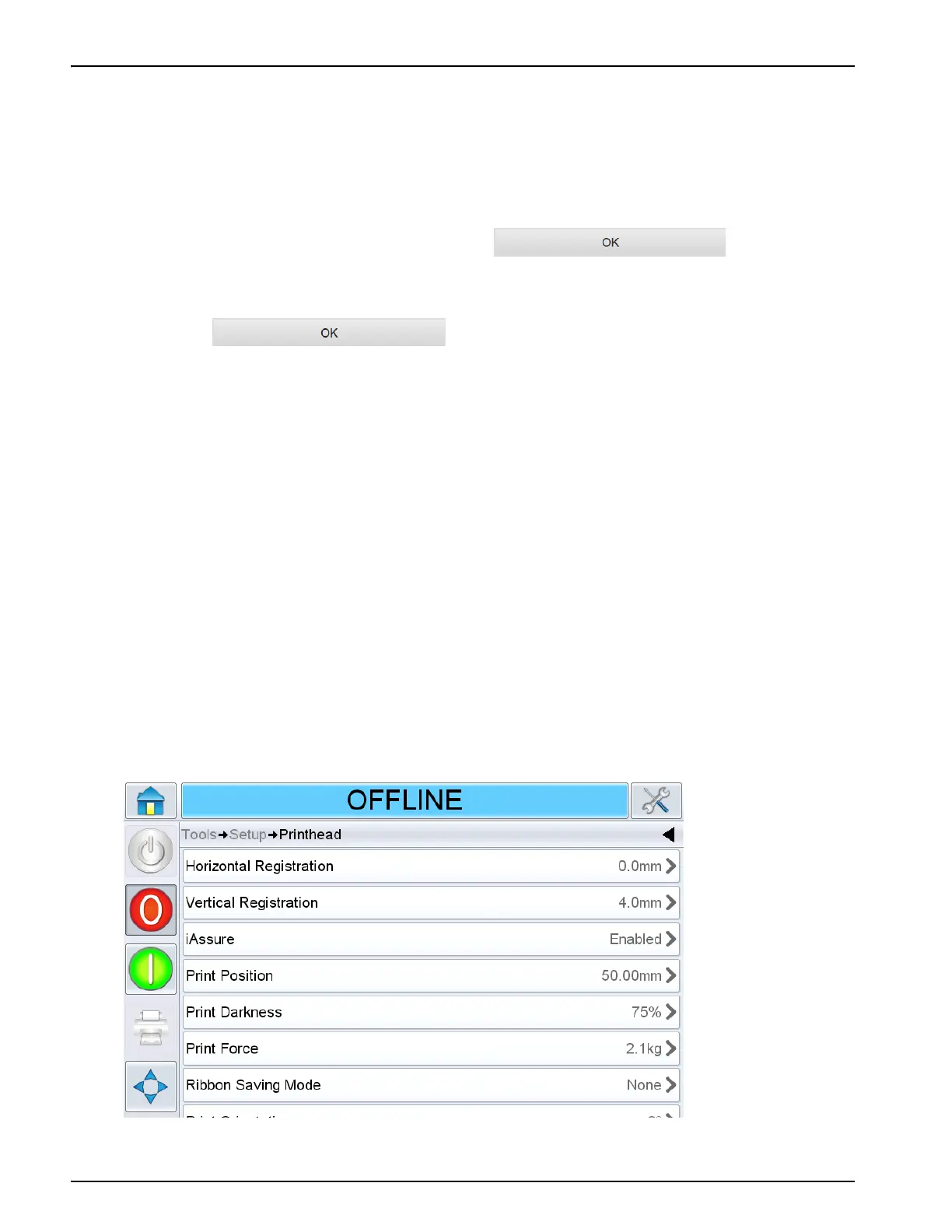
The print settings can be viewed and changed through the printhead setup screen by navigating
to Tools > Setup > Printhead.
Figure 6-8 shows the printhead setup screen for printers that have been installed to work on an
intermittent motion packaging machine (prints only when the target material is stationary).
Figure 6-8: Printhead Setup Screen for Intermittent Motion Applications



 To Next Page