6-6 Videojet DataFlex 6530 Operator Manual - Rev AA
Job Editor
6.4 User Editable Fields
Some jobs contain job variables. Job variables are parts of the job image that can be changed.
There are three types of job variables:
• Variable TEXT fields.
For example, they are used for batch codes, product names, and other text labels.
•Variable DATE fields.
For example, they are used for sell by dates.
• Variable COUNTER fields.
Allows you to modify the starting value for a counter.
If a selected job includes variable information, CLARiTY prompts the user to enter or edit the
required information.
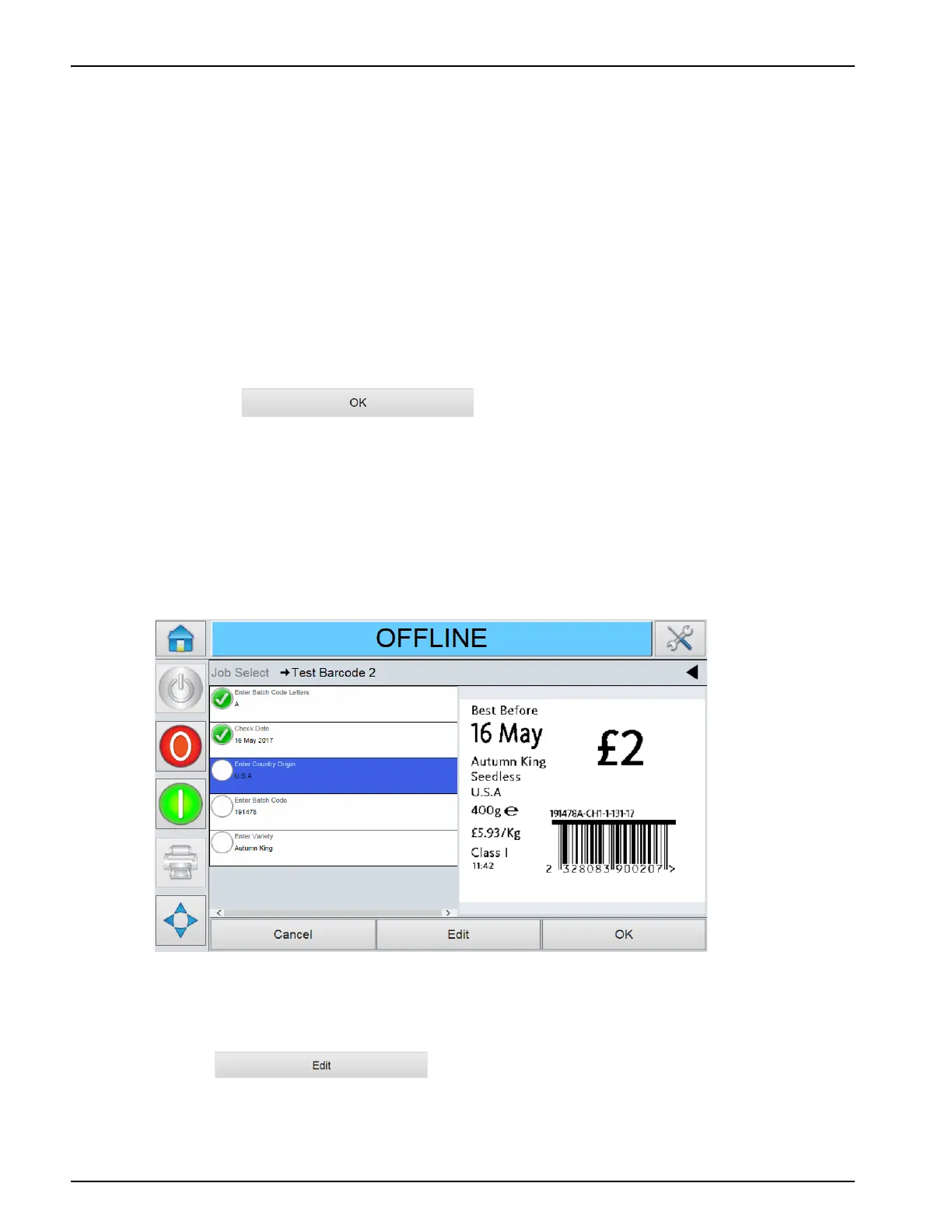
Note: Each variable has a check box. The check box is unchecked initially. As user enter the variable data
and touch , CLARiTY automatically checks the box. User can
proceed to the next step only when all the boxes are checked.
6.4.1 Changing Variable Text and Date Information
To edit the user field, proceed as follows:
1. When a job is selected, the list of user editable fields in the job are displayed.
2. Touch the required field from the list to select it (the first one in the list is automatically
selected). The default data for that field appears in the preview window (Figure 6-7).
3. If the information in the preview window is the information that you want to print, go to step
6. If you want to change the information, perform step 4.
4. Touch to modify the information.
Figure 6-4: Default Date Code Window



 To Next Page