6-8 Videojet DataFlex 6530 Operator Manual - Rev AA
Job Editor
For date fields, do the following tasks:
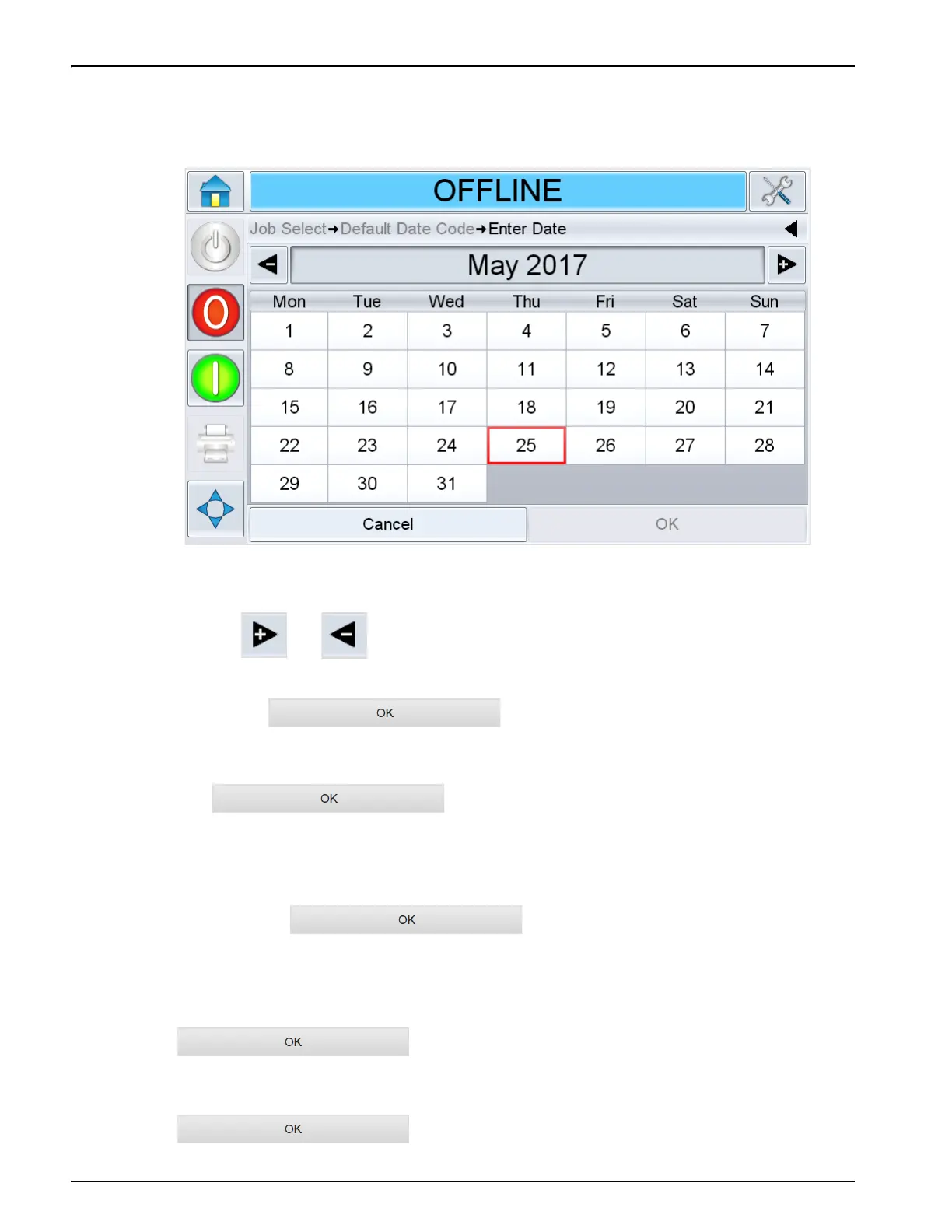
d. Touch the data window to display the Calendar page (see Figure 6-6).
e. Touch or to change the month and year.
f. Touch the date on the calendar to choose the date of the month,
and touch .
Note: Any dates that are not available for selection because of pre-defined rules that may have
been set in CLARiSOFT are dimmed.
6. Touch when you are satisfied that the information in the
data window is correct. The user interface checks the check box. If there are only two user
editable fields in the job, the user interface automatically displays the second field. If there
are three or more fields, it displays the list of user editable fields, so that you can select one.
When you touch at the final field for this job (and all the
check boxes are checked) the user interface shows you the preview of the image.
7. At the preview, perform one of the following:
• If you are satisfied with the image and you want to run the new job, touch
. Products will be printed with the new image until
you make further changes or select a new job.
• If you are not ready to print the job, you can leave this screen as it is. You can touch
at a later stage, to select the job at that time.
Figure 6-6: Calendar Page



 To Next Page