Videojet DataFlex 6530 Operator Manual - Rev AA
Section 5 CLARiTY Operating System
This chapter contains the following topics:
• Getting started with the CLARiTY
• Using the Home Screen
• Using the Tools Screen
• Password Protection
• Master/Slave Printers
5.1 Getting started with the CLARiTY
CLARiTY is an icon-based operator control system. It has an easy-to-use touch screen. All
technical aspects of the printer setup and control are accessed through the Tools button.
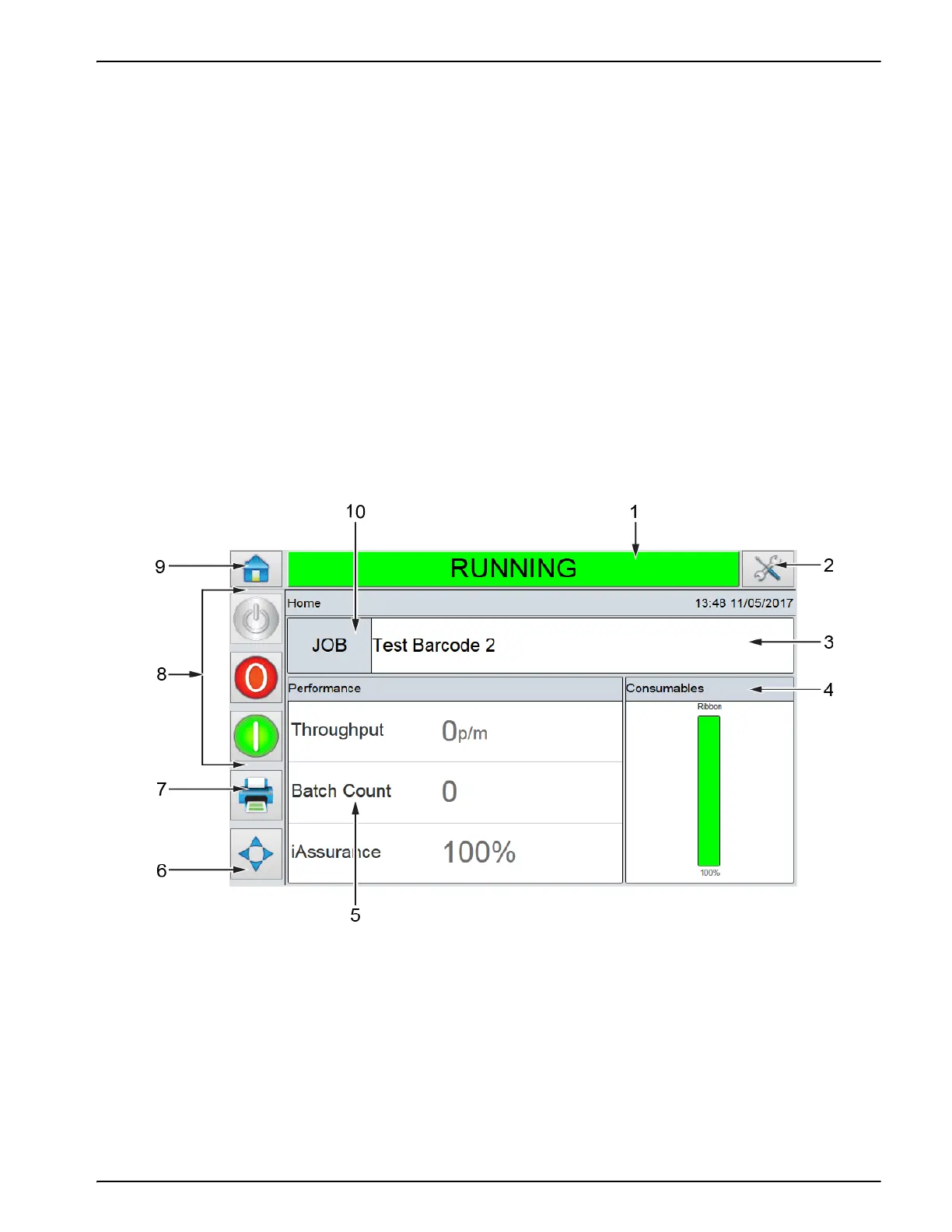
Figure 5-1 shows the Home screen of the CLARiTY operator control system.
Note: If password protection is enabled, the options available may be restricted dependent on user level.
Refer to “Password Protection” on page 5-42 for more information.
5.2 Using the Home Screen
Figure 5-1: CLARiTY Home Screen
1. Status Bar
2. Tools Button
3. Current Job Details Bar
4. Consumables
5. Performance Information
6. Print Position
7. Print Button
8. System Control Buttons
9. Home Button
10. Job Select Button



 To Next Page