5-2 Videojet DataFlex 6530 Operator Manual - Rev AA
CLARiTY Operating System
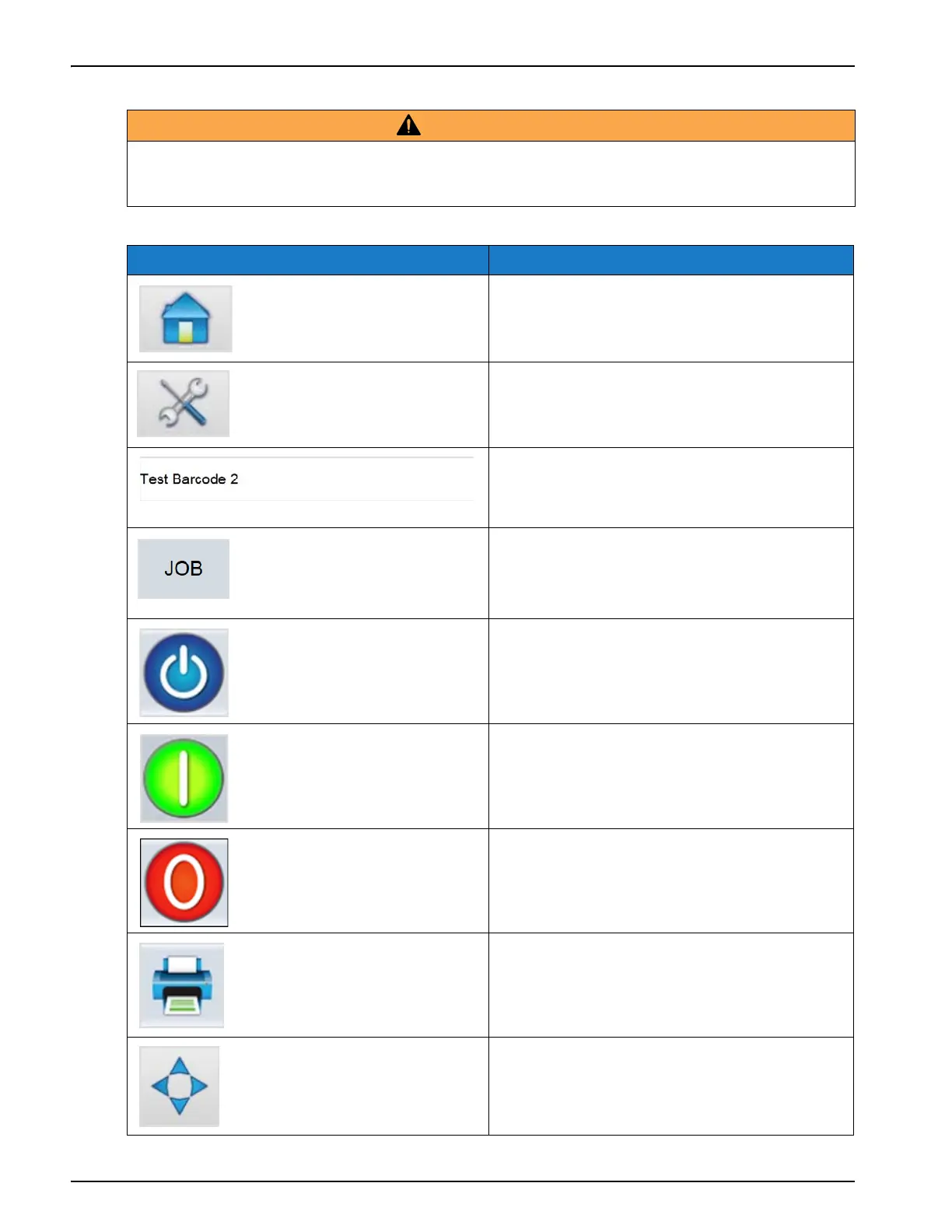
The Home screen allows the user to access the below options:
WARNING
PERSONAL INJURY.
The printer starts printing if you touch the status bar when the printer is in OFFLINE mode.
Make sure that you do not touch the status bar if the printer is not required to run.
Buttons Description
Returns to the Home screen.
Opens the Tools screen.
Displays the information about the current
job and when selected, opens the current job
details screen.
Shows the list of jobs available, including the
current job. Once a job is selected, the job can
be loaded for printing. If the fields are user
enabled, the user can confirm before printing.
Changes the print state from SHUTDOWN to
OFFLINE and vice-versa.
Starts the print.
Stops the print.
Prints a test image.
Note: This option is only present if option is
enabled on the printer using CLARiTY
Configuration Manager.
Adjusts the print position in the horizontal
and vertical direction.
Table 5-1: Home Screen



 To Next Page