35
Prima Sprint.
OPERATING MANUAL
VERSION 07/2009 ORDER NUMBER DOC 2305835
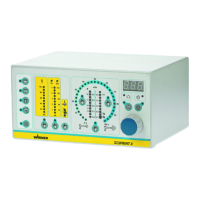
29 Push button: Current limiting
● To activate the function, the current limiting is set with the rotary controller 24 and
is indicated in the LED display 19.
● Range of adjustment: 5-120 µA.
● Resolution: 1 µA.
30 Display LED: Current limiting
● Lights up yellow. The current limiting is selected and can be adjusted using knob
24.
31 Push button: Characteristic slope
● To switch the characteristic slope.
● Display with LED 32.
32 Display LED: Characteristic slope
● Lights up green.
● Lower LED characteristic curve, fl at.
● Middle LED characteristic curve, medium.
● Upper LED characteristic curve, steep.
33 Illuminated display: Powder quantity
● Lights up green.
● Display range: 0-100%.
● Resolution: 3.33%.
● Single LED display: Set point (high-voltage and powder are deactivated).
● Bar graph LED: Actual value (high-voltage and powder are activated).
34 Illuminated display: Overall air quantity
● Lights up green.
● Display range: 2-6 m³/h.
● Resolution: 0.2-0.5 m³/h.
● Single LED display: Set point (high-voltage and powder are deactivated).
● Bar graph LED: Actual value (high-voltage and powder are activated).
35 Illuminated display: Atomizing, ionising and Tribo air quantity
● Lights up green.
● Display range: 0.1-4 m³/h.
● Resolution: 0.1-1.0 m³/h.
● Single LED display: Set point (high-voltage and powder are deactivated).
● Bar graph LED: Actual value (high-voltage and powder are activated).
36 Push button: Powder quantity
● To activate the function, the powder quantity is set with the rotary controller 24 and
is indicated in the LED display 19.
● Range of adjustment: 1-100%.
● Resolution: 1%.
37 Display LED: Powder quantity
● Lights up yellow, when the powder quantity is selected.


 To Next Page
 Loading...