PROCEDURE
1 Turn the power supply of E85 “off”.
2 Remove the top cover from the actuator terminal box. Make sure that no particles or
liquids enter the box.
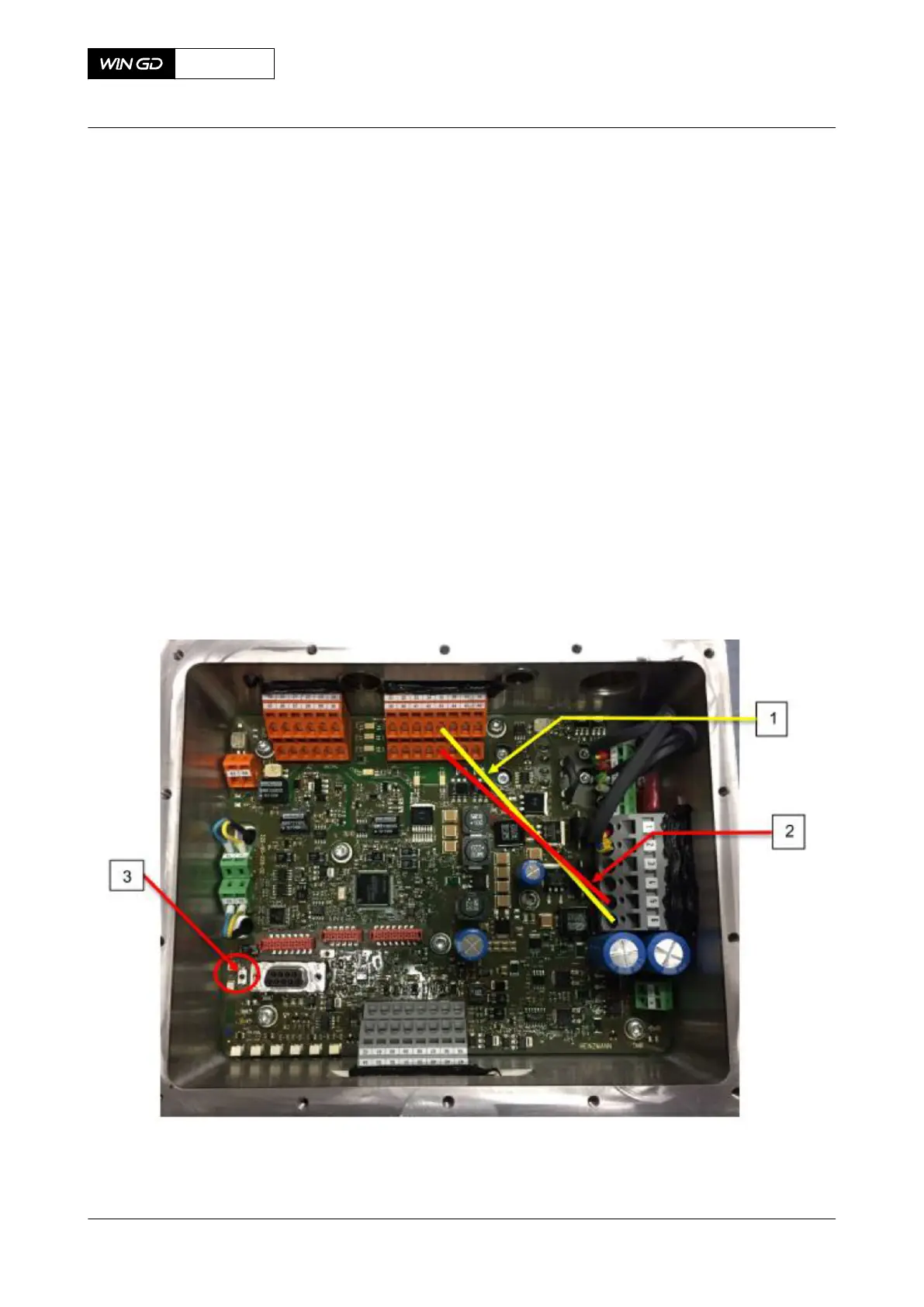
3 Put a bridging wire between terminals 6 and 35. See number 1 in Figure 10-20
4 Put a bridging wire between terminals 5 and 43. See number 2 in Figure 10-20
5 Turn the power supply of E85 “on”.
6 Push the switch. See number 3 in Figure 10-20
NOTE: If the switch is pushed correctly, the actuator moves to the maximum and
minimum position (self-adjustment).
NOTE: The switch is very fragile. Make sure to use as little force as possible when
pushing it.
7 Wait until the movement of the fuel pump actuator stops.
8 Turn the power supply of E85 “off”.
9 Remove the two bridging wires. See numbers 1 and 2 in Figure 10-20
10 Re-attach the top cover of the actuator terminal box.
11 Turn the power supply of E85 “on”.
Fig 10-20 Calibration illustration
X72DF
AA00-5583-00AAA-273A-A
Maintenance Manual Fuel pump actuator - calibrate
Winterthur Gas & Diesel Ltd.
- 577 - Issue 002 2020-10



 To Next Page