10. DJI DRONES AND CAN BUS
dierently if your WIRIS is in the Main screen, in the menu or if you are holding the buon for certain amount
of me.
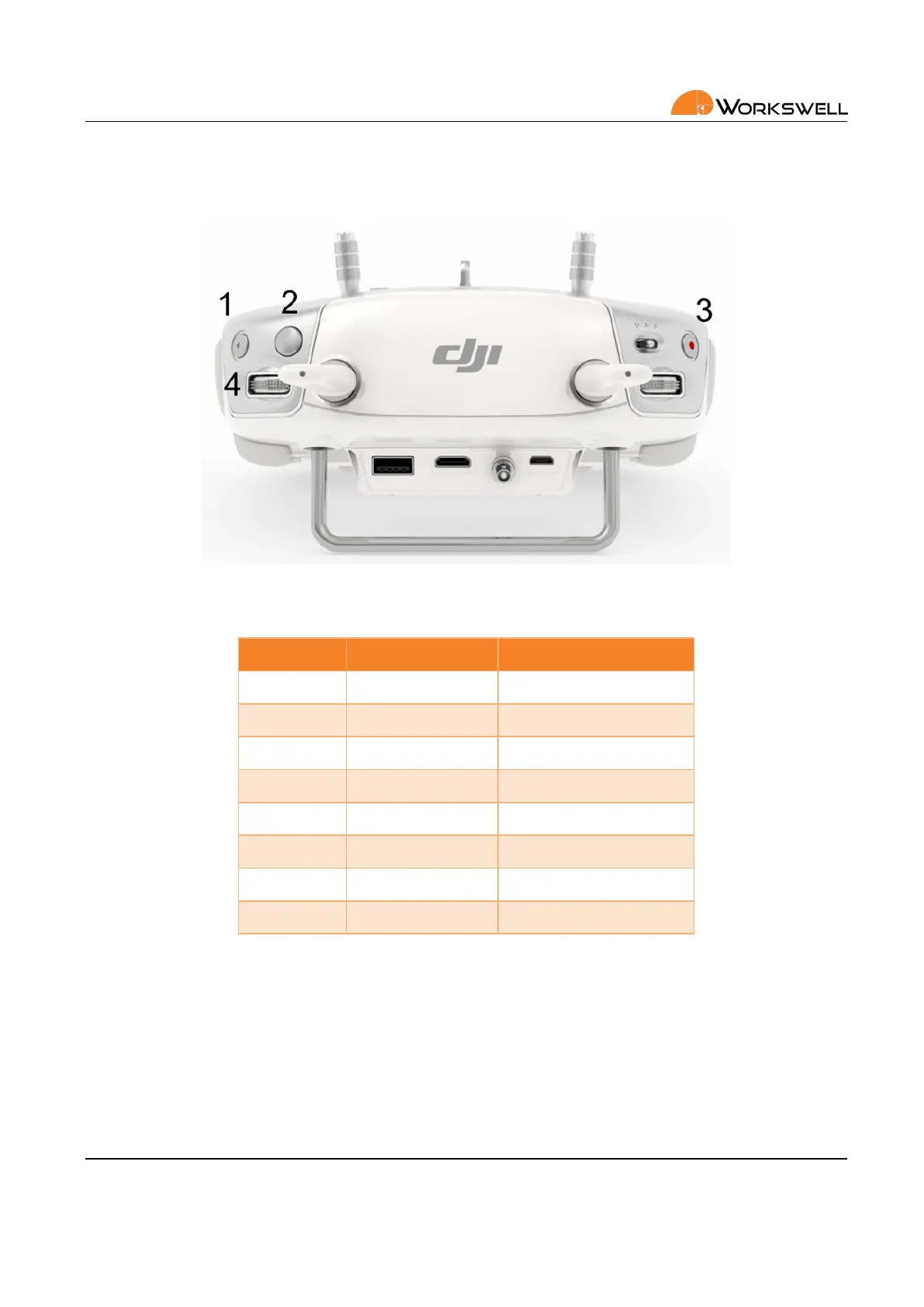
Figure 10.2: DJI Lightbridge 2 controller.
Buon System State Funcon
1 ‐ Capture
1 Hold 2sec Correcon (NUC)
2 Main Screen Change Mode
2 In the Menu Escape
3 ‐ Record
4 ‐ Wheel Main Screen Zoom
4 ‐ Wheel In the Menu Move Up or Down
4 ‐ Buon ‐ Enter or Open Menu
Table 10.1: WIRIS Pro funcons assigned to the RC controller.
E‐mail and Web
info@workswell.eu
www.workswell.eu
Mobile:
+420 725 877 063
ID:
Reg. No.: 29048575
VAT No.: CZ29048575
Headquarters
U Albrechtova vrchu 12
155 00, Prague 13
Czech Republic
Version: 201215 EN, 15
th
Dec, 2020
All pictures are only for illustraon.
Real values may vary.
28



 To Next Page