13. MAIN MENU (SETTINGS)
13.6 Measure
MEASURE submenu allows user to toggle the display of three marking highlighng crosses (CENTER, MIN and
MAX) as well as toggle if they should display the temperature measured in the given area. Addionally, the MEA‐
SURE submenu allows setup of ALARM visualizaon overlay as an alternave to linear palees in four dierent
modes (ABOVE, BELOW, BETWEEN or ABOVE&BELOW) and the thresholds of the visualizaon.
MEASURE menu consists of the following items:
SHOW CROSS MAX ‐ toggles appearance of the highlight cross which always posions itself on the maximal
temperature measured within the view
SHOW CROSS MIN ‐ toggles appearance of the highlight cross which always posions itself on the minimal
temperature measured within the view
SHOW CROSS CENTER ‐ toggles appearance of the highlight cross always posioned at the center of the
screen
SHOW TEMPERATURES ‐ toggles display of measured temperature values at each of the three highlighng
crosses
ALARM ‐ cycles between the available ALARM overlay modes and the opon to leave ALARM o altogether.
LIMIT ABOVE ‐ sets the upper temperature threshold considered in the ALARM visualizaon (only accessi‐
ble when relevant in current ALARM seng)
LIMIT BELOW ‐ sets the lower temperature threshold considered in the ALARM visualizaon (only acces‐
sible when relevant in current ALARM seng)
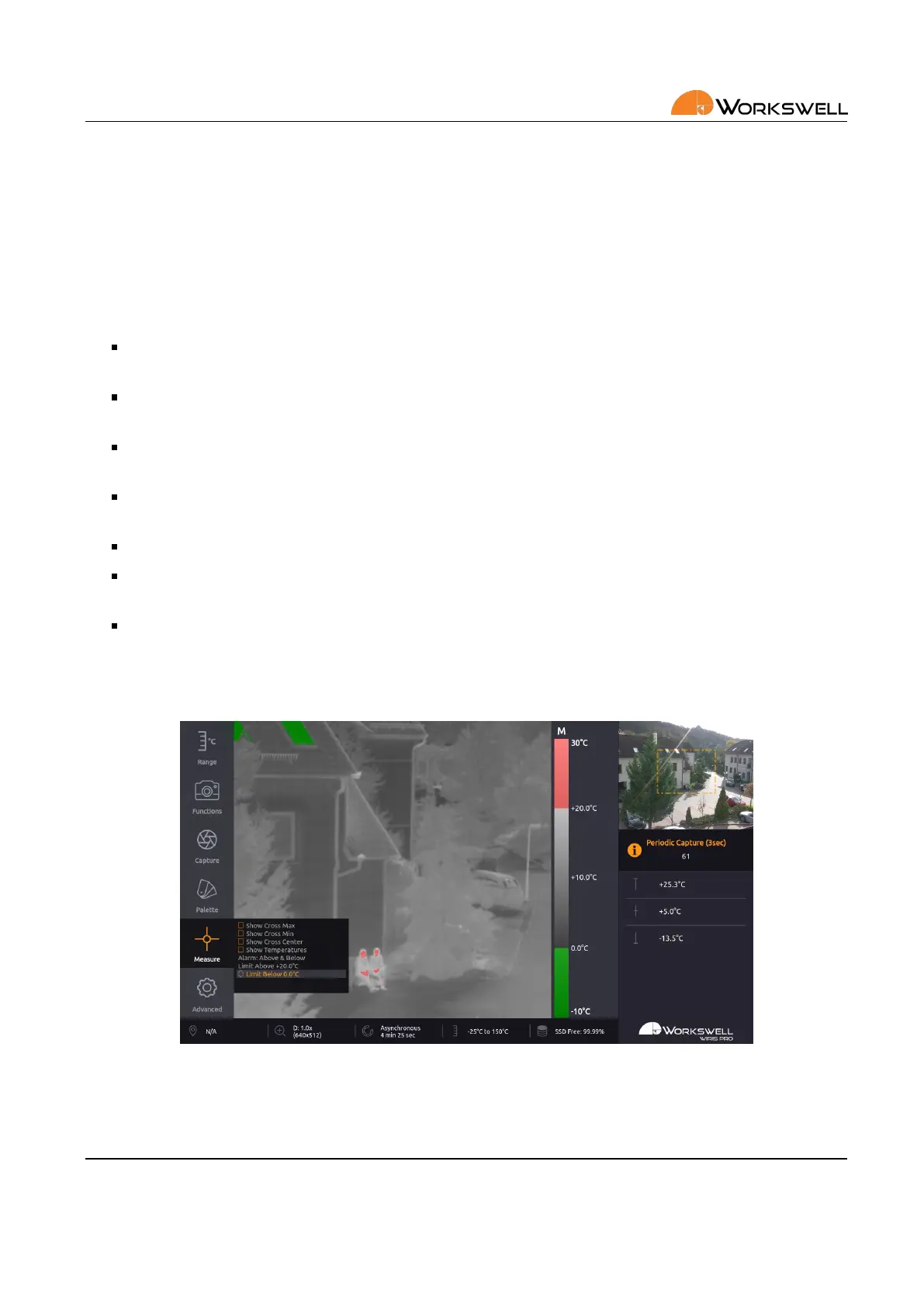
ABOVE & BELOW mode marks all the areas that have higher temperature than ABOVE LIMIT or lower temperature
than BELOW LIMIT.
Figure 13.7: Alarm display – ABOVE & BELOW.
E‐mail and Web
info@workswell.eu
www.workswell.eu
Mobile:
+420 725 877 063
ID:
Reg. No.: 29048575
VAT No.: CZ29048575
Headquarters
U Albrechtova vrchu 12
155 00, Prague 13
Czech Republic
Version: 201215 EN, 15
th
Dec, 2020
All pictures are only for illustraon.
Real values may vary.
42



 To Next Page