ADPRO Presidium by Xtralis Installation and User Manual
Doc. 12384_05 11
2.5.3 System Hardware
Appendix D contains a checklist for system design and equipment selection.
Camera Selection and Location
The selection and location of cameras is vitally important for the successful operation of the
Presidium Video Intrusion System. The cameras are intrinsically linked with any other detectors
in use and the availability of suitable lighting.
1. Camera and Video Signal Requirements
Cameras must adhere to the CCIR/PAL or RS170/NTSC standard for suitable operation with
Presidium. Each camera channel can pass both colour and monochrome video signals.
Presidium only processes the monochrome section of the video signal. Any colour signal
present, neither adds nor detracts from the performance.
The following conditions must be met for the Presidium to synchronise to an incoming video
signal from the camera and to provide good video motion detection:
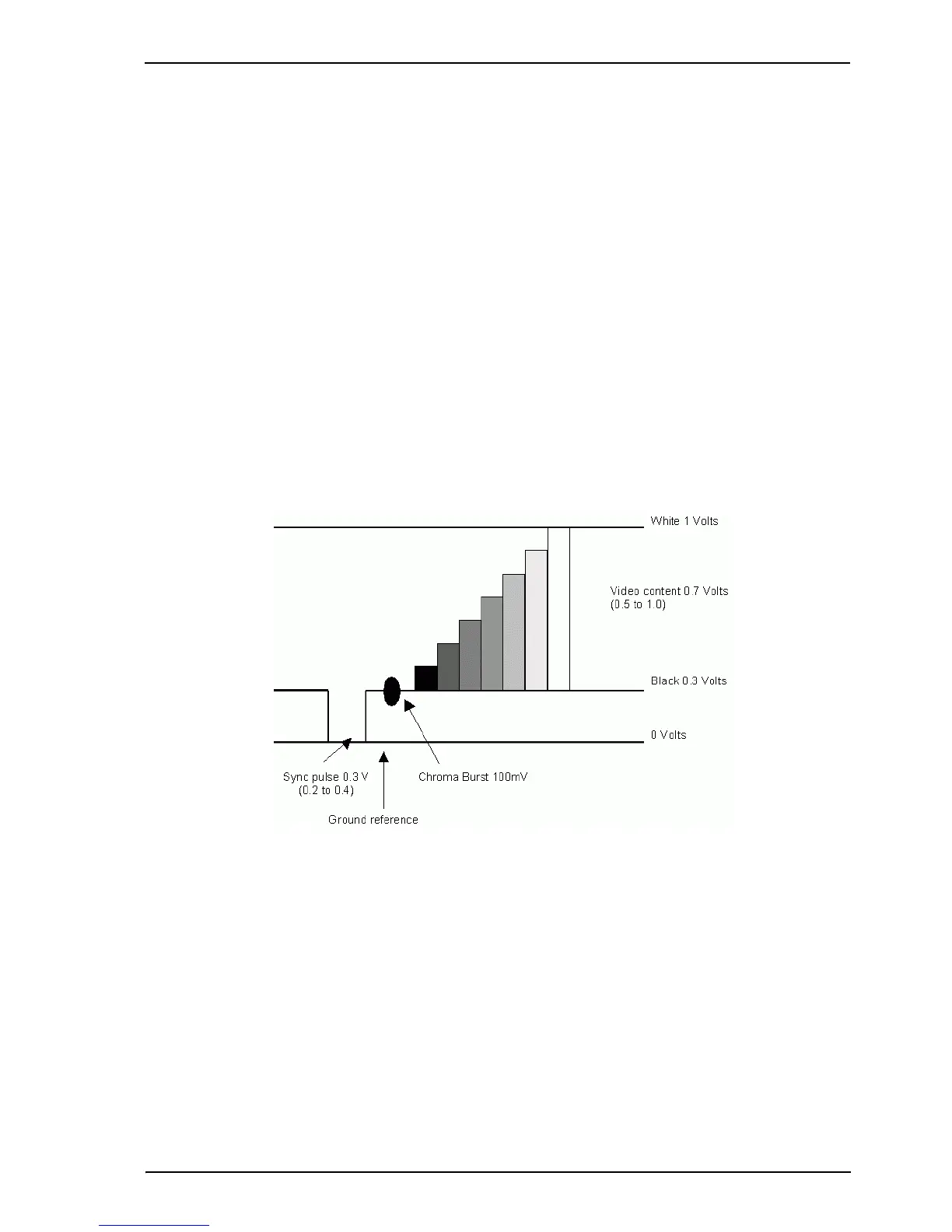
• The sync amplitude at the video input of the Presidium must be within 0.2V to 0.4V range
• The video amplitude (not including sync) at the video input of the Presidium must be within
the range of 0.5V to 1.0V.
Figure 3: Required Video Signal
If the video level at the video input of the Presidium is low, cable compensators, or line drivers,
should be installed at the camera end and adjusted to boost the video signal to within the correct
voltage levels. Typically, the best solution is to ensure that the correct grade of coaxial cable is
installed to transmit the images over the required distance. Take into consideration impedance
and capacitance qualities of the selected cable type to ensure that image degradation is
minimised from the outset.
The quality of the video is influenced by the cable length. Generally the shorter the cable runs
between the Presidium and the camera, better the quality of the picture. For long cable runs,
cable compensators may be required.
A video contrast level indicator may be displayed on the Presidium video output, if required, to
assist with setting the video contrast levels. Refer to Display All Tracks on Video Output on
page 54 for more information.



 To Next Page