Installation and User Manual ADPRO Presidium by Xtralis
58 Doc. 12384_05
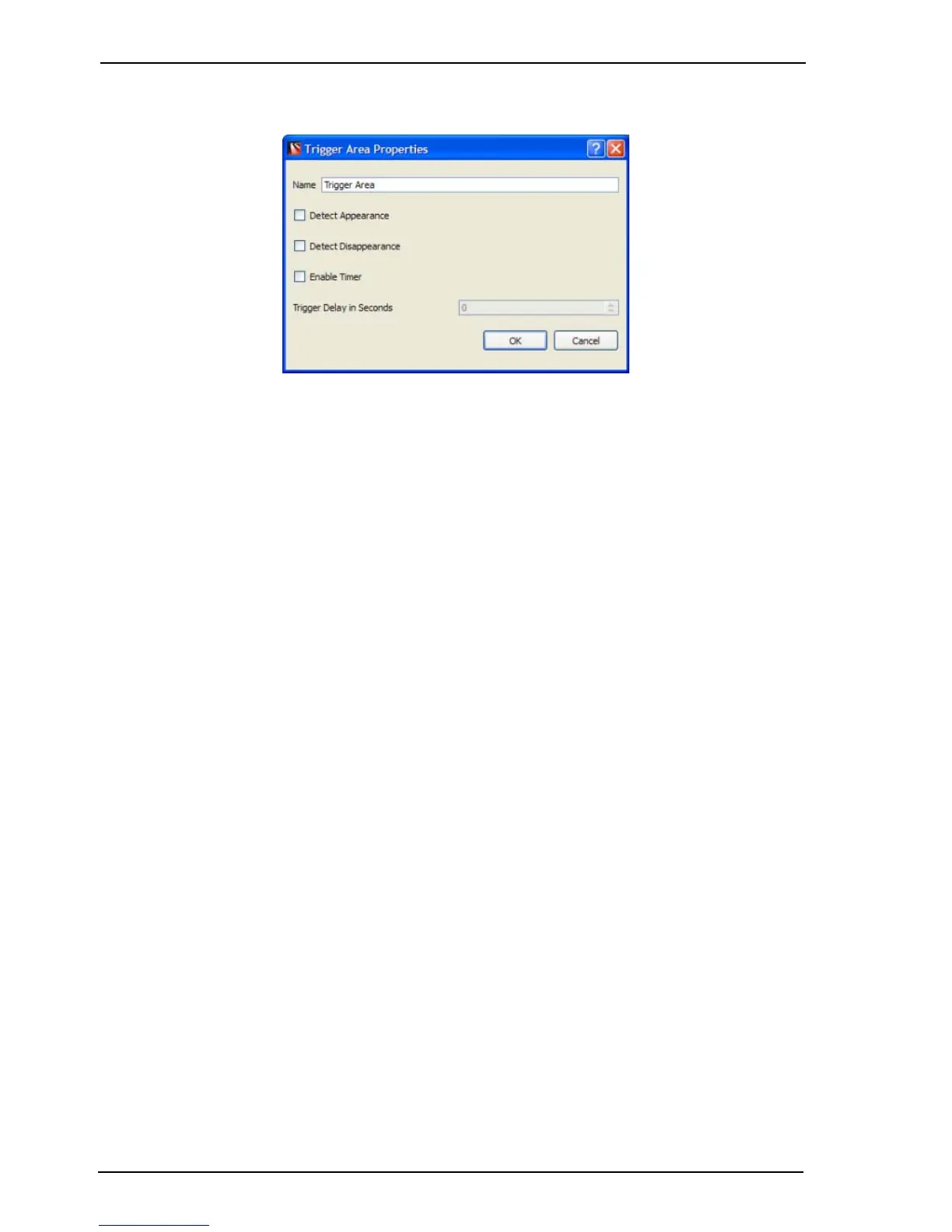
Trigger Area Properties
Figure 49: Trigger Area Properties
Trigger Areas can be given a unique Name to assist with identification. Attached to each trigger
area are options to:
Detect Appearance: Select this option if an alarm is to be generated when a target appears, but
has not entered the trigger area by crossing an edge.
Detect Disappearance: Select this option if an alarm is to be generated when a tracked target
“disappears” from the trigger area (for example, hides behind a pillar) or stops moving.
Enable Timer: By selecting the Enable Timer option, a value of 0 to 180 seconds can be
entered as the Trigger Delay in Seconds. A timer delay of 0 seconds will cause an alarm to be
generated as soon as a target track crosses an Entry or Crossing edge. A value of 1-180
seconds defines the maximum time a target track can remain within the trigger area before an
alarm is generated.
The entire field of view of a Detection Area may be selected using the Select Entire Area button.
The Invert Active Region checkbox selects the previously unselected part of the detection area.
The Darken Image checkbox increases the visibility of the detection area lines.
When a Trigger Area is selected using the right mouse click an option will be present in the drop
down list to duplicate the current selected shape including properties. Using this option may
decrease setup time when requiring multiple Trigger Area shapes that are simular in shape and
properties.



 To Next Page