Installation and User Manual ADPRO Presidium by Xtralis
36 Doc. 12384_05
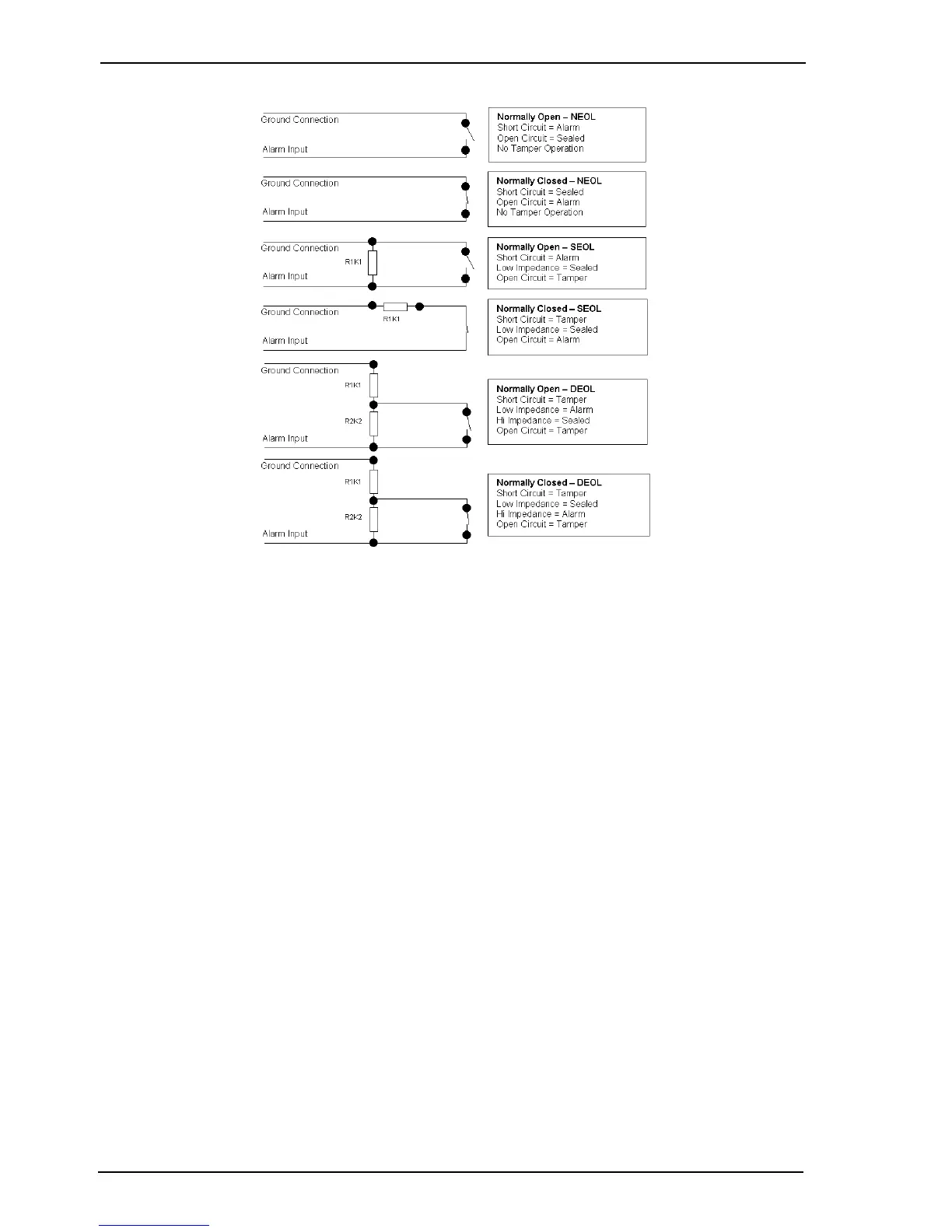
Figure 26: Alarm and Isolate Input Configuration
3.7 Isolation
Isolation inputs are provided for each video channel: ALM Isolate A and ALM Isolate B. These
connections allow individual channels to be isolated (prevented from generating an alarm). This
feature is useful in a number of scenarios:
• Commissioning a Presidium
• Fault finding an installation
• Configuring detectors
• Disabling faulty detectors
Both the alarm input and alarm isolate connections are tamper protected (regardless of the
access/secure state).
To ensure the best immunity to EMC disturbances, the isolation input should be wired using
shielded cable. Connect the shield to the ground (GND) terminal.
Note: If a channel is isolated, no alarm input or tamper alarm will be generated.
The Isolate input state may be:
• Normally Open - No End Of Line (NEOL) Resistor
• Normally Closed
• Normally Open SEOL - Single End Of Line Resistor
• Normally Closed SEOL
• Normally Open DEOL - Dual End Of Line Resistor
• Normally Closed DEOL.



 To Next Page