Installation and User Manual ADPRO Presidium by Xtralis
22 Doc. 12384_05
transmitters are optimised for operation over low-bandwidth links, however they also
provide outstanding operation over higher bandwidth links.
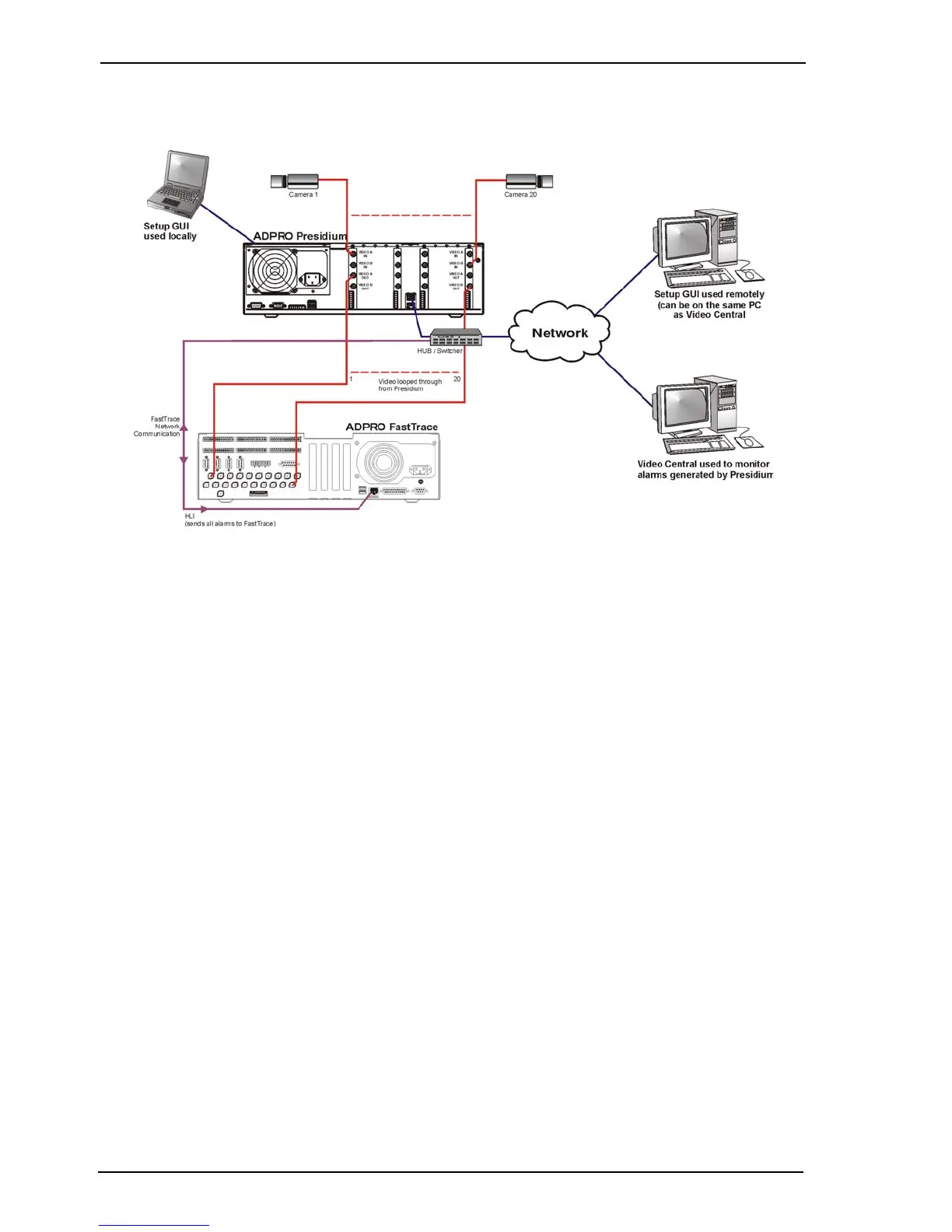
Figure 17: Typical Connections to a standard Presidium
2.6 System Installation
Install the Presidium system and associated hardware in accordance with appropriate CCTV
installation practices. Ensure adherence to any local, legal or mandatory requirements for
electrical or telecommunications infrastructure.
Appendix I contains a flowchart providing an overall view of the installation and commissioning
process. It can be used as a guide for the installation and commissioning sequence of events.
2.6.1 Camera Installation
Alignment
Confirming the FOV of the camera is very important. The initial design must ensure that the
perimeter (or area) is completely protected and no dead zones are present. Adherence to the
design during installation ensures there will be no dead zones or blind spots in the protected
area.
Placing traffic cones or markers at the edges of the expected detection areas (foreground and
background) provides a mechanism to initially align the camera and ensure that the FOV is as
per requirement. Alternatively have one person watch a monitor and direct another (use a walkie-
talkie) to walk the site.



 To Next Page