Accessories
125
Setup
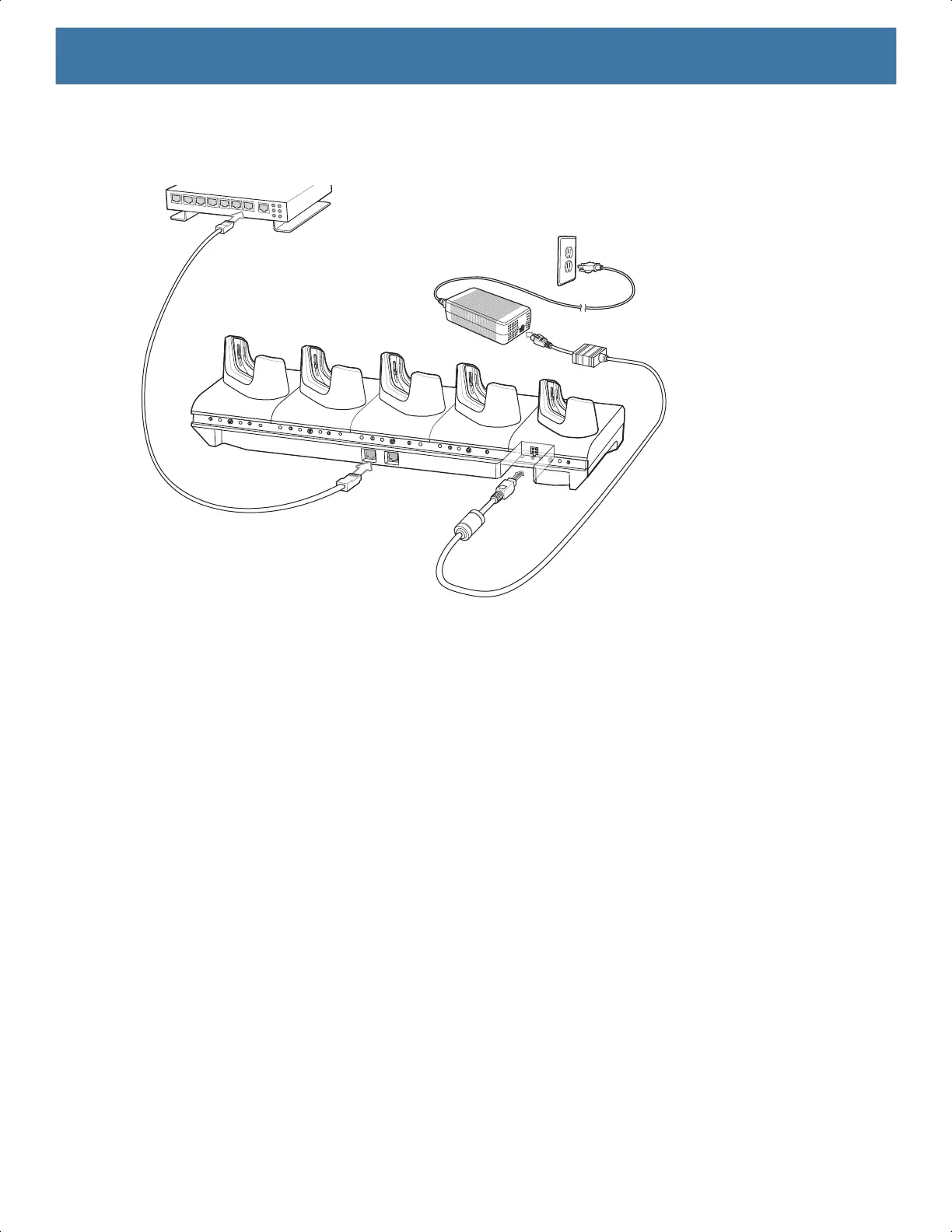
Figure 62 5-Slot Ethernet Cradle Setup
Daisy-chaining Ethernet Cradles
Daisy-chain up to ten 5-Slot Ethernet cradles to connect several cradles to an Ethernet network. Use either a
straight or crossover cable. Daisy-chaining should not be attempted when the main Ethernet connection to the
first cradle is 10 Mbps as throughput issues will almost certainly result.
To daisy-chain 5-Slot Ethernet cradles:
1. Connect power to each 5-Slot Ethernet cradle.
2. Connect an Ethernet cable to one of the ports on the switch and the other end to the to Primary Port of the
first cradle.
3. Connect an Ethernet cable to the Secondary port of the first cradle.
4. Connect the other end of the Ethernet cable to the Primary port of the next 5-Slot Ethernet cradle.
MN-003834-01ENa_tc52-android-10-ug-en.book Page 125


 To Next Page
 Loading...
