Getting Started
16
Device Features
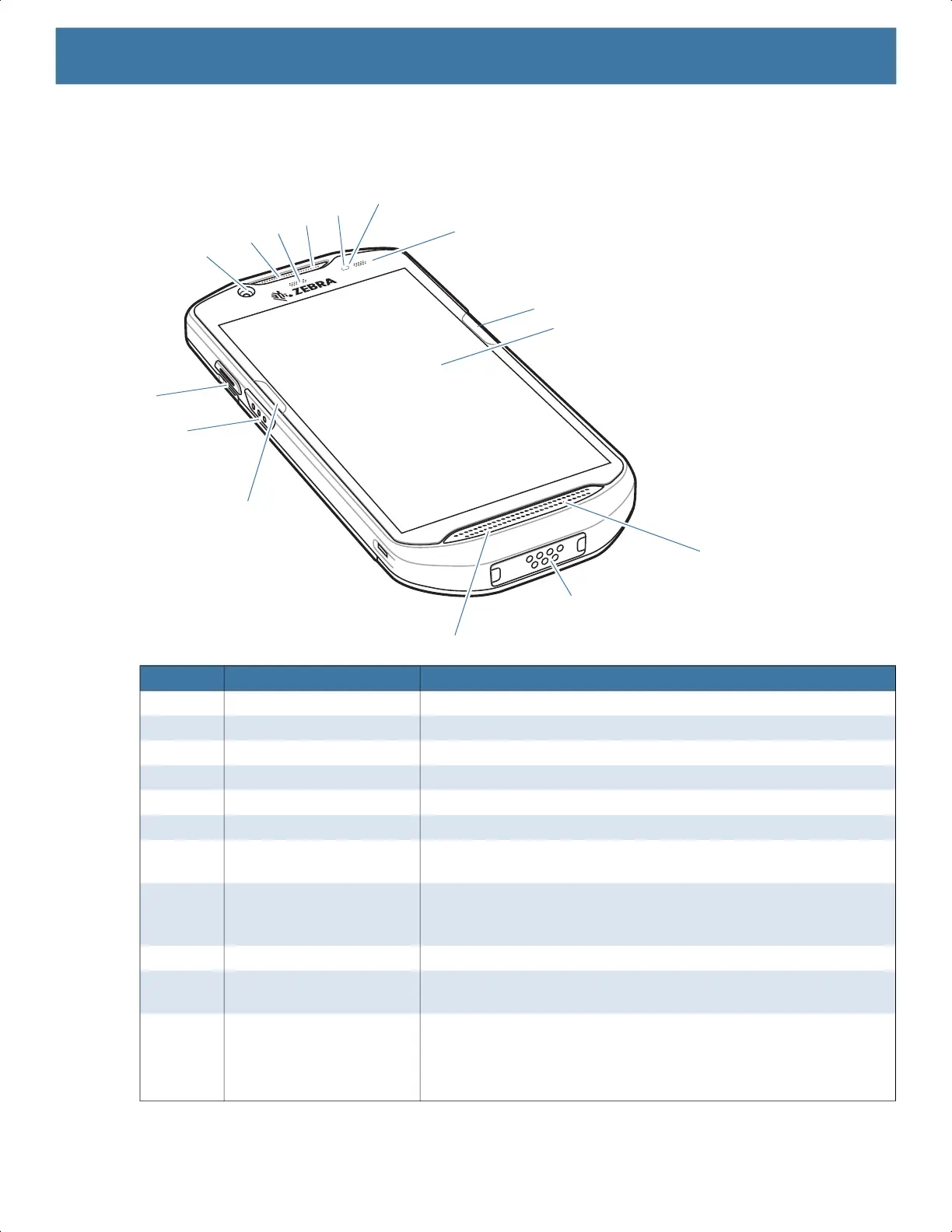
Figure 1 Front View
Number Item Function
1 Front Camera Takes photos and videos.
2 Receiver Use for audio playback in Handset mode.
3 Data Capture LED Indicates data capture status.
4 Microphone Use for communications in Speakerphone mode.
5 Proximity Sensor Determines proximity for turning off display when in handset mode.
6 Light Sensor Determines ambient light for controlling display backlight intensity.
7 Charging/Notification LED Indicates battery charging status while charging and application
generated notifications.
8 ActiveEdge Touch Zone Programmable dynamic soft key positioned near the perimeter of
the display for one-touch access to a frequently used application or
function.
9 Touch Screen Displays all information needed to operate the device.
10 Speaker Provides audio output for video and music playback. Provides
audio in speakerphone mode.
11 Interface Connector Provides USB host and client communications, audio and device
charging via cables and accessories.
CAUTION: Do not remove the interface connector to ensure proper
device sealing.
9
14
13
12
11
10
7
6
5
3
2
4
1
8
8
MN-003834-01ENa_tc52-android-10-ug-en.book Page 16


 To Next Page
 Loading...
