3 Product and Functional Description | 3.4 Specimen Stage ZEISS
Info
It is highly recommended that the CCD illumination control is set to Auto Detect. This avoids
any problems by the user forgetting to switch the illumination back for a different detector.
Fig.23: Chamber CCD camera disabled as indicated by a pause sign (e.g. if a diode detector is
selected).
3.4 Specimen Stage
Purpose
The 5-axes motorized Cartesian specimen stage is used to navigate the specimen inside the speci-
men chamber.
Position
The specimen stage is mounted on the chamber door. If the chamber door is closed, the speci-
men stage is inside of the specimen chamber.
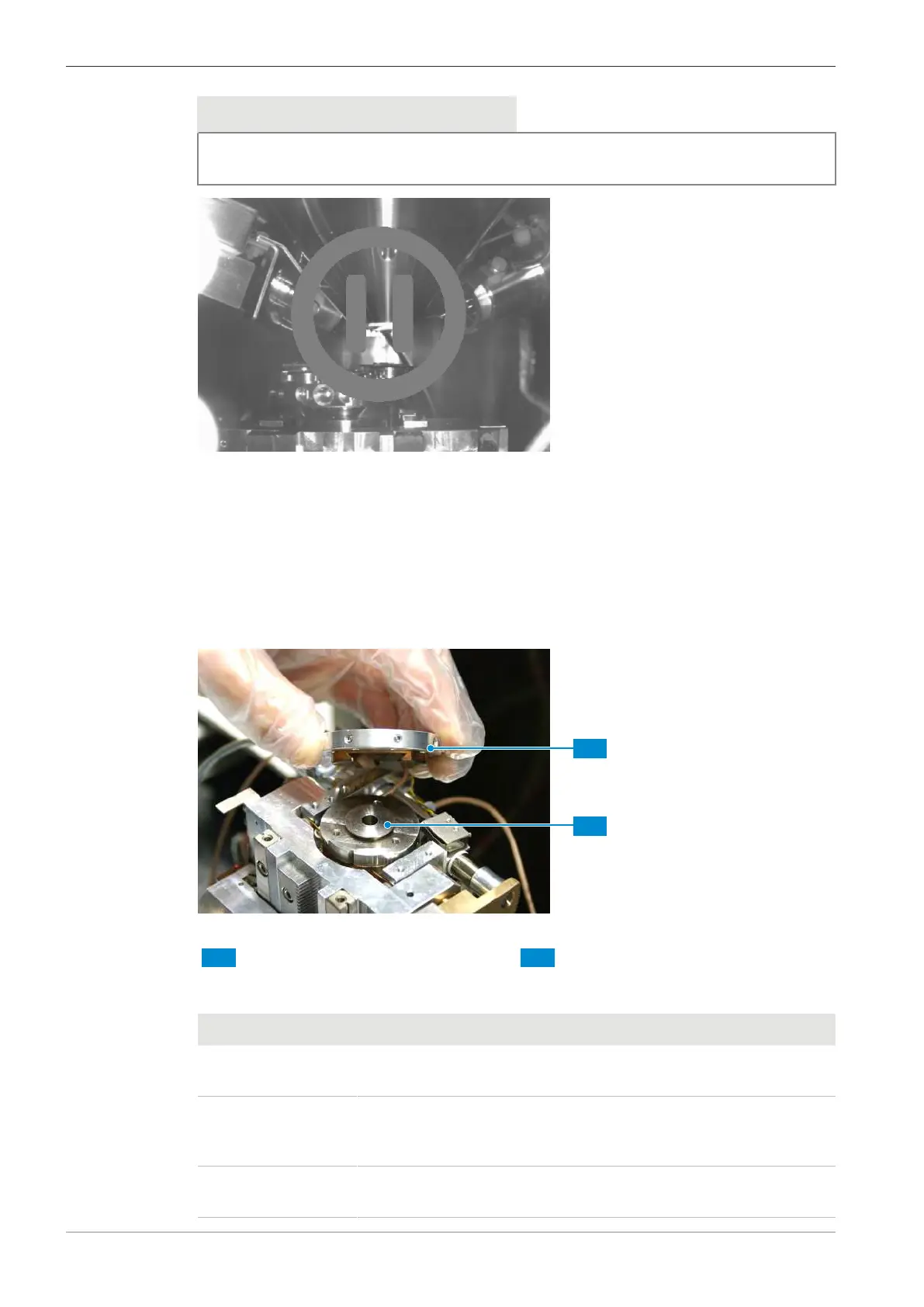
Fig.24: Specimen stage with dovetail fitting for precise fitting
1 Specimen holder 2 Specimen stage
Function
The stage can be operated using the dual joystick or using the SmartSEM software.
Axis Description Movement
X X-axis Movement towards or away from the cham-
ber door (horizontal movement in the image)
Y Y-axis Movement to the left or right seen from the
chamber door (horizontal movement in the
image)
Z Height Vertical movement (movement towards or
away from the focal plane of the image)
38 Instruction Manual ZEISS EVO | en-US | Rev. 10 | 354706-0780-006



 To Next Page