3 Product and Functional Description | 3.6 Software Description ZEISS
3.6 Software Description
3.6.1 SmartSEM User Interface
The SmartSEM software graphical user interface (GUI) allows you to monitor and operate most of
the active components of the microscope.
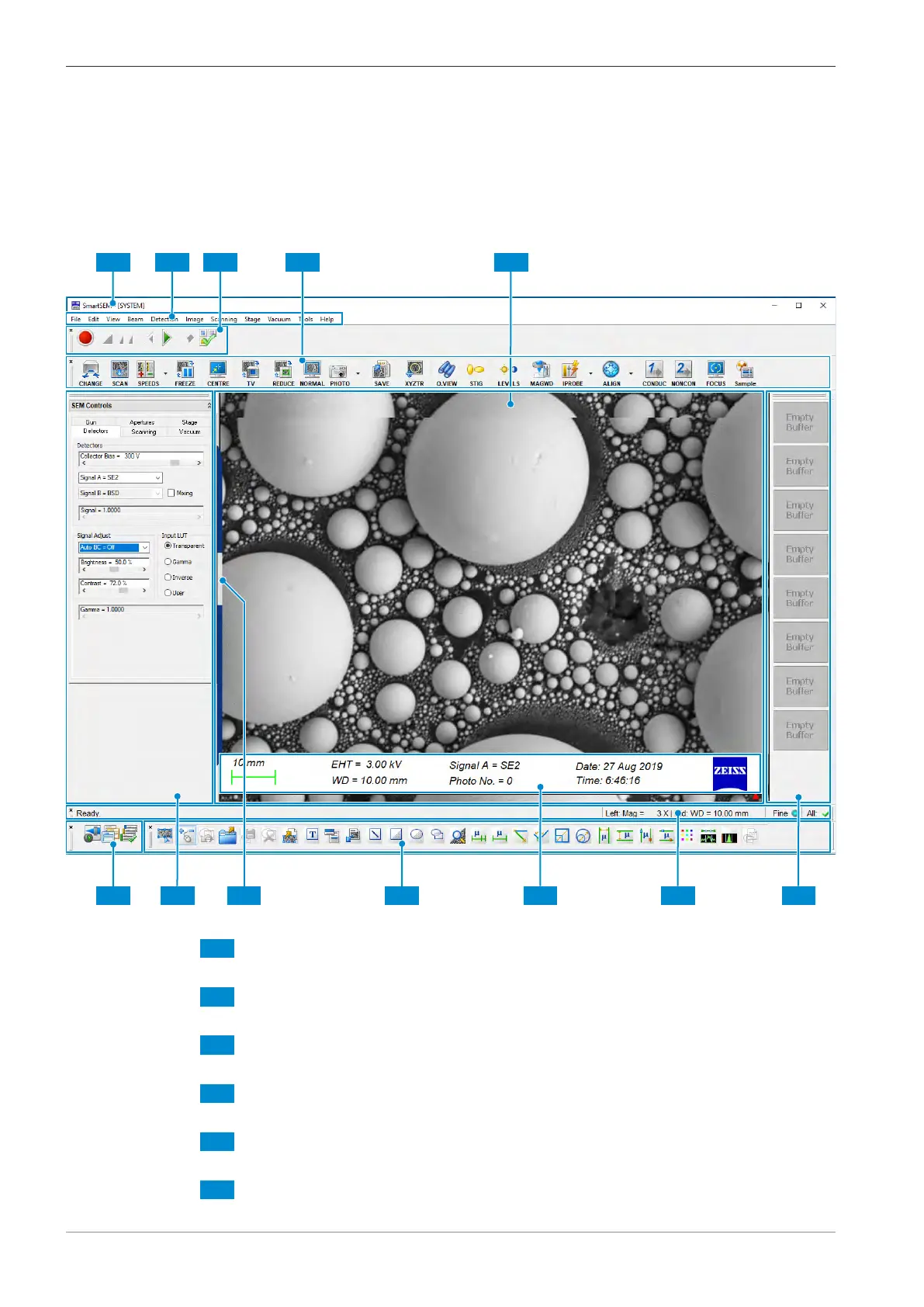
The following screenshot indicates the main elements of the SmartSEM user interface:
Fig.38: Screen layout of the user interface
Title Bar
Displays the name of the user interface and the logged-on user.
Menu Bar
Enables you to access SmartSEM features via sub-menus.
AVI Toolbar
Contains the controls to set up, record, and playback video sequences of scanned images.
Toolbar
Provides quick access to SmartSEM tools.
Image Area with Data Zone
Displays image information and acquisition parameters from the microscope.
Thumbnails Panel
50 Instruction Manual ZEISS EVO | en-US | Rev. 10 | 354706-0780-006



 To Next Page