LINE OUTPUTS
Cantar X3 has 8 Line outputs.
I. Outmaps
You can configure up to 26 Outmaps (from 'a' to 'z') each applicable to one or several outputs.
NB: Line and AES Outmaps are shared. (Line Outmap 'a' is the same as AES Outmap 'a').
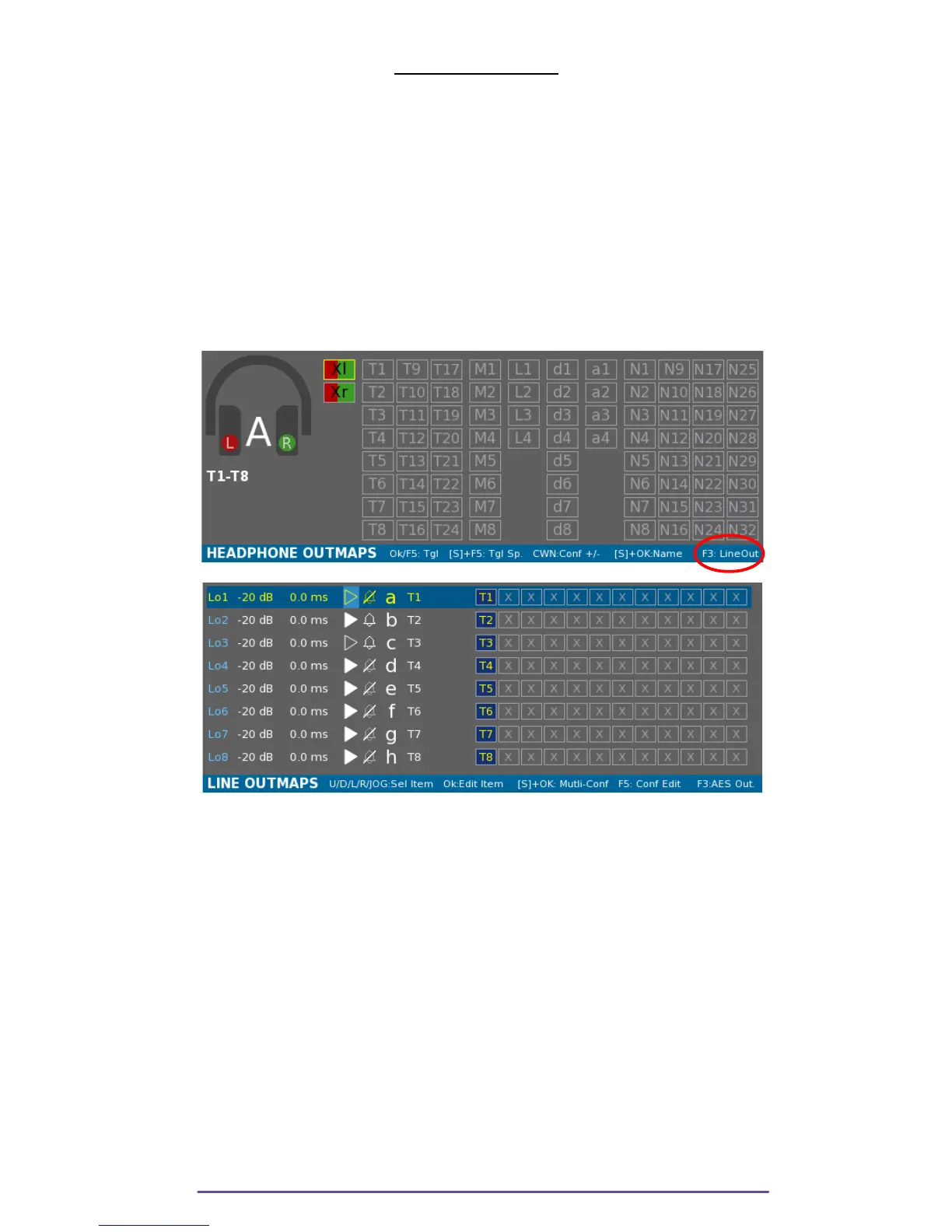
Outmaps can be modified while the Main Selector is in the 6 o'clock position.
In that position, Headphone Outmaps are displayed but by pressing the F3 button, you will
access the Line Outmaps panel (pressing the F3 button again will display the AES Outmap
panel).
Pict. 06
Pict. 10
Pict. 11
Each row represents a Line Output. On a row, five parameters may be setup:
• the Attenuation Level.
• the Delay applied to the Output.
• the Play-Mute option.
• the Beep Mute option.
• the current outmap configuration of the Output.
In Pict 07: Line Out 1 has the Outmap 'a' which is named « T1 ».
Track 1 is sent to Line Out 1.
You can select a row by using the Up and Down buttons. Using the Left and Right buttons or the
Jog wheel enables to select among the 5 parameters.
Once a row is selected, the corresponding Outmap is applied on the Headphone ouput.
Cantar X3
10



 To Next Page