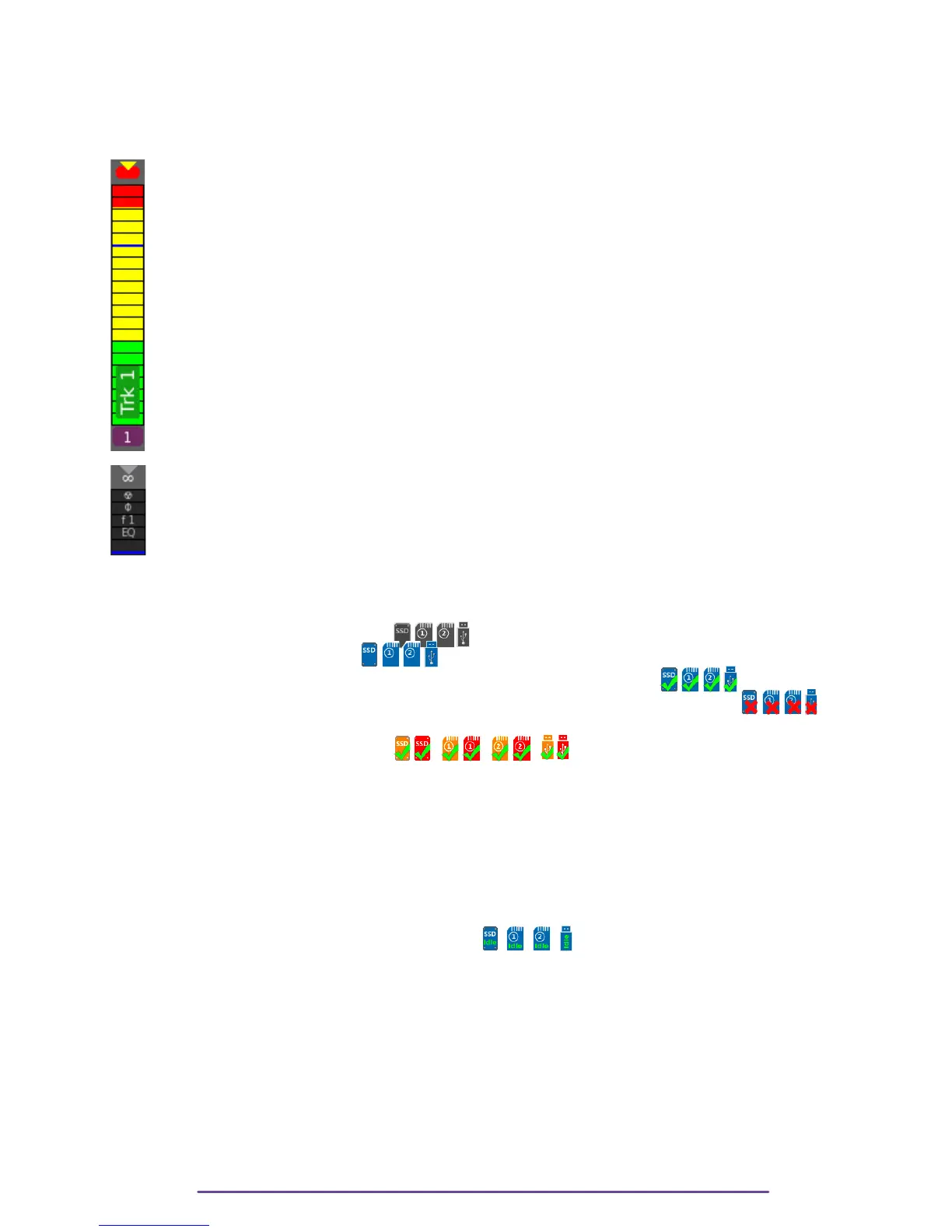
On the right part, Vumeters are automatically displayed according to the number of Track used in
current InGrid, in group of 4, with a minimum of 12. i.e if 12 or less tracks are used, 12 track
are displayed then between 13 and 16 tracks used: 16 tracks displayed etc…
• Track's number is under each Vumeter. It is the colored with the color type of the first
input routed to the Track.
• Vumeters can be divided into 3 color zones which can be set up in the Audio-Timecode
Menu.
• A blue line can be added to put a reference at a level which can be set up in the
Audio-TC Menu.
• Above the Vumeter according to the Display Mix Track Level option may appear:
◦ Mix Track Gain
◦ Current Track Audio Level
• A Triangle above the Vumeter symbolises the Limiter (if enabled on an input routed to the
Track). The triangle is grey if the Limiter is enabled but not currently in action. It blinks
yellow as soon as the Limiter begins its action (it continues to blink for 3 seconds after the
Limiter's action has ended).
• A Red square above the Vumeter symbolizes the Clip Level.
• If an input routed to the Track has a modifying parameter applied such as: Phantom
power, Phase inversion, Preamp Filter or Digital EQ, it is displayed at the top of the
vumeter with respectively a radioactive symbol (☢), a phase symbol (f), a 'fn' symbol
(with n being the number of the filter) or an 'EQ' symbol. If more than one input is routed
to a track, each symbol is replaced by a plus sign (+).
III.Media States
• Grey: not present and not used.
• Blue: present, but not used.
• Blue, with a green check: present, being used by a Recording process..
• Blue, with a red X: not present or faulty, while being used by a Recording process.
> WARNING, please check
• Red and Orange: Slow media.
Cantar uses its internal audio buffer to deal with slow media but if your media is not fast
enough, according to the record parameters (track count, sample-rate, bit-depth), it will
warn you.
൦ Orange: Warning this media is slow, end of record may take a while in order to flush
the Audio buffer.
൦ Red: Alert very slow media, record may fail if the internal Audio buffer is fully filled.
• Idle: The media is used as an Idle Backup media. When Idle backup process is running, its
progress is displayed as a percentage.
NB: Red or orange may appear at the very start of a Take but should not long.
WARNING: Cantar monitors the filling of its internal Audio buffer so that if a safety limit is
reached, any slow media will automatically be stopped.
NB: • While 3 Usb ports are available, only one will be used: the first which was plugged
and mounted.
• If a media fails during a recording (stopped due to speed issue or media filled or media
error), record will continue if a mono process is still active on a media.
Cantar X3
23



 To Next Page