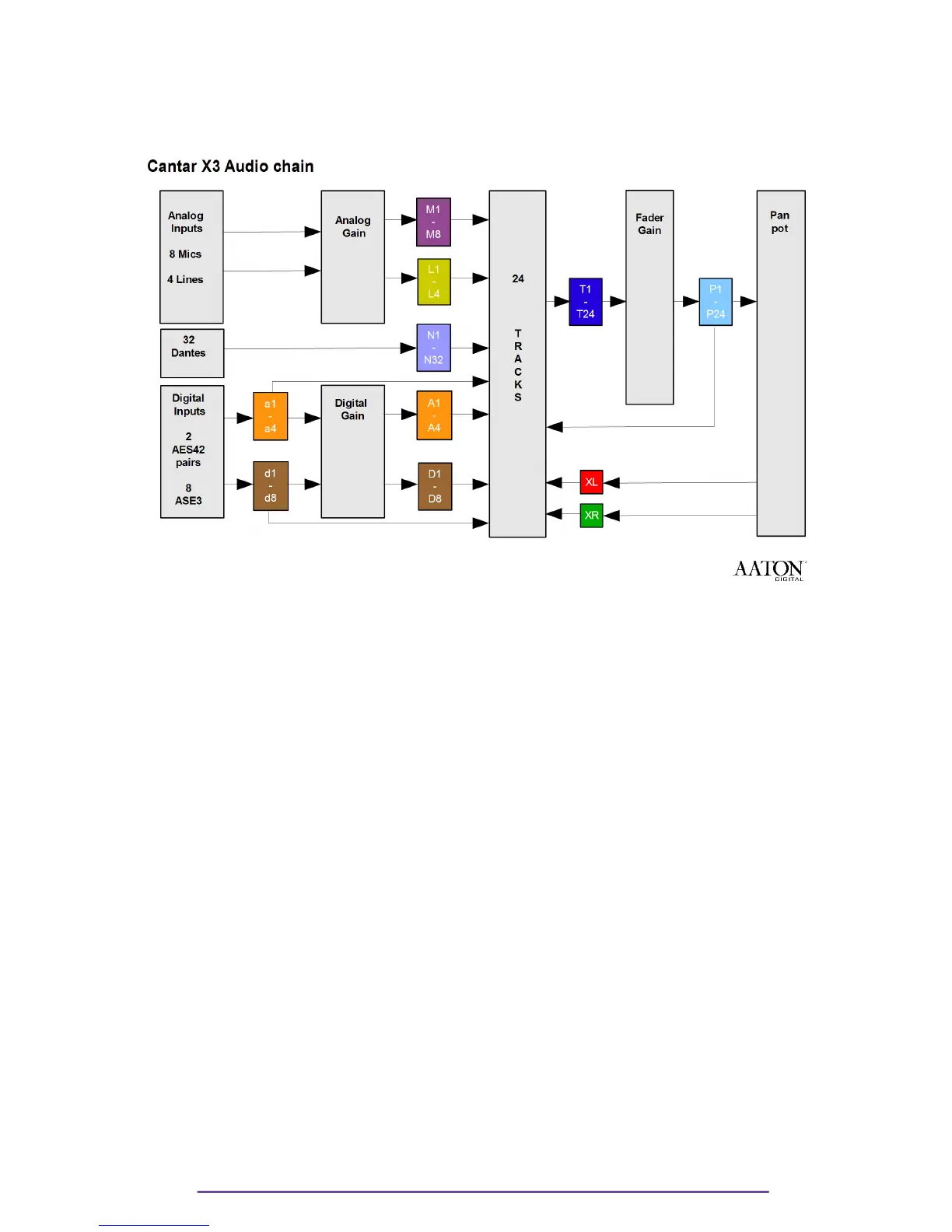
II. Cantar Audio Chain
III.Software history
version 1.113 (June 23, 2016)
• Track name auto completion, a tool tip list displays the suggestions
From editing metadata screen, press F2 to open completion management (edit, delete,
ON/OFF).
• Into edit fields, the cursor goes to the next/previous field with Left and Right key
Double press on Left / Right while on the first / last character of a field or hold the
Left/Right key pressed
• The all Cantar settings can be saved and restored using save/load settings into technical
menu.
At restore step, Cantar user can select between all, Ingrid, Outmap ....
• Low power is available in stop position.
The duration before starting the low power mode can be adjusted into technical settings.
• Cantarem II Function Button assignment
Press Cantarem II Left Shift and Right Shift and a function key (e.g C1) to display
Assignment Panel
Press Left-Right (or C1 to C4) Keys to select Cantarem II Function Button
Press Up/Down keys to choose the action emulated (F1 to F6 ; Talk 1 & 2)
Press Ok to validate
• In PPR position, on "delete last take", a confirmation is now requested before moving the
last take to the trash.
• In BROWSER position on delete take, you can clean the other media(s) at the same time.
Cantar X3
75



 To Next Page