4. Fix Files
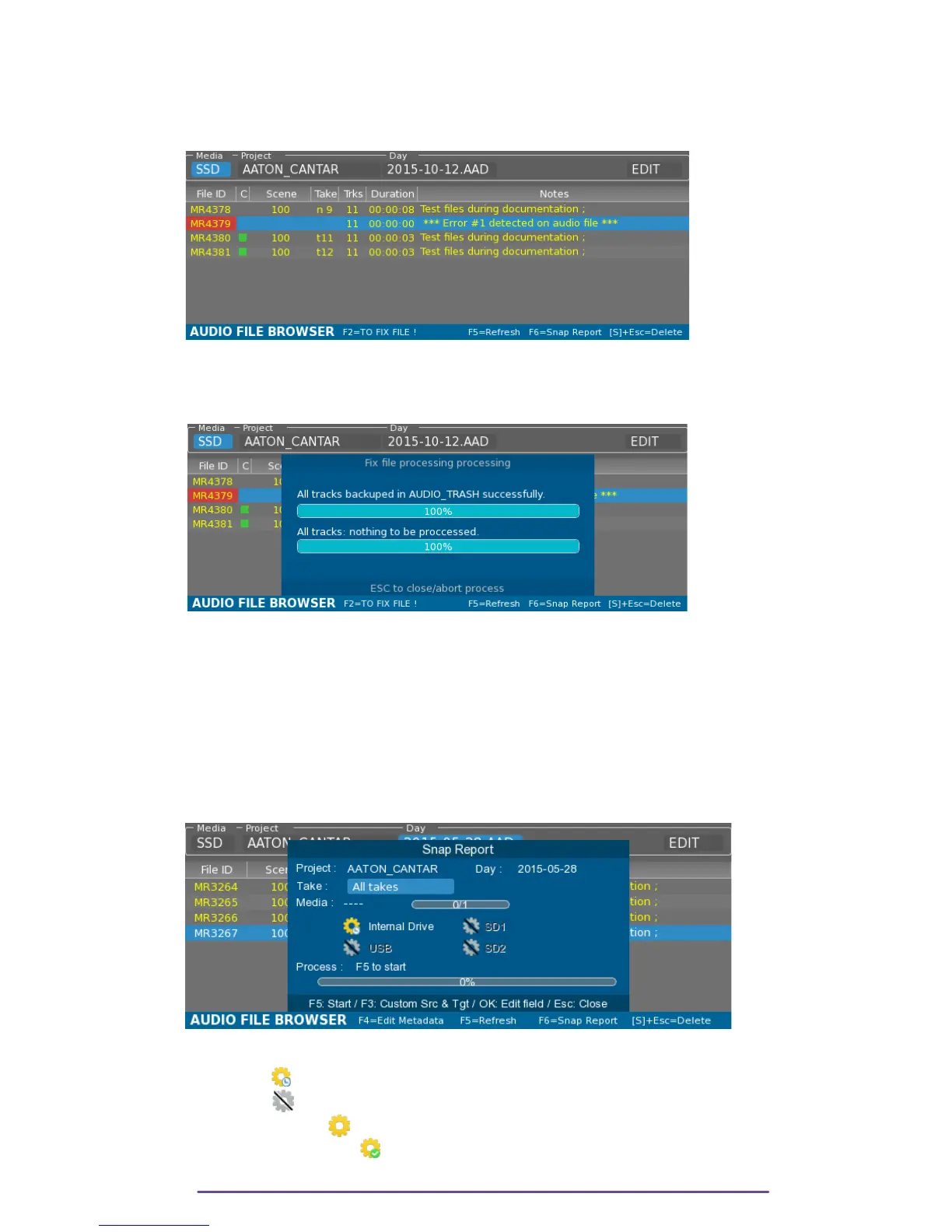
When a Take is improperly closed (upon power failure, system error, or media error), the Take is
colored in Red. Metadata editing is not possible as the files are missing the iXML data.
Pict. 100
It is possible to try to fix the Take by pressing the F2 button.
The original Take (improperly closed) is copied in the Audio_Trash as a backup and the fixed
files are put into the current Day folder.
Pict. 101
III.Snap Report
In the Audio Browser menu, the Audio Sound Report is generated by pressing the F6 button.
1. Simple Snap
The Snap Report process, for each media detected, scans the current selected Project and Day
folder looking for Mono, Stereo and Poly folder, in order to create a report representing the
media state at the moment.
Pict. 102
For each media, the Report process state is displayed:
• Scheduled : at least one Sound folder was found (.AAD, .AAX, .AAN)
• Non active : no Sound folder found.
• Processing Report .
• Report process finished.
Cantar X3
54



 To Next Page