Pict. 07
NB: • A digital gain can be applied on Digital inputs: from -¥ to +12dB on AES inputs and
from -¥ to +36 dB for AES 42.
Both version of inputs (before or after gain) can be routed in an Outmap. These versions
are symbolised by the letter representing the input type being capital or not: for example,
for an AES input, 'd' is for the input before gain and 'D' is for the input after gain.
By default with the OK and F5 buttons, the version before gain is changed, in order to
cycle throught the Left, Right and Center mapping, press the Shift + F5 buttons.
• A track may be mapped Post-fade in an Outmap, to cycle throught the Left, Right and
Center mapping, press the Shift + F5 buttons.
IV.Other Main Selector Positions
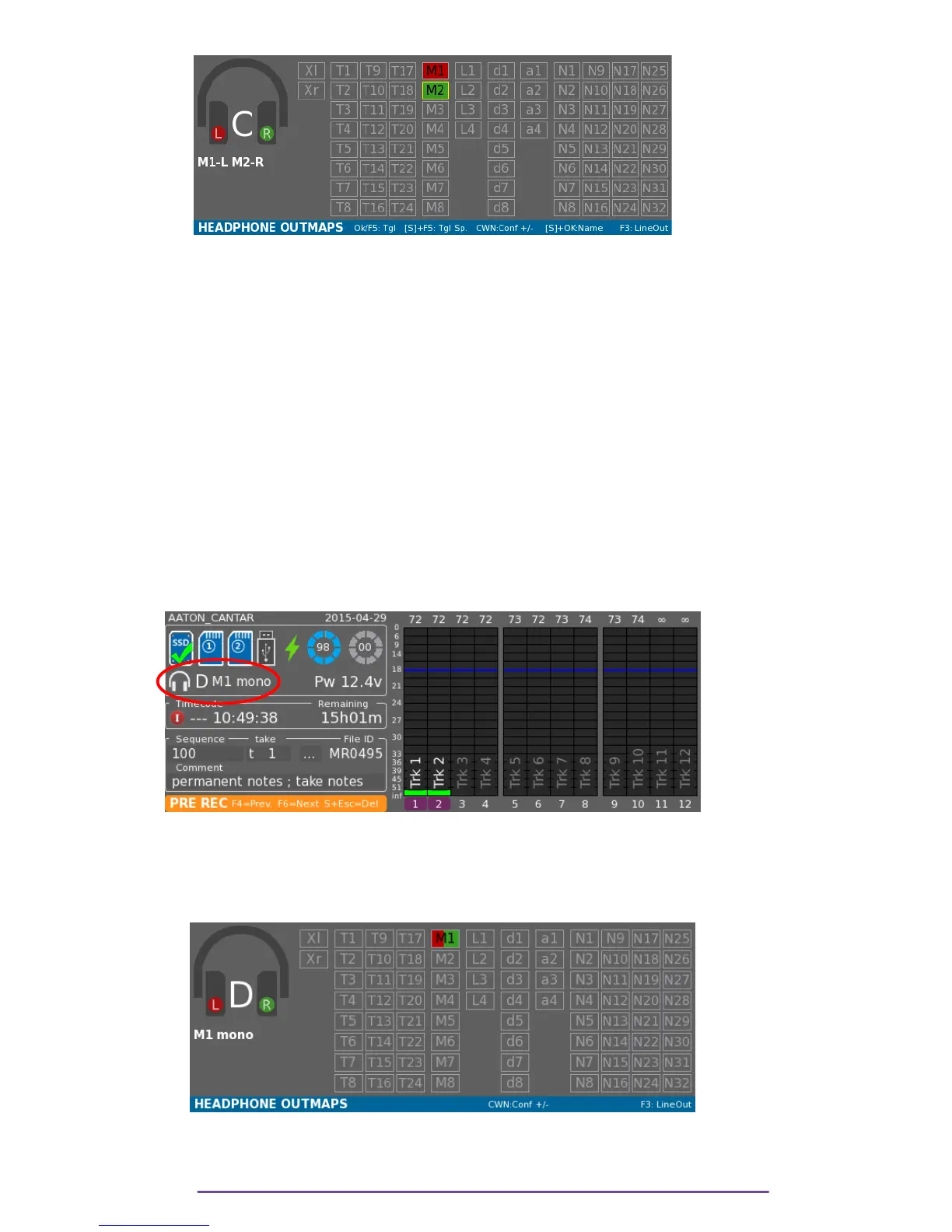
When the Main Selector is in the Test (10 o'clock), Pre Record (11 o'clock), or Record (12
o'clock) positions, the current Headphone Outmap is indicated bellow the media icons.
Symbolised by a headphone icon, it displays the Outmap's letter and name.
Pict. 08
You can change the current Headphone Outmap and go to previous or next one using the Left
Crown. The letter and name will be updated.
By pressing the F2 button, you will see the Outmap grid, as for the 6 o'clock position, it can be
edited.
Pict. 09
In that view it is also possible to go to the previous or next Outmap using the Left Crown.
Cantar X3
9



 To Next Page