ADT-HC4500 Flame/Plasma Cutting Machine CNC System
- 36 -
w Current function, mode and state of the system;
x Cutter model;
y Current working state of the system;
・ Code run by current processing program;
ヲ Tracking of current processing graphics;
The differences between plasma and flame processing interface are that plasma doesn’t have
preheating time and certain electronic valves are different.
1.1 Program running description
In the Auto interface shown in Fig. 3.1p and Fig. 3.1q above, press [Start] button to run current program. Press
[Start], and the torch starts perforating in the steel plate in any cutting mode (M07 is the perforating instruction by
default), and cuts after perforating; cuts off the oxygen after cutting. Please refer to Chapter 4.4 for the specific
content of M07 perforating instruction.
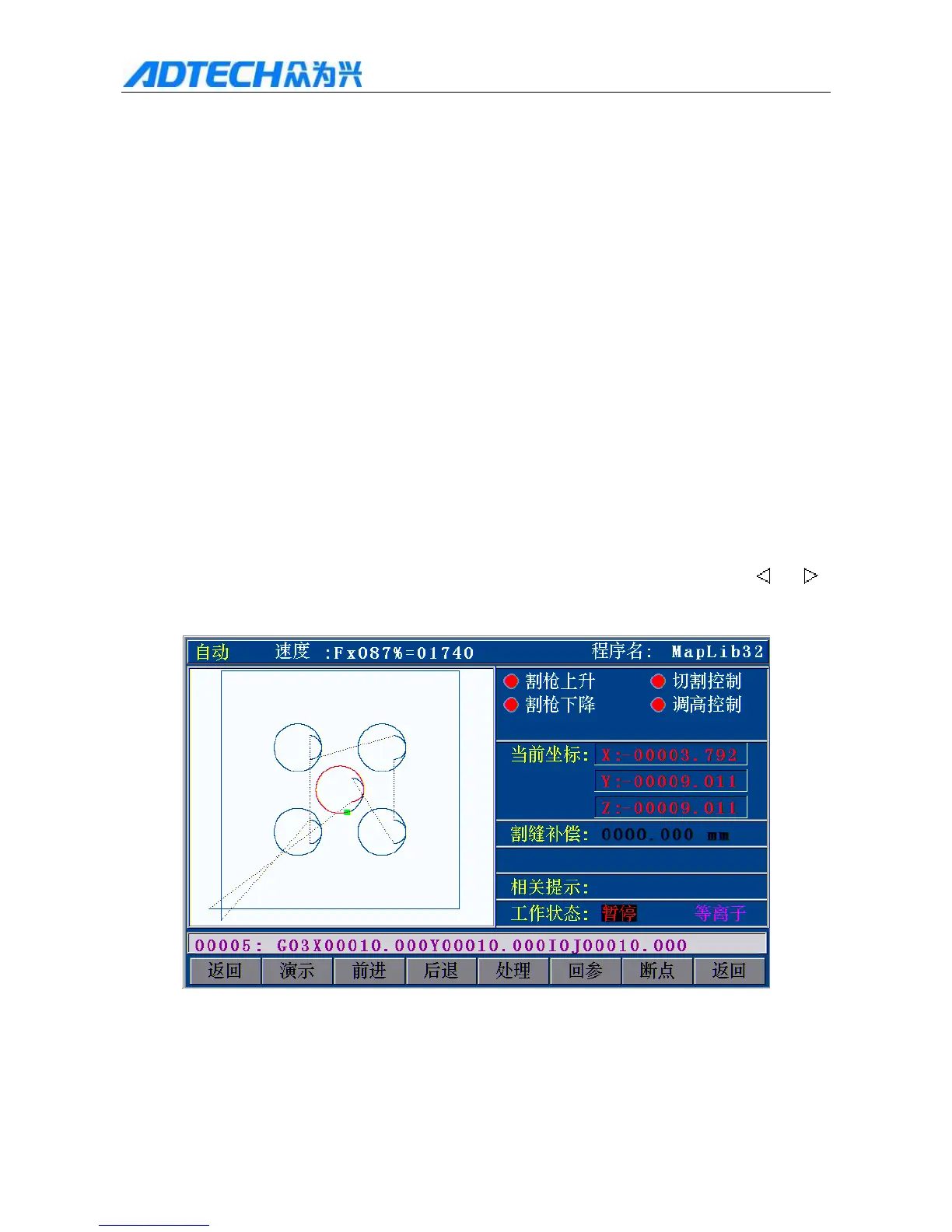
If you press Pause while cutting, the interface shown in Fig. 3.1.1 will appear. [F2] turns into [Forward] from
[Manual]; if you press [F2][ Forward], the machine will move forward along the track; if you press [
] or [ ],
[Forward] turns into [Manual].
Auto / Speed: / Program name:
Torch up / Cutting Control
Torch down / Height control
Current coordinates



 To Next Page