ADT-HC4500 Flame/Plasma Cutting Machine CNC System
- 76 -
Press [F4] to test the reverse rotation of X axis
Press [F5] to stop current rotation of X/Y axis
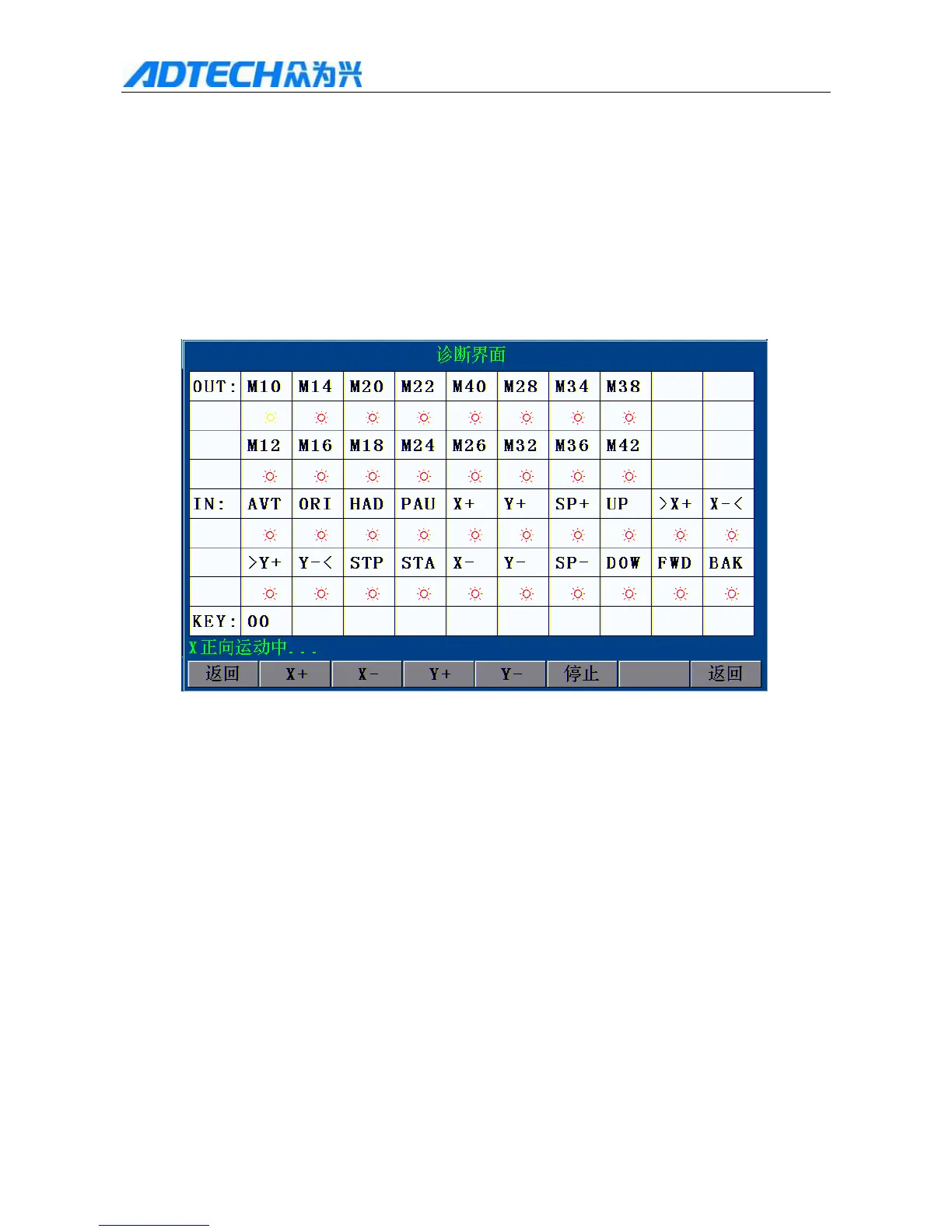
Press [X+] [X-] [Y+] [Y-] to move output cursor, and press [OK] to output related switching
signal.
If there is input signal, the red circle below pin mark corresponding input diagnosis will turn into
yellow.
With this function, you can check whether the I/O port is normal.
Diagnosis Interface
X X forward moving
Return / Stop / Return
Fig. 5.1.1 Diagnosis Test Window
2) Defining reserved I/O interface
In Fig. 5 Diagnosis interface, press [F2] to show output function customizing interface, and press
[X+][X-][Y+][Y-] to set. As in Fig. 5.1.2, “Default” is the default output of the system, while “Standby” is
the standby output connected to the system. Please refer to Chapter 5, 2.3 Electrical Connection for the
definition of output.
Note: The “Standby” output is used only when the default output optical coupling has failure, while
“Default” output is used under normal condition.



 To Next Page