MX2800 STS-1 User Manual Configuration, Section 3
Network Interface
61204659L1-1A 3-5
1. NETWORK INTERFACE
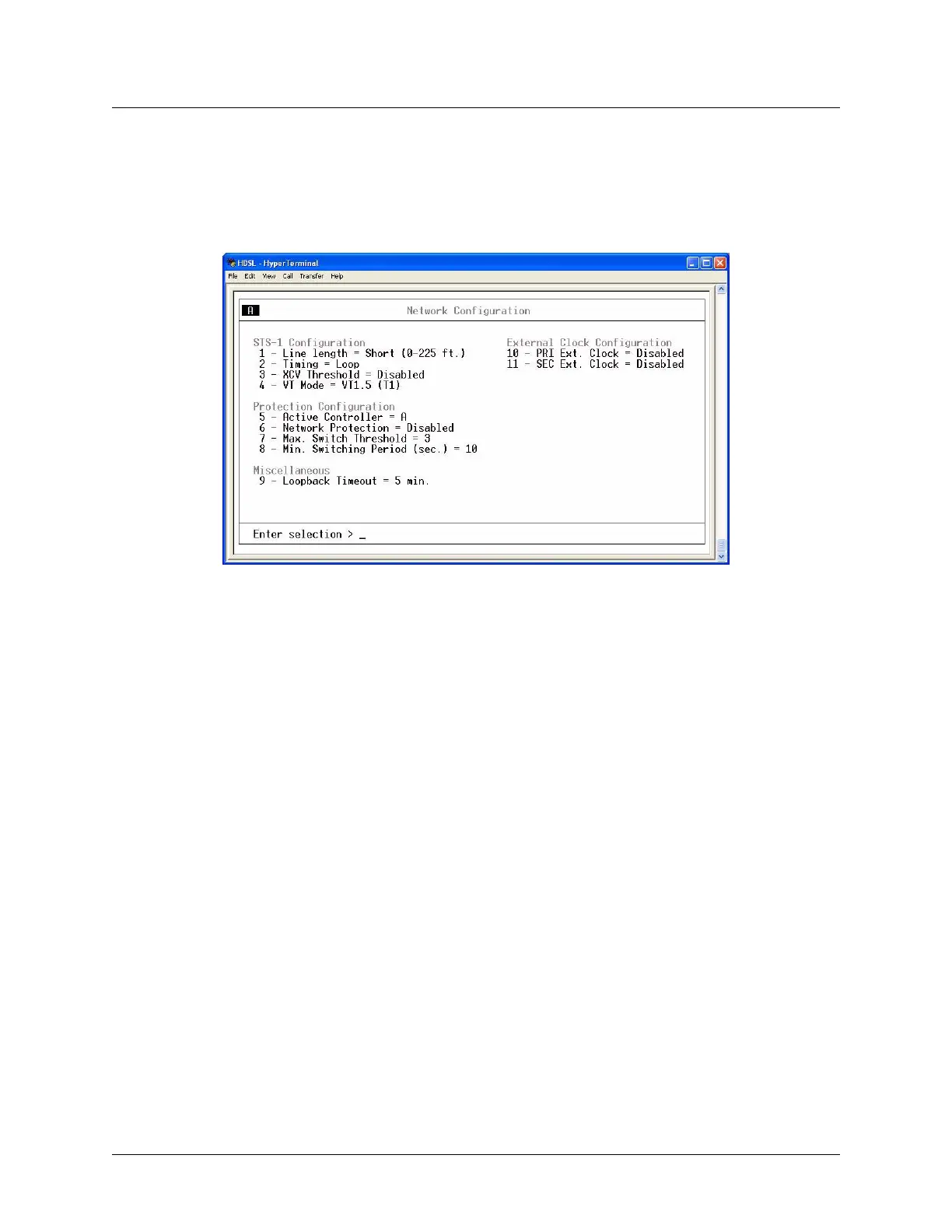
Select Network Interface to access the network configuration parameters (Figure 3-5). Configure the
MX2800 STS-1 network settings appropriately for the application.
Figure 3-5. Network Configuration Menu
Menu-option descriptions are described in the following sections:
• STS-1 Configuration on page 3-5
• Protection Configuration on page 3-7
• Miscellaneous on page 3-8
• External Clock Configuration on page 3-8
STS-1 Configuration
Use the STS-1 Configuration selections described below to configure the STS-1 network settings to match
an application.
Line Length
Set the line length to reflect the physical length of the STS-1 network line, as follows:
• Set the line length to
Long if the cabling distance is between 225-450 feet
• set it to
Short if the distance is less than 225 feet
Timing
This option determines the source of timing used to derive the transmit signal. The MX2800 STS-1 has
four modes of timing operation:











 To Next Page