3-18 61204659L1-1A
Section 3, Configuration MX2800 STS-1 User Manual
System Management
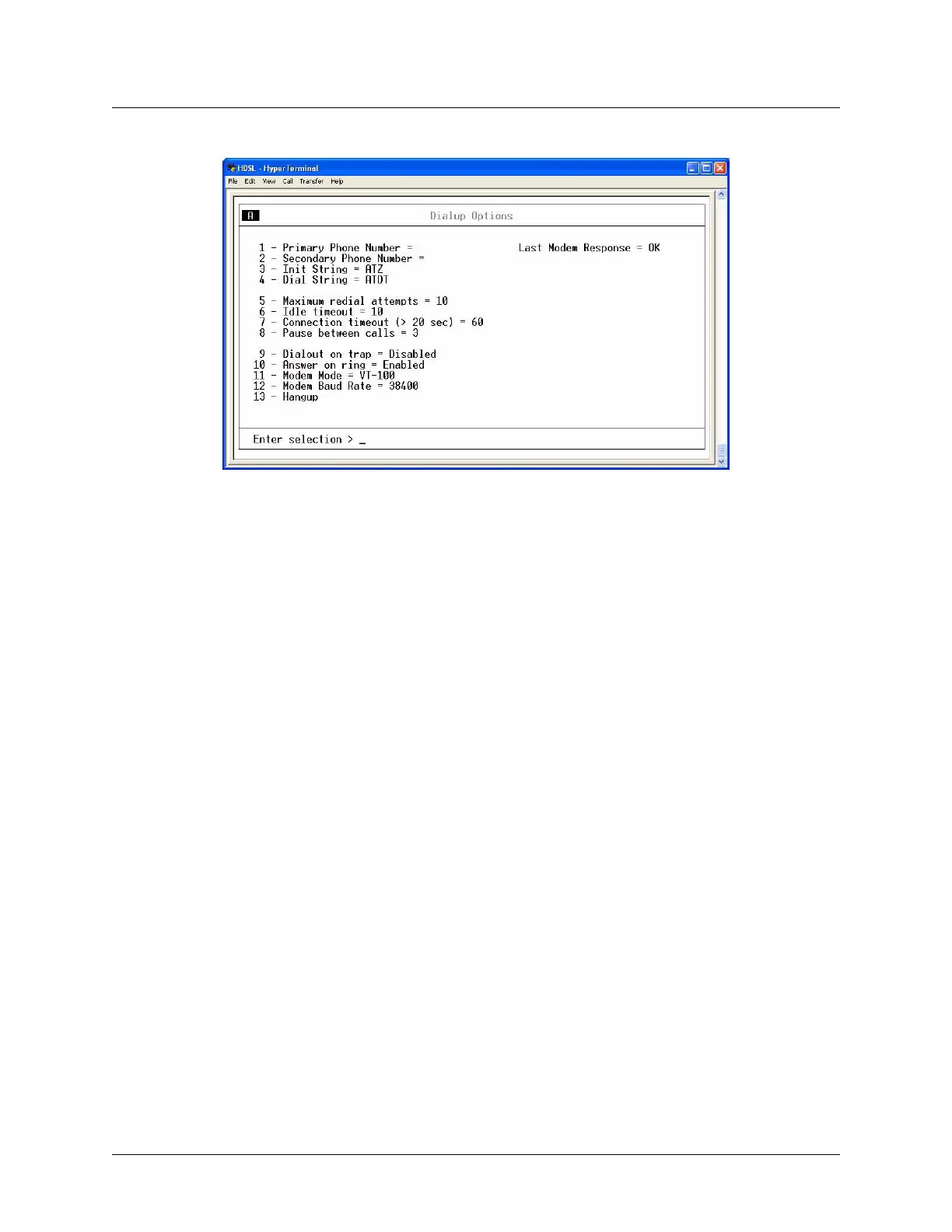
Figure 3-11. Dialup Options Menu
Primary and Secondary Phone Numbers
When the MX2800 dials out to send a trap, it first dials the Primary Phone Number. If the call is unsuccess-
ful, it tries the Secondary Phone Number. Attempts between the two numbers continue until a call is estab-
lished and the trap is reported (or until each number’s maximum redial attempts is reached; refer to
Maximum Redial Attempts below).
Initializing String
This AT command in this field is used to initialize the modem, and is normally left at the default setting of
ATZ.
Dial String
This AT command causes the modem to dial out, and is normally left at the default setting (ATDT).
Maximum Redial Attempts
This setting controls the number of times a call is attempted. If a successful call is not established after the
final attempt, the MX2800 discards the trap messages.
Idle Timeout
After establishing a call and sending trap messages, the MX2800 remains online for the number of seconds
set in this field. If the field is set to 0, the unit disconnects as soon as the trap is sent.
Connection Timeout
This setting determines the number of seconds the MX2800 waits for a connection. Timing begins as soon
as the dial command is issued. This field must be set for greater than 20 seconds.











 To Next Page