3-10 61204659L1-1A
Section 3, Configuration MX2800 STS-1 User Manual
VT Interface
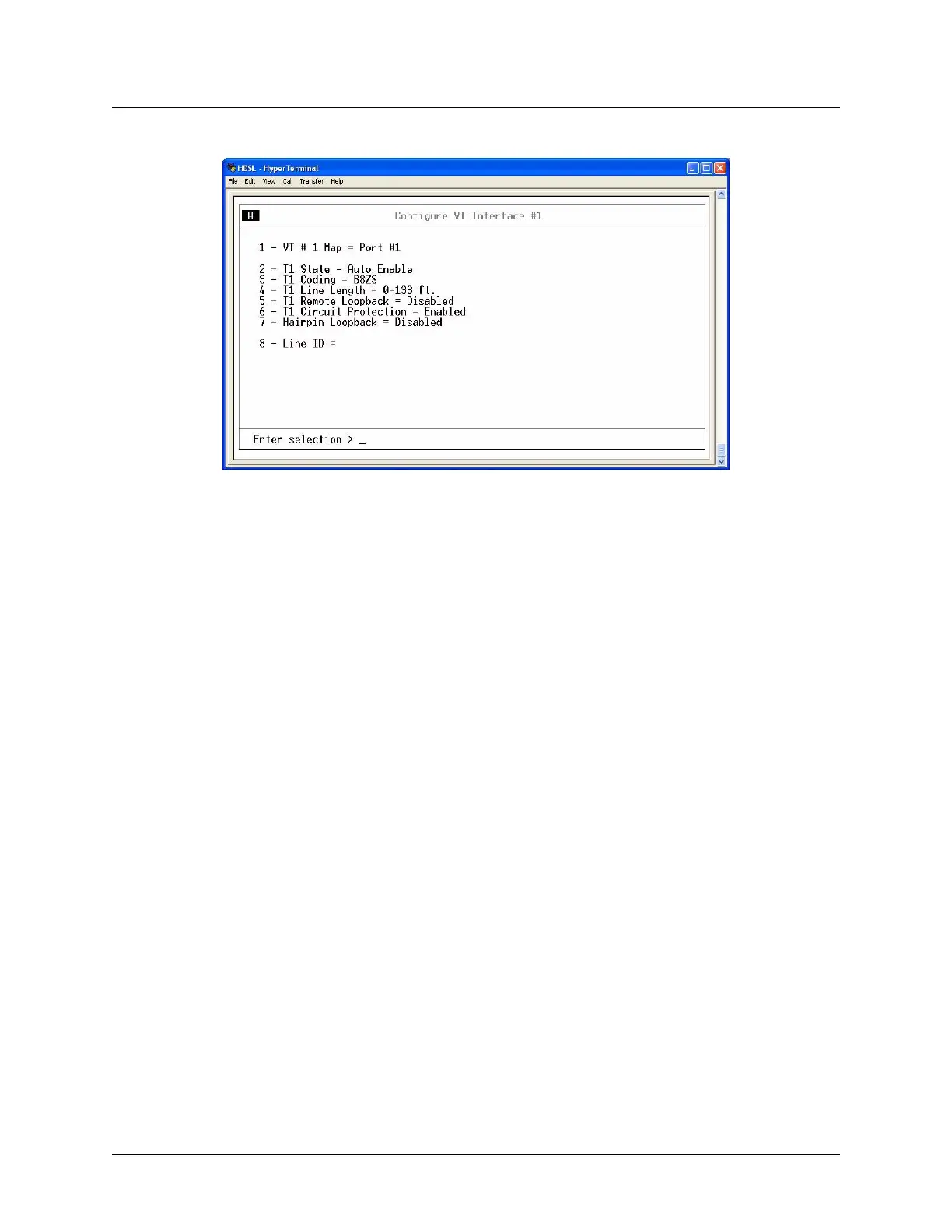
Figure 3-7. Configure VT Interface #1 Menu
VT # Map
Map a T1/E1 port of the VT selected in the VT Interface Menu to a VT. Any available T1/E1 port can be
mapped to an available VT. An error is returned if the port is already mapped to another VT. Select
Unequipped to unmap a VT.
T1/E1 State
Set T1/E1 as Disabled, Enabled, or Auto Enable. In Auto Enable, the unit automatically detects when a
T1/E1 signal is connected and begins to allow alarm reporting for that channel.
T1/E1 Coding
Set the line code for each individual T1/E1 interface to match the connected device.
• T1 line code choices are AMI and B8ZS
• E1 line code choices are AMI and HDB3
T1/E1 Line Length
Set the line length for each T1 interface according to the distance from the MX2800 to a DTE device.
• Options are available for T1 channels for up to 655 feet
• The only available option for an E1 channel is
0-6 dB loss
T1 Remote Loopback
Allows a selected T1 to respond to CSU or NIU loopbacks arriving from the STS-1 side. This option is not
supported for E1.











 To Next Page