Maintenance
Replacing the Hydraulic Fluid and Filter 7.25
97
[en-US] | 08/2022 | 5100064108 | SM100 | Operator’s Manual
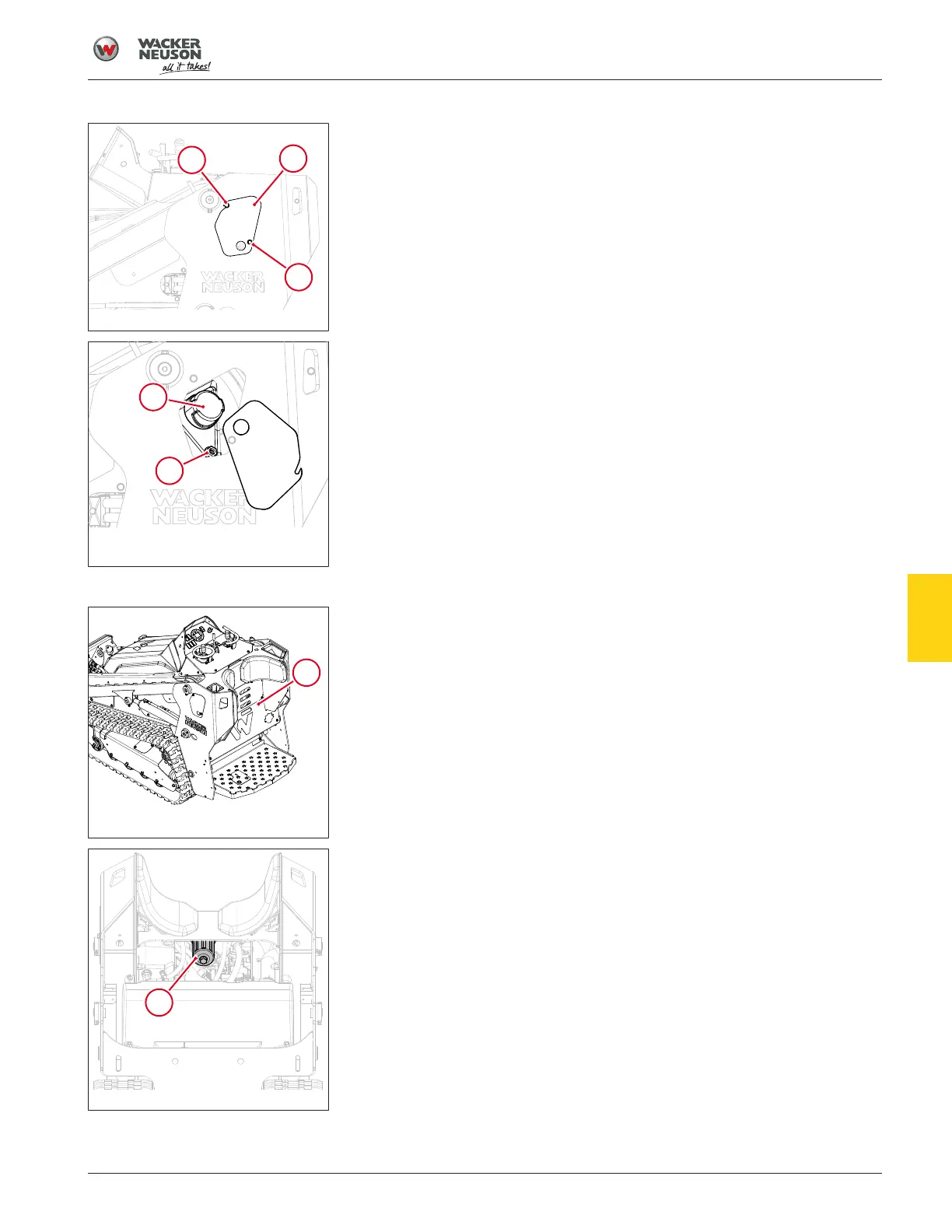
Fig.87: Hydraulic fill access plate
Replacing the hydraulic oil
1. Remove the hydraulic fill access plate (1) by removing the retaining
bolt (2) and loosening the pivot bolt (3).
2. Rotate the access plate out of the way
Fig.88: Hydraulic tank filler cap and
sight glass
3. Remove the hydraulic tank filler cap (4).
4. Insert a suction hose into the fill tube to remove the hydraulic fluid.
5. Add the replacement hydraulic fluid to the reservoir until the fluid level
is half full in the reservoir sight glass (5).
6. Install the hydraulic tank filler cap.
7. Start the engine and operate the hydraulic controls.
8. Stop the engine and check for leaks.
9. Observe the hydraulic oil level through the sight glass and add fluid as
needed.
Fig.89: Rear access panel
Replacing the hydraulic filter
1. Remove the rear access panel (6).
2. Place a suitable container under the filter to catch any fluid.
Fig.90: Hydraulic tank filter
3. Remove the hydraulic filter (7).
4. Clean the surface of the filter housing where the seal contacts the
housing.
5. Put clean oil on the seal of the new hydraulic filter.
6. Install and hand-tighten the hydraulic filter.
7. Start the engine and operate the hydraulic controls.
8. Stop the engine and check for leaks.
9. Observe the hydraulic oil level through the sight glass and add fluid as
necessary.
10. Install the rear access panel.
7



 To Next Page