Advanced settings
- 121 -
♦ Online account access – You will be able to access your smartcard account
balance at any time through your card issuer's internet site – so you can always
track your spending or reward points easily.
Note, cards that contain the conventional magnetic strip only (without the gold
contacts) will not work on the e-m@iler.
Pocket Dock-it (optional accessory)
For full details of operation, see the instruction leaflet supplied with the Pocket Dock-it.
Transferring data between e-m@iler and Pocket Dock-it
Note, whenever you transfer data FROM the e-m@iler TO the Pocket Dock-it, not
only is the Address Book data transferred, so is personal data such as email
account registration details, user PINs, passwords, etc. Although this data
cannot be viewed on the Pocket Dock-it, it can be transferred back to the
e-m@iler if, for example, you swap one E3 e-m@iler for another and want the new
unit to contain your old setup and Address Book details (excluding postal
addresses and ringtone groups).
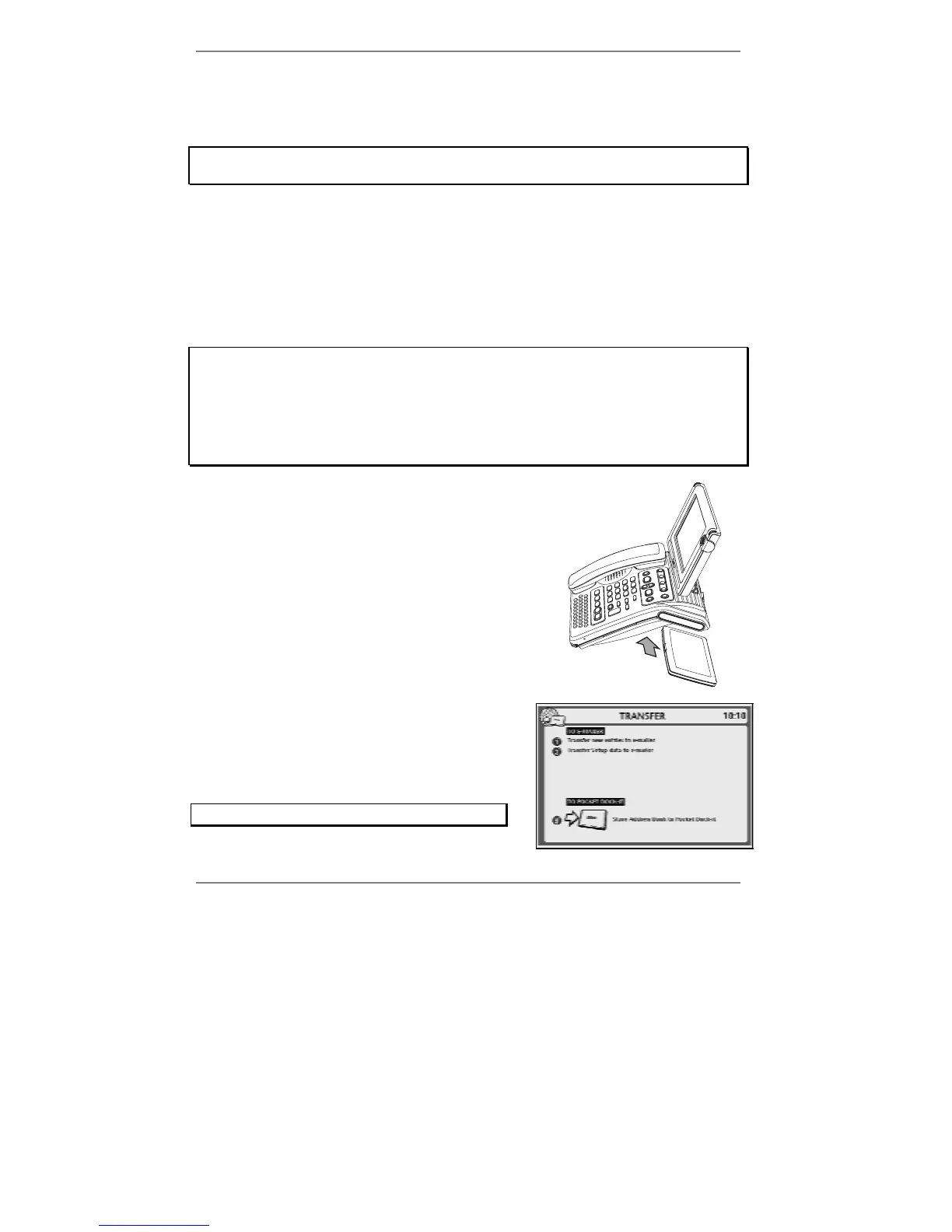
1. To transfer data between the
e-m@iler and the
Pocket Dock-it, close the Pocket Dock-it and
plug it into the docking station at the right-hand
side of the
e-m@iler.
The following display will appear:
(Note you can also receive this display by pressing
"SHIFT and ADDRESS BOOK together on the
keyboard.)
To abort the transfer, press STOP.



 To Next Page