Page 70
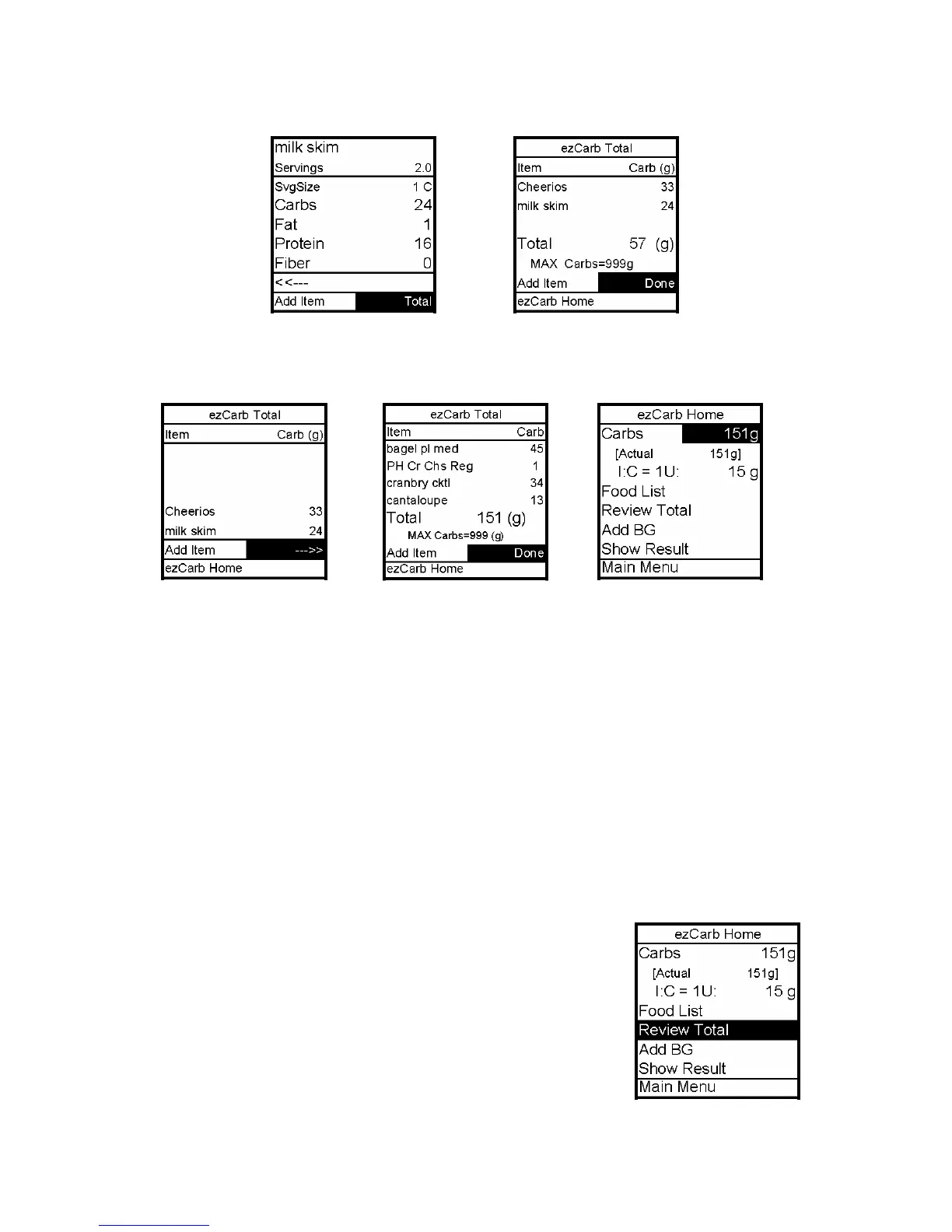
9. When you enter the serving size for the last food item, press OK. Add Item is
highlighted. Use the Down arrow to scroll to Total. Press OK.
10. The ezCarb Total screen is displayed. Review the items and carb amounts. If you’ve
entered more than 5 items, scroll to the forward arrow and press OK to see the second page
of your meal list. Done is highlighted.
Note: The max limit for ezCarb Total is 999g. If your meal total is more than 999g, the pump
display will show the actual total and the max amount. The ezCarb Home screen will use the
max number for the calculator and will show the Actual total in parentheses.
11. Review the items and carb amounts. With Done highlighted, press OK.
12. The ezCarb Home screen is displayed, with the total carb amount displayed in the carbs
field. Proceed as outlined in the two previous sections.
13. To review your meal from the ezCarb Home screen, scroll to Review Total and press OK.
a. If entries are correct, proceed as outlined in the two
previous sections.
b. If entries are not correct, see next section, Editing
ezCarb Total entries.
12



 To Next Page