8
Inserting SIM Card
Always power off beforehand.
・Set SIM Card in Card Tray beforehand. Do not insert SIM
Card without setting it in Card Tray.
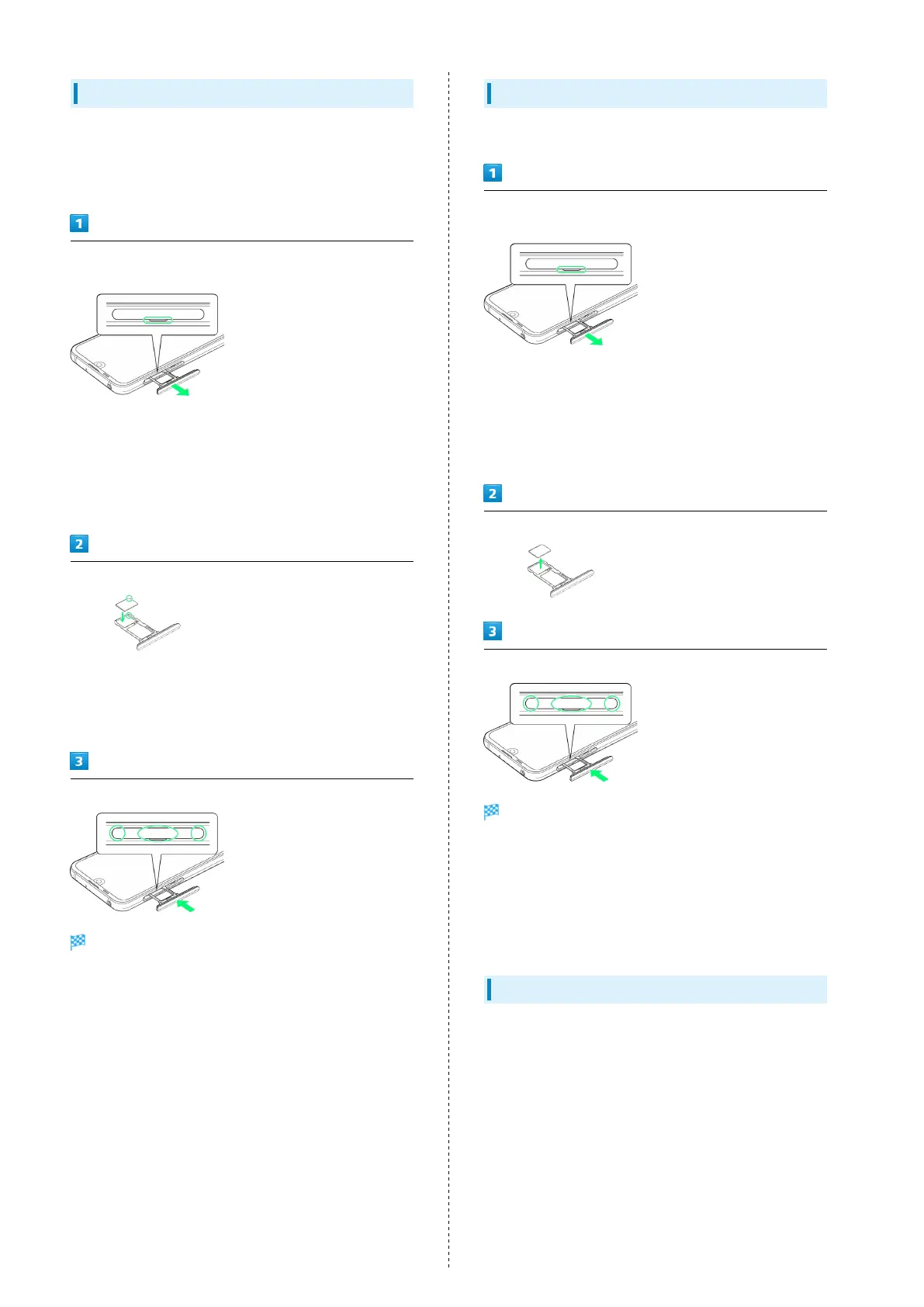
With Display upward, pull out Card Tray by hooking a finger
on groove (○)
・With Display upward, pull out Card Tray. Pulling out Card
Tray with Display downward or handset held upright can
allow SIM Card and SD Card to fall from Card Tray and
become misplaced.
・Do not pull Card Tray forcefully or at an angle; damage may
result. Gently pull Card Tray out horizontally.
Set SIM Card in Card Tray
・Place gently, noting orientation of SIM Card (notch/IC (gold)
chip facing down).
・Make sure SIM Card is in Card Tray. Inserting Card Tray with
SIM Card on its edge may cause damage.
Insert Card Tray in SIM/SD Card Slot
SIM Card is inserted.
・Do not insert Card Tray upside down.
・Insert gently all the way horizontally in direction shown.
・Push Card Tray firmly where circled (○) so that there is no
gap between handset and Card Tray.
・To maintain water and dust resistance, use handset with
Card Tray completely closed.
Removing SIM Card
Always power off beforehand.
With Display upward, pull out Card Tray by hooking a finger
on groove (○)
・With Display upward, pull out Card Tray. Pulling out Card
Tray with Display downward or handset held upright can
allow SIM Card and SD Card to fall from Card Tray and
become misplaced.
・Do not pull Card Tray forcefully or at an angle; damage may
result. Gently pull Card Tray out horizontally.
Remove SIM Card
Insert Card Tray in SIM/SD Card Slot
SIM Card is removed.
・Do not insert Card Tray upside down.
・Insert gently all the way horizontally in direction shown.
・Push Card Tray firmly where circled (○) so that there is no
gap between handset and Card Tray.
・To maintain water and dust resistance, use handset with
Card Tray completely closed.
SIM-Unlocking Handset
Handset can be SIM-unlocked. SIM-unlocking handset allows
other-carrier SIM cards to be used with it.
・Some services, functions, etc. may have restrictions when
an other-carrier SIM card is used. SoftBank Corp. does not
guarantee operation whatsoever.
・For details on SIM unlocking, see SoftBank Website.



 To Next Page