7
Getting Started
AQUOS R compact
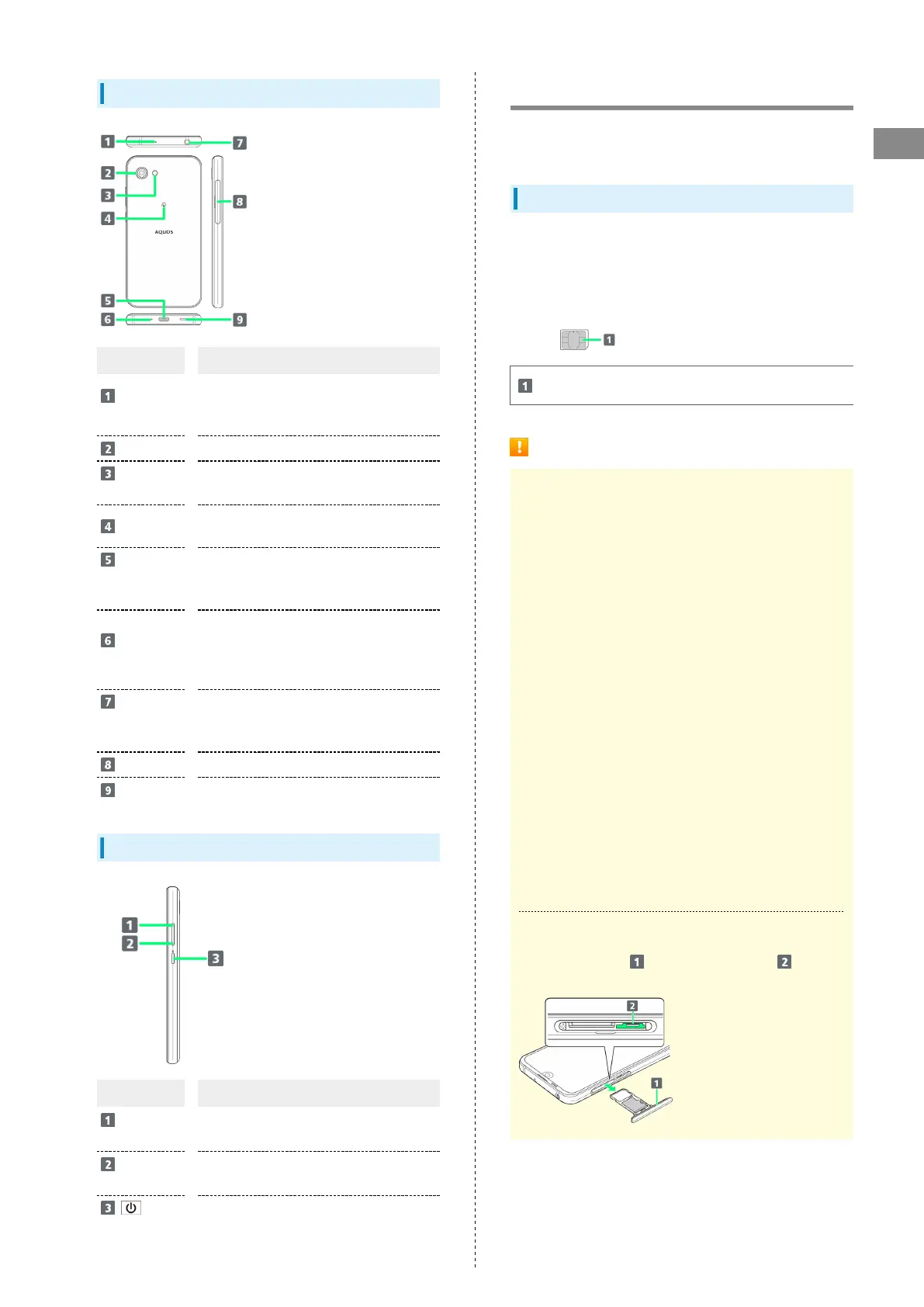
Handset (Back and Sides)
Name Description
Mic
(Recorder Mic)
Use while recording videos or when talking
through Speakerphone.
Make sure not to cover Recorder Mic.
Camera
Shoot photos or videos.
Mobile
Light
Use as a camera flash, flashlight, etc.
FeliCa mark
Hold up to reader/writer to use NFC/
Osaifu-Keitai
®
.
External
Connection
Jack
Connect ROBOQUL, AC Adaptor, etc.
Mic/
Recorder Mic
Talk to the other party here. Also use
while recording videos or when talking to
emopa.
Make sure not to cover Mic/Recorder Mic.
Earphones-
Microphone
Jack
Connect TV Antenna Cable or Earphones
with Mic (sold separately) here.
Card Tray
Insert/remove SD Card and SIM Card.
Speaker
Listen to music, video sound, TV, etc.
Handset Keys
Name Description
Volume Up
Key
Increase volume.
Volume
Down Key
Decrease volume.
(Power Key)
Turn Display off/on. Long Press for power
on/off or reboot.
SIM Card
SIM Card is an IC card containing phone number and other
customer information.
Handling SIM Card
・See instructions included with SIM Card for handling.
・Avoid applying labels. May damage SIM Card.
・SIM is replaceable (at cost) in case of loss/damage.
・Wipe clean with a dry, soft cloth.
・Always keep the IC (gold) chip clean.
IC (gold) chip
SIM Card Cautions
About SIM Card
Observe the following when using SIM Card.
・Within Japan, SIM Card must be installed to make
emergency calls (110, 119, 118).
・Always follow emergency procedures to suspend service
if your SIM Card or handset (SIM Card inserted) is lost/
stolen. For details, contact Customer Service.
・Customer is responsible for any damage caused by
inserting SIM Card in an other-brand IC card reader, etc.
SoftBank Corp. is not responsible in such case.
・It is recommended that you back up information that is
saved on SIM Card. SoftBank Corp. is not responsible for
damages from saved information that is lost.
・Always power off handset before inserting/removing SIM
Card.
・Note that SIM Card specifications and performance may
change without notice.
・Return SIM Card to SoftBank Corp. when canceling
subscription.
・SIM Card is the property of SoftBank Corp.
・Returned SIM Cards are recycled for environmental
purposes.
About IMEI Sheet
Pull out Card Tray ( ) to access IMEI Sheet ( ). Do not
pull out IMEI Sheet.



 To Next Page