185
Global Services
AQUOS R compact
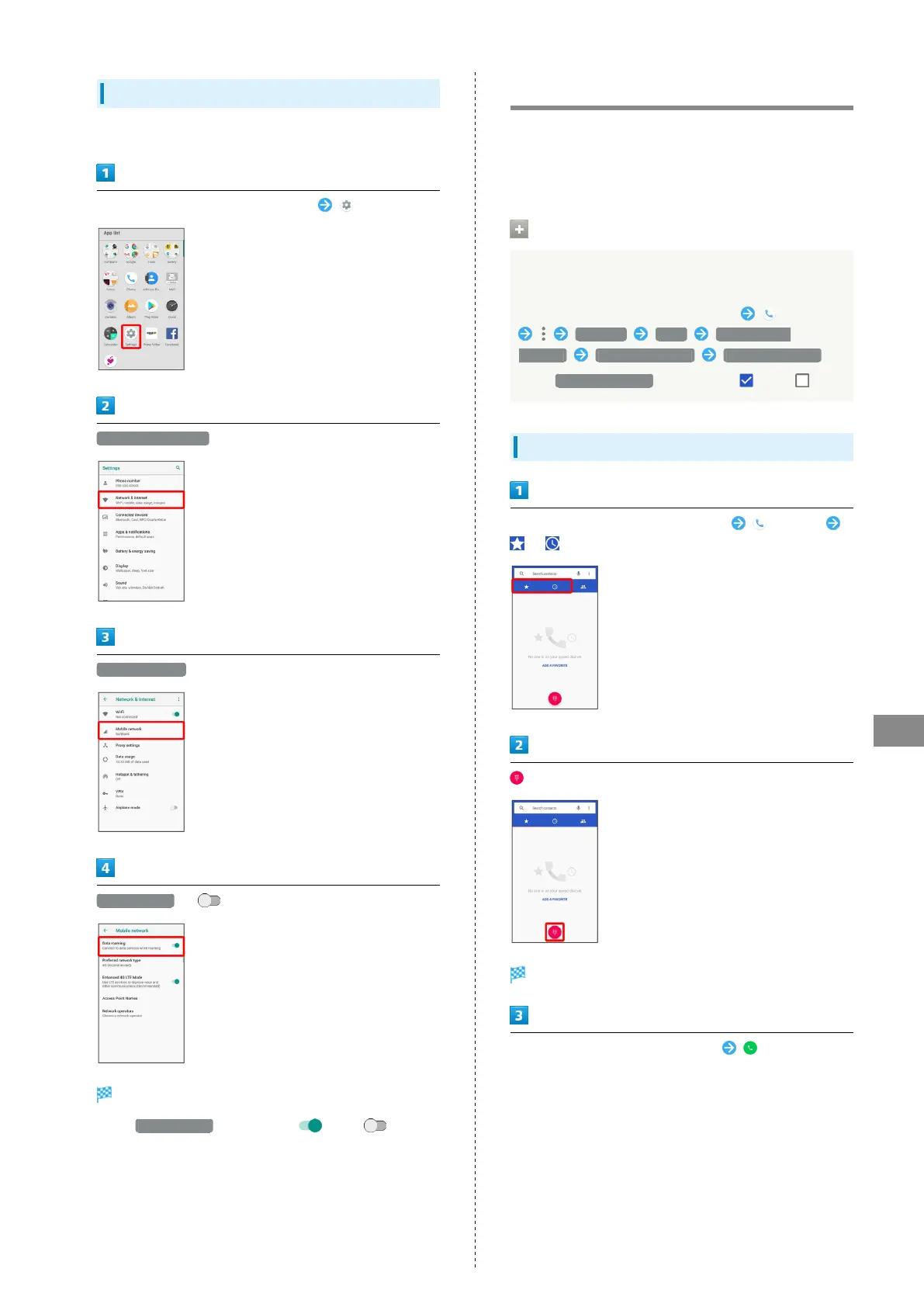
Changing Data Roaming Setting
Change setting for data communication outside Japan.
In Home Screen, Flick Favorites Tray up (Settings)
Network & Internet
Mobile network
Data roaming ( )
Data roaming is disabled.
・
Tap Data roaming to toggle on ( )/off ( ).
・If confirmation appears, follow onscreen prompts.
Calling from Outside Japan
See SoftBank Website to learn about roaming areas/rates, etc.
http://mb.softbank.jp/en/global_services/
Print out roaming area/rate information to carry while
traveling abroad as needed.
Enabling/Disabling Abroad Assistant
While outside Japan, use Abroad assistant to select how to
place calls.
In Home Screen, Flick Favorites Tray up (Phone)
Settings Calls SoftBank call
settings Int'l call settings Abroad assistant
・
Tap Abroad assistant to toggle on ( )/off ( ).
Calling Japan
In Home Screen, Flick Favorites Tray up (Phone)
/
Dialpad window opens.
Use onscreen dialpad to enter number
・Do not add + before the number.



 To Next Page