98
Confirmation when First
Activating Applications
Set the operation of applications when activating for the
first time.
The type and content of a confirmation differ with the
application. The following explains two types of confirmation:
First things first and Battery optimization.
Setting Required Permissions for
Applications
Permit applications to use data on handset, Camera, etc.
Activating (Album) for the first time is described as an
example.
・An application may not function correctly if permission to
use it is not set.
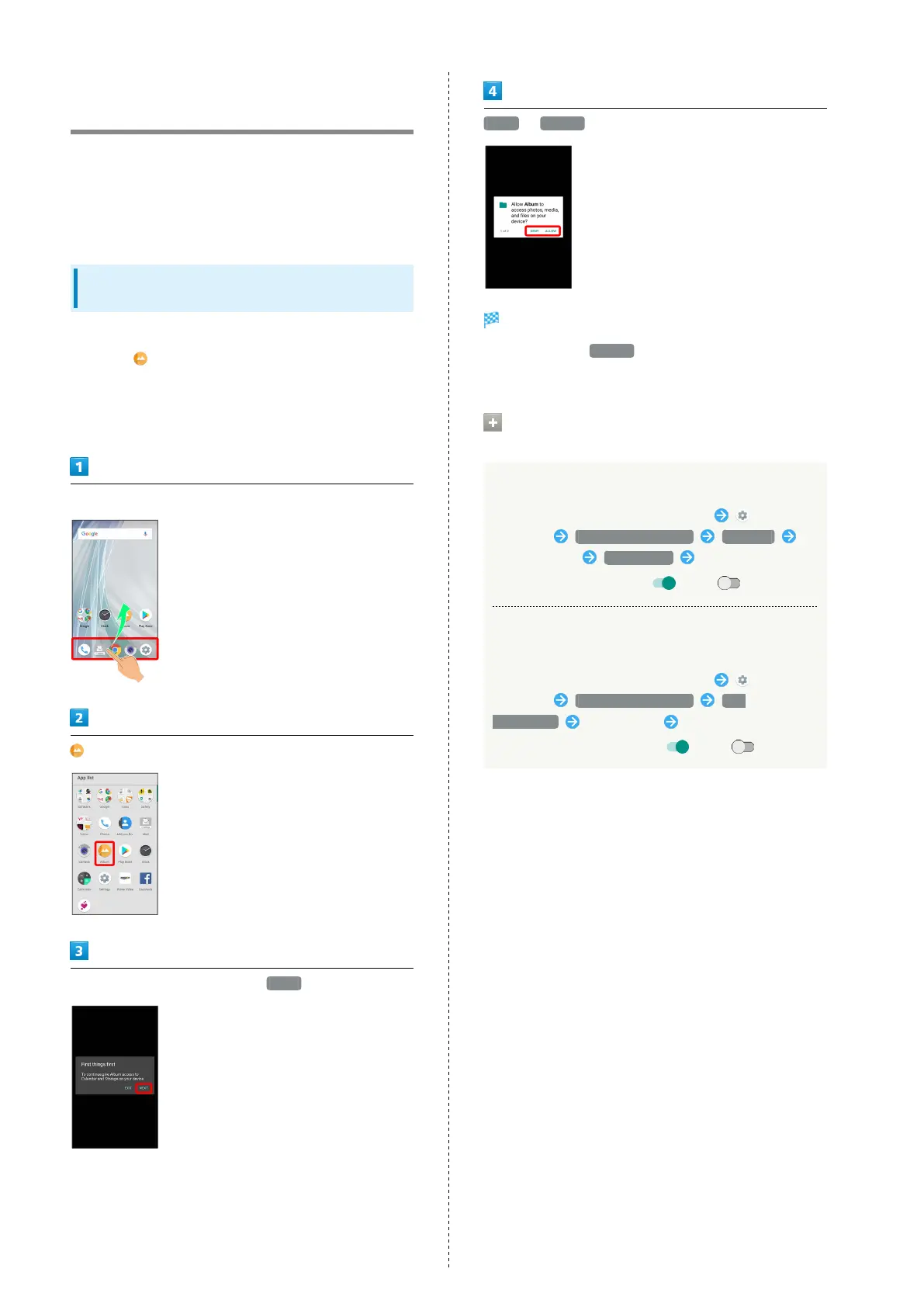
In Home Screen, Flick Favorites Tray up
(Album)
In First things first confirmation, NEXT
DENY / ALLOW
Setting is complete.
・
Normally, select ALLOW to permit usage of the function.
・For several functions, continue in the same way.
Other Ways to Set Required Permissions
for Applications
Setting Functions to Use by Application
In Home Screen, Flick Favorites Tray up
(Settings) Apps & notifications App info
Tap application Permissions Tap function
・
Tap function to toggle on ( )/off ( ).
Setting Applications with Permitted Usage by
Function
In Home Screen, Flick Favorites Tray up
(Settings) Apps & notifications App
permissions Tap function Tap application
・
Tap application to toggle on ( )/off ( ).



 To Next Page