12
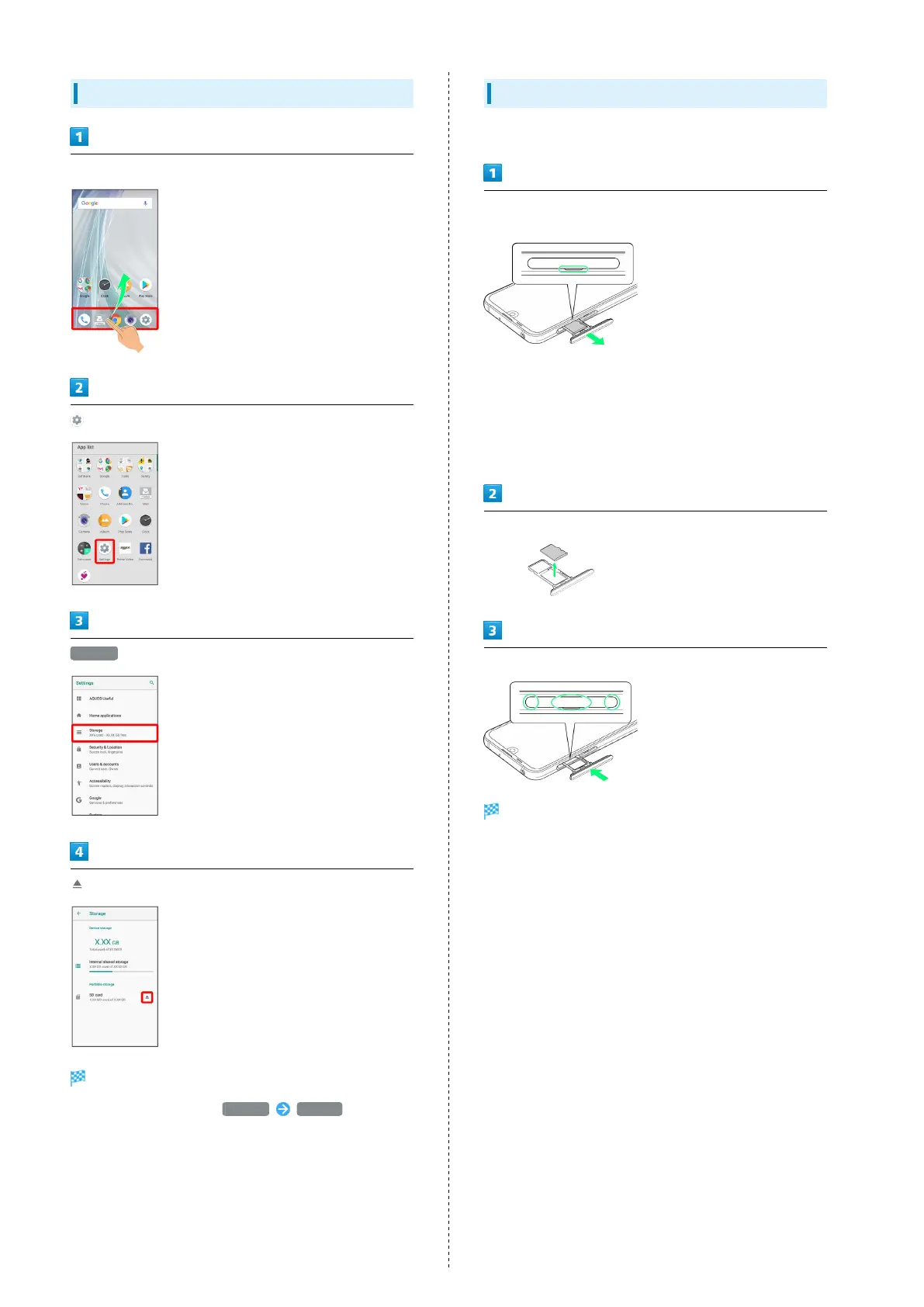
Unmounting SD Card
In Home Screen, Flick Favorites Tray up
(Settings)
Storage
SD Card is unmounted.
・
To mount SD Card again, SD card MOUNT .
Removing SD Card
Always power off beforehand.
With Display upward, pull out Card Tray by hooking a finger
on groove (○)
・With Display upward, pull out Card Tray. Pulling out Card
Tray with Display downward or handset held upright can
allow SIM Card and SD Card to fall from Card Tray and
become misplaced.
・Do not pull Card Tray forcefully or at an angle; damage may
result. Gently pull Card Tray out horizontally.
Remove SD Card
Insert Card Tray in SIM/SD Card Slot
SD Card is removed.
・Do not insert Card Tray upside down.
・Insert gently all the way horizontally in direction shown.
・Push Card Tray firmly where circled (○) so that there is no
gap between handset and Card Tray.
・To maintain water and dust resistance, use handset with
Card Tray completely closed.



 To Next Page