30
Saving Fingerprints
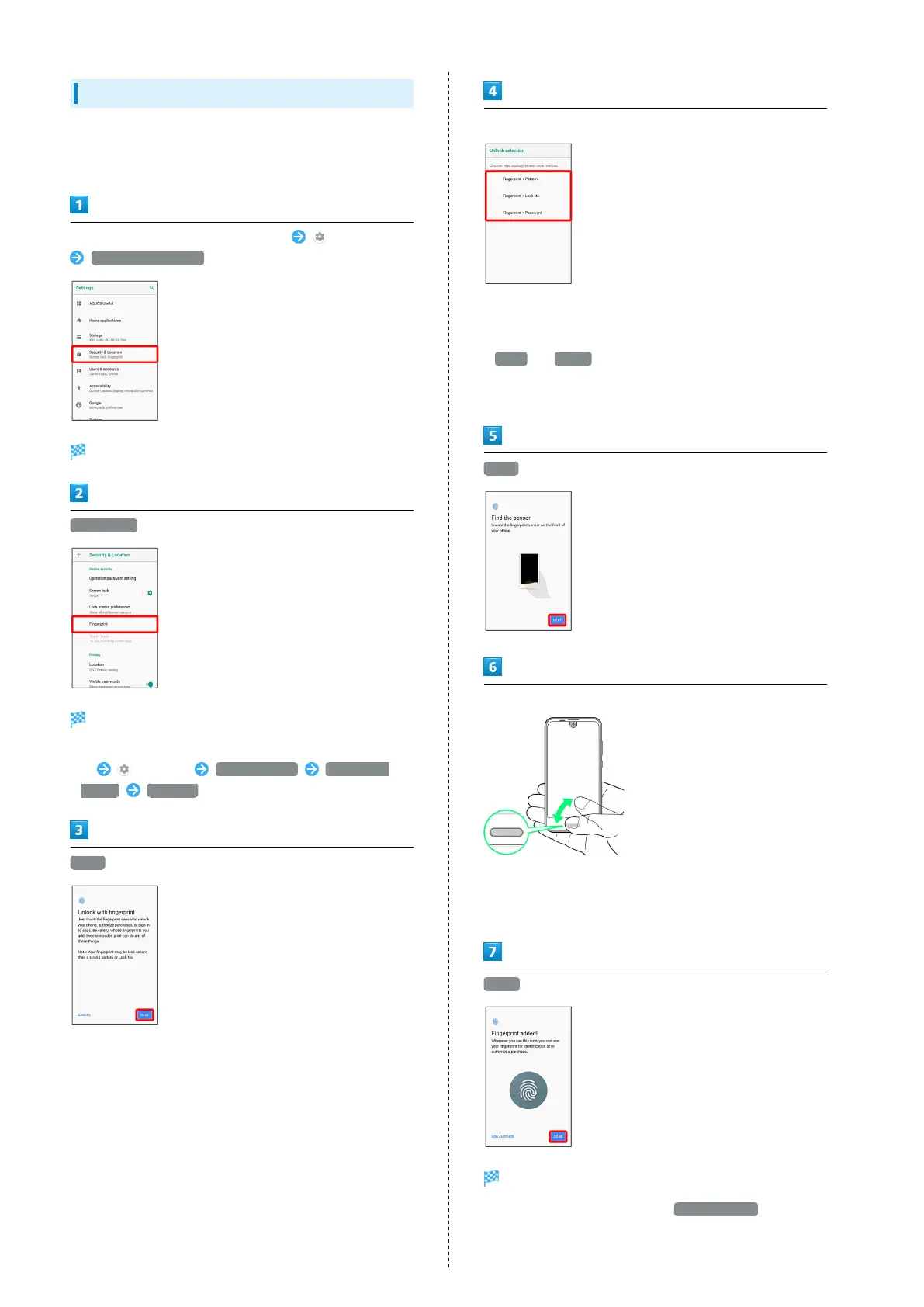
Save your fingerprints for fingerprint authentication.
・Save up to 5 fingerprints.
In Home Screen, Flick Favorites Tray up (Settings)
Security & Location
Security & Location menu opens.
Fingerprint
Fingerprint settings open.
・Alternatively, in Home Screen, Flick Favorites Tray
up (Settings) AQUOS Useful Fingerprint
sensor Register to save fingerprints.
NEXT
Set pattern/Lock No./password for unlocking screen
・This is a backup method for unlocking the screen if unable
to authenticate with your fingerprint.
・If method for unlocking screen is setting other than
None or Swipe , first unlock screen.
・For details on screen lock methods, see "Security & Location
Settings."
NEXT
Hold finger to sensor until handset vibrates
・Move finger a little at a time and hold it to sensor.
・Repeat until percentage reaches 100%.
・If finger is already saved, use another finger.
DONE
Fingerprint is saved.
・
To save other fingerprints, Tap ADD ANOTHER .



 To Next Page