57
Phone
AQUOS R compact
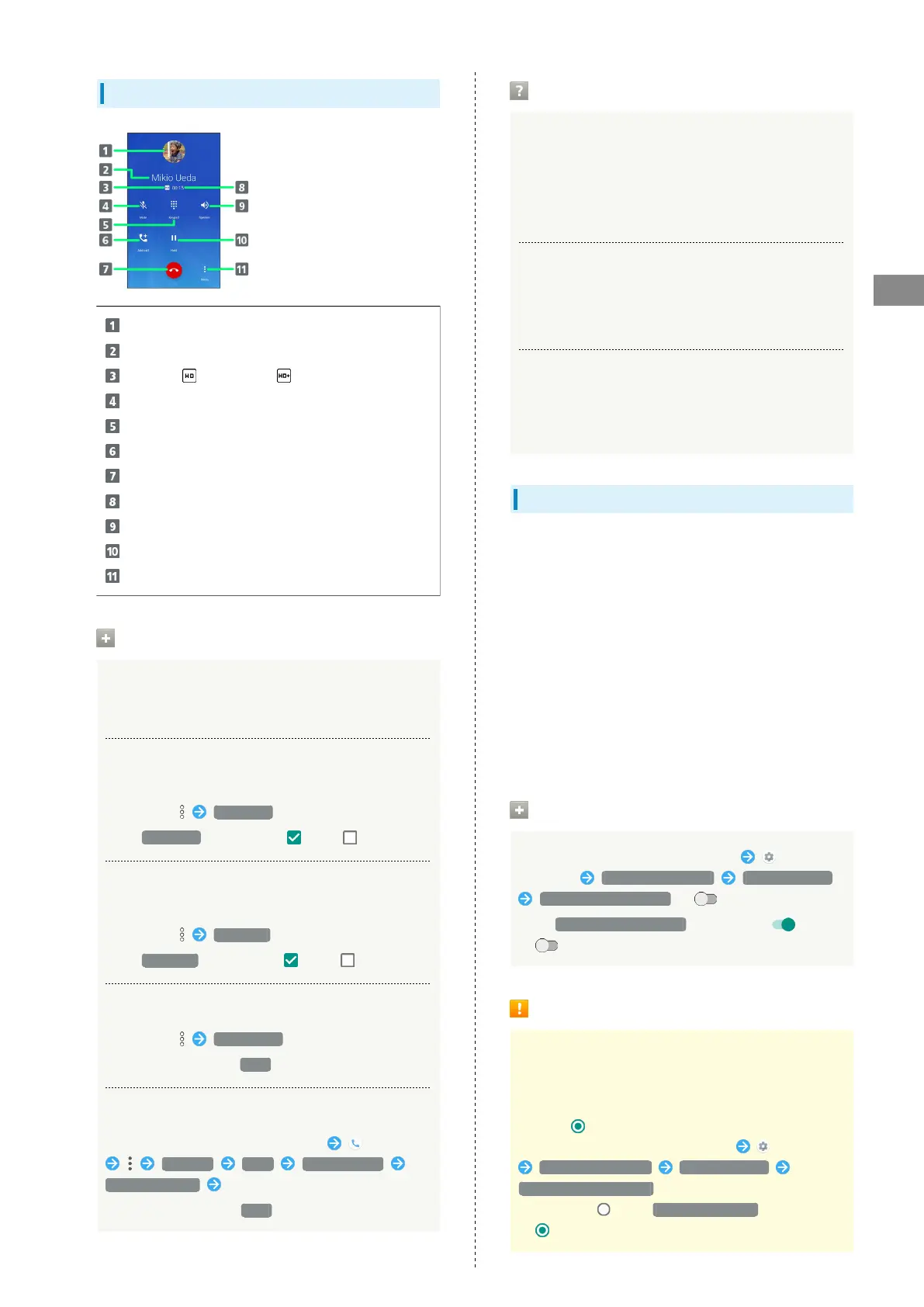
Call Window Layout/In-Call Operation
Other party photo
Other party name/number
HD Voice ( )/HD+ Voice ( ) call in progress
Mute own voice.
Show dialpad.
Add call.
End call.
Call time.
Use Speakerphone.
Place call on hold.
Open menu.
In-Call/Voice Memo Operations
Adjusting Call Volume
During call, Volume Up/Down Key
Setting Whether to Use Noise Suppression
Enable Noise suppression for clearer other-party voice.
During call, Clear talk
・
Tap Clear talk to toggle on ( )/off ( ).
Setting Whether to Use Slow Talk
Enable Slow talk for slower other-party voice.
During call, Slow talk
・
Tap Slow talk to toggle on ( )/off ( ).
Recording Call (Voice Memo)
During call, Voice Memo
・
To end recording, Tap Stop .
Playing Back Voice Memos
In Home Screen, Flick Favorites Tray up (Phone)
Settings Calls Answer phone
Voice Memo List Tap Voice Memo
・
To stop playback, Tap Stop at bottom.
Troubleshooting
Q. Difficulty with call
A. It may be difficult to make a call in a location with
noise.
A. Check the call volume when using Speakerphone. It may
be difficult to make a call with a raised call volume.
Q. The other party cannot hear me
A. Are you covering Mic/Recorder Mic on the bottom
surface of handset with your finger, etc.? Make sure
not to cover Mic/Recorder Mic.
Q. Sound experiences popping during a call
A. Are you moving location during a call? Popping may
occur when switching areas for a better signal. This is
not a malfunction.
Using VoLTE/VoLTE (HD+)
VoLTE (Voice over LTE) is a system enabling voice calls over
LTE networks. Compared to voice calls over conventional 3G
connections, high-sound quality calls and reduced time until
ringtones sound are possible. VoLTE (HD+) provides a clearer
and more natural quality call than conventional VoLTE.
・VoLTE/VoLTE (HD+) are available when the counterpart
model is respectively a VoLTE- or VoLTE (HD+)-compatible
model from SoftBank/Y!mobile. In addition, it is necessary
for both handset and the counterpart model to be within
the SoftBank 4G LTE (FDD LTE) service area, with "Use 4G"
and "Enhanced 4G LTE Mode" enabled.
・VoLTE is unavailable during international roaming.
Disabling VoLTE/VoLTE (HD+)
In Home Screen, Flick Favorites Tray up
(Settings) Network & Internet Mobile network
Enhanced 4G LTE Mode ( )
・
Tap Enhanced 4G LTE Mode to toggle on ( )/off
( ).
VoLTE/ VoLTE (HD+) Cautions
VoLTE/VoLTE (HD+) use 4G network service, and are
unavailable when 4G network service is disabled on
handset. If VoLTE/VoLTE (HD+) are unavailable, follow
the steps below to check whether 4G network service is
enabled ( ).
In Home Screen, Flick Favorites Tray up (Settings)
Network & Internet Mobile network
Preferred network type
・
If disabled ( ), Tap 4G (recommended) to enable it
( ).



 To Next Page