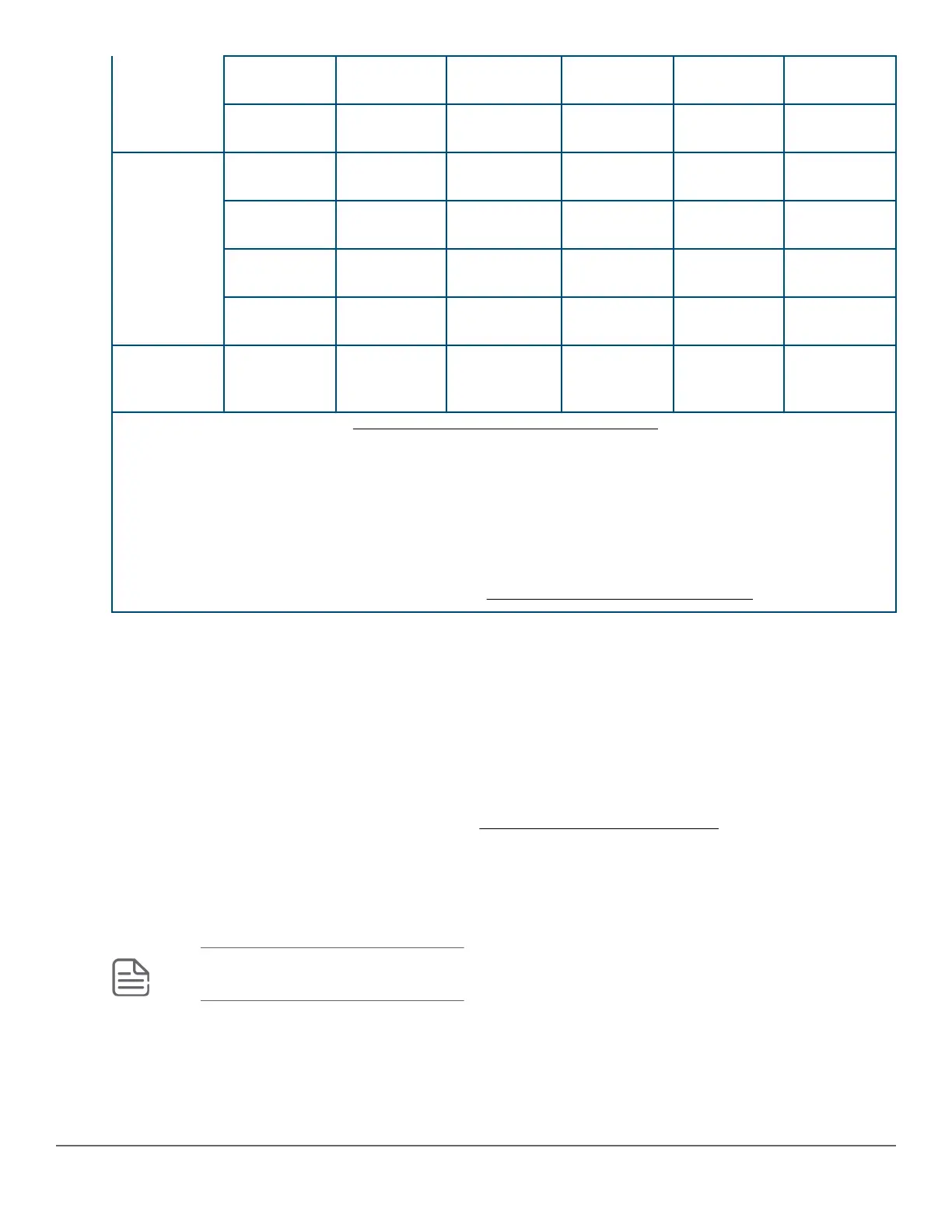
10-Gig LR Fiber (single
mode)
- - LC -
10-Gig ER Fiber (single
mode)
- - - -
40 Gbps 40-Gig Direct
Attach 1/3/5 m
Copper
(twinaxial)
- - - Not Applicable
40-Gig SR4 Fiber
(multimode)
- - - MPO
40-Gig ESR4 Fiber
(multimode)
- - - MPO
40-Gig LR4 Fiber (single
mode)
- - LC LC
Smart Rate
1/2.5/5/10
Gbps
Smart Rate Copper
(twisted pair)
RJ-45 - - -
1
For supported transceivers, visit http://www.hpe.com/networking/support .
• In the first textbox, type J4858 (for 100-Mb and Gigabit information), J8436 (for 10-Gigabit information), or
JH231 (for 40–Gigabit information).
• Select any of the products that display in the dropdown list.
• Select Support Center. Then click on Manuals, followed by View All to and find the Transceiver Support
Matrix.
For technical details of cabling and technologies, see Cabling and technology information.
Management ports
Console Ports
There are two serial console port options on the switch, an RJ-45 or Micro USB. These ports are used to connect
a console to the switch either by using the RJ-45 serial cable optionally ordered with the switch, or a standard
Micro USB cable (not supplied). The Micro USB connector has precedence for input. If both cables are plugged
in, the console output is echoed to both the RJ-45 and the Micro-USB ports, but the input is only accepted from
the Micro-USB port.
For more information on the console connection, see Setting up a console connection on page 59. The
console can be a PC or workstation running a VT-100 terminal emulator, or a VT-100 terminal.
Auxiliary (Aux) port
An auxiliary port for processing a USB command file or downloading switch software code. This port uses a USB
Type A connector, but does not comply with all USB protocols and standards.
NOTE: FAT32 USB format is required.
Chapter 2 Introducing the 2930M switches 13












 To Next Page